Need help?
Do you have a question about the Pax Technology IM15 and is the answer not in the manual?
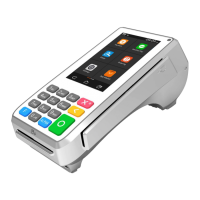
Identifies front-facing components of the IM15 terminal, including touchscreen and indicators.
Details the rear-facing ports and connectors of the IM15 terminal.
Instructions for inserting SIM cards into the IM15 payment terminal.
Instructions for inserting SAM cards into the IM15 payment terminal.
Provides the physical dimensions of the IM15 payment terminal for installation planning.
Steps for powering the IM15 terminal on and off.
Guidance on how to perform contactless payments with the device.
Instructions for scanning 1D or 2D codes with the IM15 terminal.
Details on recommended storage and operating temperatures and humidity.
 General
| Storage | 512MB Flash |
|---|---|
| Connectivity | WiFi, Bluetooth |
| Card Reader | EMV, NFC, magnetic stripe |
| Security | PCI PTS 5.x |
| Payment Methods | Credit, debit, contactless, mobile payments |
| Operating System | Android 7.1 |


 To Next Page