4
3. INSTALLATION
1. SIM Cards(Not include SIM card slot for configuration with only BT/WIFI/NFC or with only
NFC)
Figure 4: accessing SIM card slot
Remove the back cover to reveal the 4G board. Hold the antenna connector and pull
the 4G board away from the body of the IM15. Flip the 4G board over to access the SIM
card slot. Open the card slot and insert the card into the slot with the contacts facing
towards the 4G board and with the clipped corner of the card aligned with the slot, then
lock the mount with the card inside.
2. SAM Cards
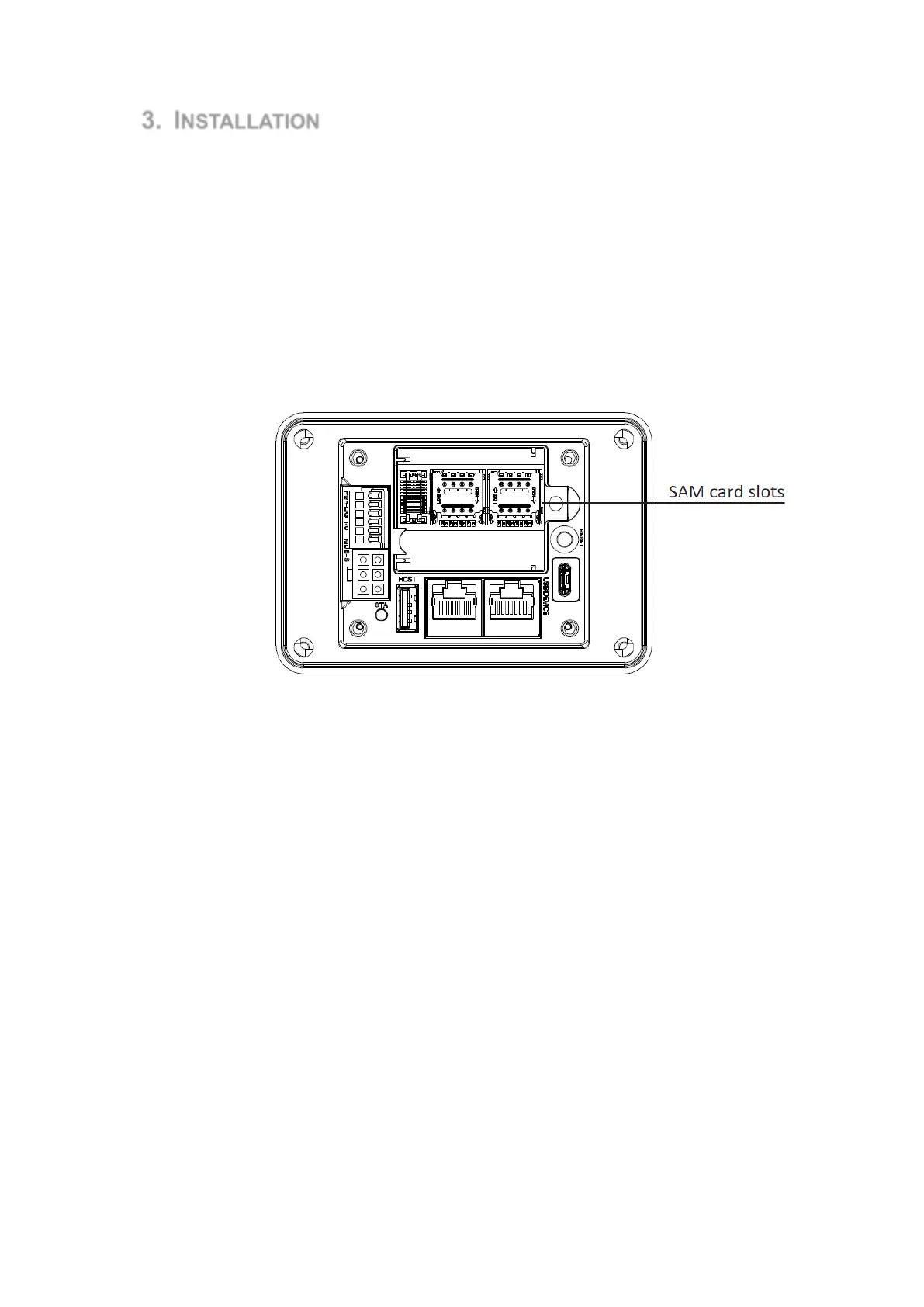
Figure 5: SAM card slots
The 2 SAM cards slots of the IM15 can be seen while the back cover and 4G board are
removed. To install a SAM card, open the card slot and insert the card into the slot with
the contacts facing towards the IM15 and with the clipped corner of the card aligned with
the slot, then lock the mount with the card inside.
Note
Do not power on the IM15 while installing or removing SIM or SAM cards. To
reassemble the device, slot the 4G board into the board to board connector while aligning
4 notches on the board with 4 plastic tabs on the body of the IM15, then replace the back
cover and screw it in place.
3. Device Dimensions



 To Next Page