EasyManua.ls Logo

Paxton 521-836-US - User Manual

Paxton 521-836-US
8 pages
Print Icon
To Next Page IconTo Next Page
Loading...
ins-30109
Question and Answer IconNeed help?

Do you have a question about the Paxton 521-836-US and is the answer not in the manual?

Summary

Fitting the Paxton Keypad

Water Resistant Installation

Assembly is waterproof (IPX7 rated) with mounting plate; cable connections made inside.

Connection to Existing Wiring

Alternative surface box has a terminal strip for easy connection to existing wiring.

Wiring and System Initialization

System Wiring Overview

Details lock control, voltage requirements, and current limits for outputs.

Programming Code Setup

Set a 6-digit programming code, following specific rules for default user code and order.

User Code Configuration

Set user codes (4-8 digits) for normal operation, with examples provided.

Programming System Options

User Code Management

Configure user codes for normal, duress, or toggle access.

Door Open Time Settings

Set duration door remains unlocked (7-60 seconds).

Code Mode Selection

Choose between single code only or multiple codes allowed.

Lock Wire Configuration

Configure lock behavior for fail-locked or fail-open states.

Silent Operation and Lockout

Enable silent mode and set lockout after incorrect keystrokes.

Exit Button and Data Reset

Configure exit button and perform data reset (excluding programming code).

Programming Code Change

Update the master programming code for system security.

Full System Reset Procedure

Perform a complete system reset and re-initialize.

Technical Assistance and Specifications

Technical Help Topics

FAQs on fail open release, entry phone integration, keypad code types, and unit connectivity.

Product Specifications

Details features, electrical requirements, environment tolerance, and dimensions.

Summary

Fitting the Paxton Keypad

Water Resistant Installation

Assembly is waterproof (IPX7 rated) with mounting plate; cable connections made inside.

Connection to Existing Wiring

Alternative surface box has a terminal strip for easy connection to existing wiring.

Wiring and System Initialization

System Wiring Overview

Details lock control, voltage requirements, and current limits for outputs.

Programming Code Setup

Set a 6-digit programming code, following specific rules for default user code and order.

User Code Configuration

Set user codes (4-8 digits) for normal operation, with examples provided.

Programming System Options

User Code Management

Configure user codes for normal, duress, or toggle access.

Door Open Time Settings

Set duration door remains unlocked (7-60 seconds).

Code Mode Selection

Choose between single code only or multiple codes allowed.

Lock Wire Configuration

Configure lock behavior for fail-locked or fail-open states.

Silent Operation and Lockout

Enable silent mode and set lockout after incorrect keystrokes.

Exit Button and Data Reset

Configure exit button and perform data reset (excluding programming code).

Programming Code Change

Update the master programming code for system security.

Full System Reset Procedure

Perform a complete system reset and re-initialize.

Technical Assistance and Specifications

Technical Help Topics

FAQs on fail open release, entry phone integration, keypad code types, and unit connectivity.

Product Specifications

Details features, electrical requirements, environment tolerance, and dimensions.

Overview

The Paxton Compact Keypad (ins-30109) is a robust and versatile access control device designed for both new installations and integration with existing wiring. It offers secure entry through user-defined codes and various operational modes, making it suitable for a wide range of applications.

Function Description

The Compact Keypad serves as a primary access control point, allowing entry to a secured area upon the successful input of a valid user code. It provides lock control through both a powered lock output and a voltage-free relay, offering flexibility in how it interfaces with different lock mechanisms. The device is designed to be waterproof (IPX7 rated) when installed with its mounting plate, ensuring durability in outdoor or water-resistant environments.

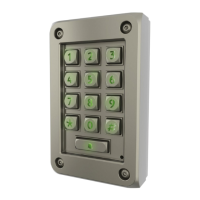
The keypad features a numeric interface with illuminated keys (1-9, *, #, and a bell button), allowing for easy code entry even in low-light conditions. It supports a programming mode that enables administrators to configure various settings, including user codes, door open times, lock wire settings, and silent operation. An exit button input is provided for seamless integration with internal exit mechanisms, allowing occupants to leave the secured area without needing a code.

For new installations, the keypad is typically mounted with its dedicated plate, and all cable connections are made inside the building to maintain its waterproof integrity. When integrating with existing wiring, an alternative surface box is available, which contains a terminal strip to simplify connections to pre-existing electrical systems.

The device's core function revolves around its ability to store and validate user codes. Upon successful code entry, it triggers the connected door lock to release for a configurable duration. It also includes features like a duress code, which, when entered, releases the lock while simultaneously activating a bell output for a specified period, signaling an emergency.

Usage Features

The Paxton Compact Keypad offers a comprehensive set of features to customize its operation according to specific security needs:

  • User Code Management: The system supports multiple user codes, each ranging from 4 to 8 digits. Administrators can easily add, modify, or delete user codes through the programming interface. The default user code is 1234, and the programming code should not be set to 123456.
  • Door Open Time: The duration for which the door remains unlocked after a valid code entry can be configured from 1 to 60 seconds, with a default of 7 seconds. This allows for precise control over access periods.
  • Code Types: The keypad supports different code types to suit various operational requirements:
    • Normal: Releases the door for the configured door open time.
    • Toggle: Releases the lock until the code is entered a second time, providing a sustained unlock state.
    • Duress: Releases the lock (like a normal code) but also energizes the bell output for 30 seconds, providing a silent alarm function.
    • Delete: Used to remove specific user codes when the system is in multiple code mode.
  • Lock Wire Setting: The keypad can be configured for both "fail locked" and "fail open" lock mechanisms. By default, it operates with a fail-locked release, providing voltage across the lock wire pair upon valid entry. For fail-open releases (e.g., maglocks), this setting needs to be changed in programming option 1.
  • Single or Multiple Codes: The system can be set to allow either a single master code or multiple individual user codes, offering flexibility for different user groups.
  • Silent Operation: The keypad can be configured to either beep upon key presses or operate silently, which can be useful in environments where audible feedback is undesirable.
  • 20 Wrong Keystrokes Lockout: To prevent brute-force attacks, the keypad implements a security feature that locks out the device for 60 seconds after 20 incorrect code entries.
  • Exit Button Integration: The keypad supports an external exit button, allowing for easy egress from the secured area. The exit button can be configured to open the door for the time set in option 5 or to toggle the door open until pressed again or a toggle code is entered.
  • Programming Code Change: The administrator can change the 6-digit programming code to enhance security.
  • Data Reset: A data reset function is available to clear all user codes and settings, except for the programming code, allowing for a fresh configuration.
  • Full System Reset: A full system reset can be performed by powering down the system and then powering it up while holding down button 3. This process initializes the unit, causing it to beep and flash LEDs three times a second, preparing it for a new system initialization.

Maintenance Features

The Paxton Compact Keypad is designed for ease of maintenance and troubleshooting:

  • Water-Resistant Installation: When installed correctly with the mounting plate and all cable connections made internally, the keypad achieves an IPX7 rating, ensuring protection against water ingress and reducing the need for frequent repairs due to environmental damage.
  • Troubleshooting Guide: The manual provides a "Technical Help" section that addresses common technical support inquiries, such as using fail-open releases, integrating with entry phone systems, understanding keypad code types, connecting with other Paxton control units, and setting up read-in/read-out with two keypad units. This helps installers and users quickly resolve issues without extensive technical support.
  • Clear Wiring Diagrams: The manual includes clear wiring diagrams for both water-resistant installations and connections to existing wiring, simplifying the installation process and reducing the likelihood of wiring errors.
  • Programming Chart: A detailed programming chart outlines the key sequences for setting various options, making it easy for administrators to configure the device.
  • Secure Programming Code Storage: The manual suggests a dedicated box for writing down the programming code and storing it in a secure place, emphasizing the importance of maintaining access to the system's administrative functions.
  • Compliance Information: The device comes with a declaration of conformity, available on request, and emphasizes that it is not suitable for retail sale and that warranties are invalid if not installed by a competent person. This ensures that the device is installed and maintained by qualified professionals, contributing to its longevity and reliable operation.
  • Dedicated Support Channels: Paxton provides various support channels, including phone numbers and email addresses, for different regions, ensuring that users can access assistance when needed.

The Paxton Compact Keypad is a robust, user-friendly, and secure access control solution with features designed for both straightforward installation and long-term reliable operation.

Paxton 521-836-US Specifications

General IconGeneral
Product TypeKeypad
ManufacturerPaxton
Model Number521-836-US
Current Consumption100mA
MaterialPolycarbonate
Weight150g
ColorBlack
Humidity0-95% non-condensing
CompatibilityNet2
Operating Temperature-20°C to +55°C (-4° to +131°F)