!
4
3
3 mm
2
1
6
1..2..3
5
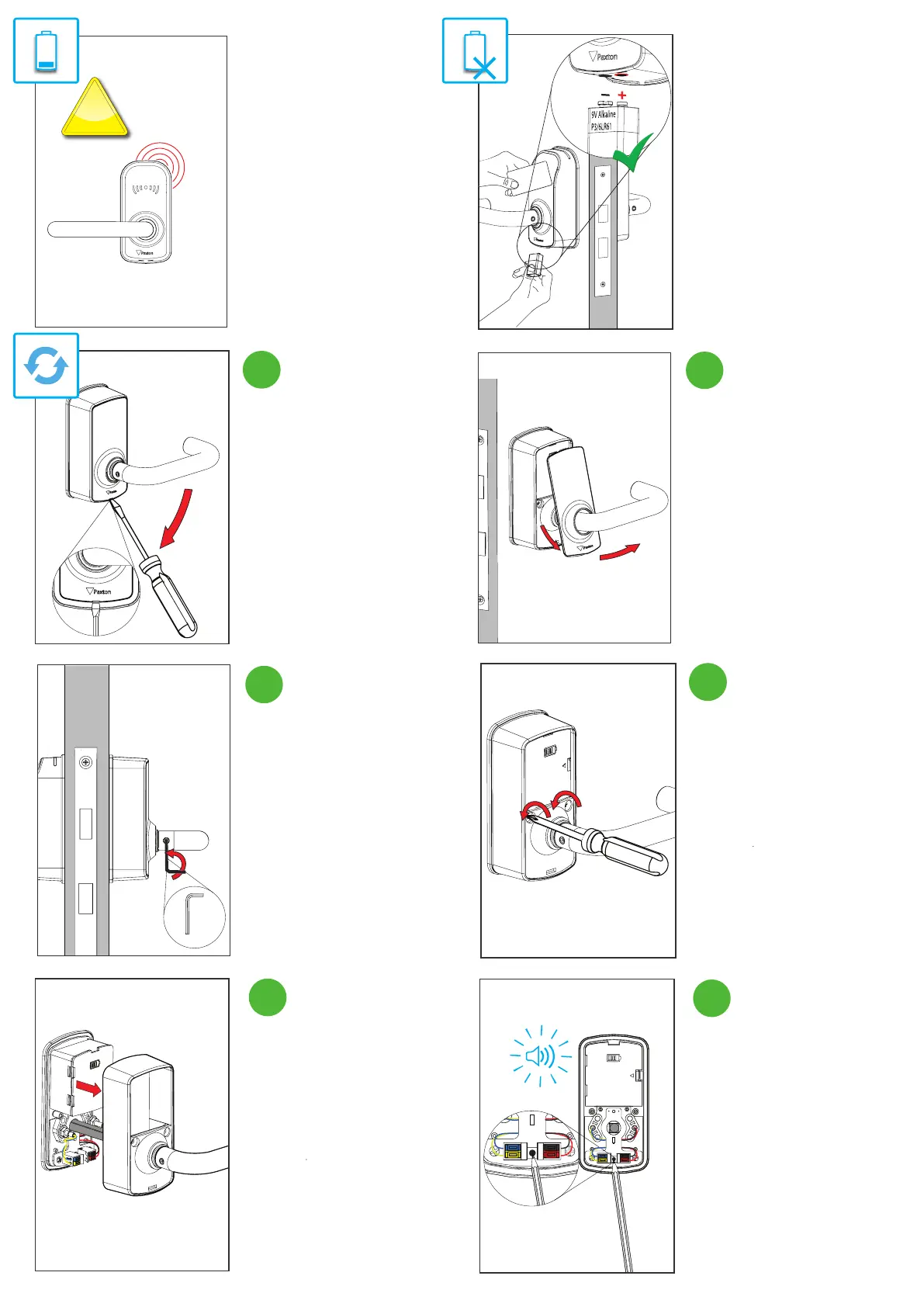
Low battery warning:
When the PaxLock Pro’s battery is
low the LED will ash red 5 times
when a token is presented. There is
also a battery indication within the
doors menu in Net2.
If the batteries run out:
Present a 9V battery to the jump
start pins under the front of the unit,
while keeping the battery in place
present a valid credential to the
reader and gain access through the
door.
Unscrew both the m4 x 26mm
machine screws.
Loosen, but do not remove the grub
screw in the handle.
Feed the cover along the handle to
remove.
Locate a terminal screwdriver into
the groove at the bottom of the
cover and angle the screwdriver
down to pop o the cover.
Remove the chassis from the back of
the unit.
Reset the unit by pressing and
holding on the button in between
the connector block. Hold until you
hear 3 beeps.
6 7


 To Next Page