9
Step 3: Bill path plate cleaning
We recommend disconnecting all power and I/O connectors from the validator at this point. If any side connectors
are still installed this could prevent you from fully removing the bottom plate without causing any damage to the
validator.
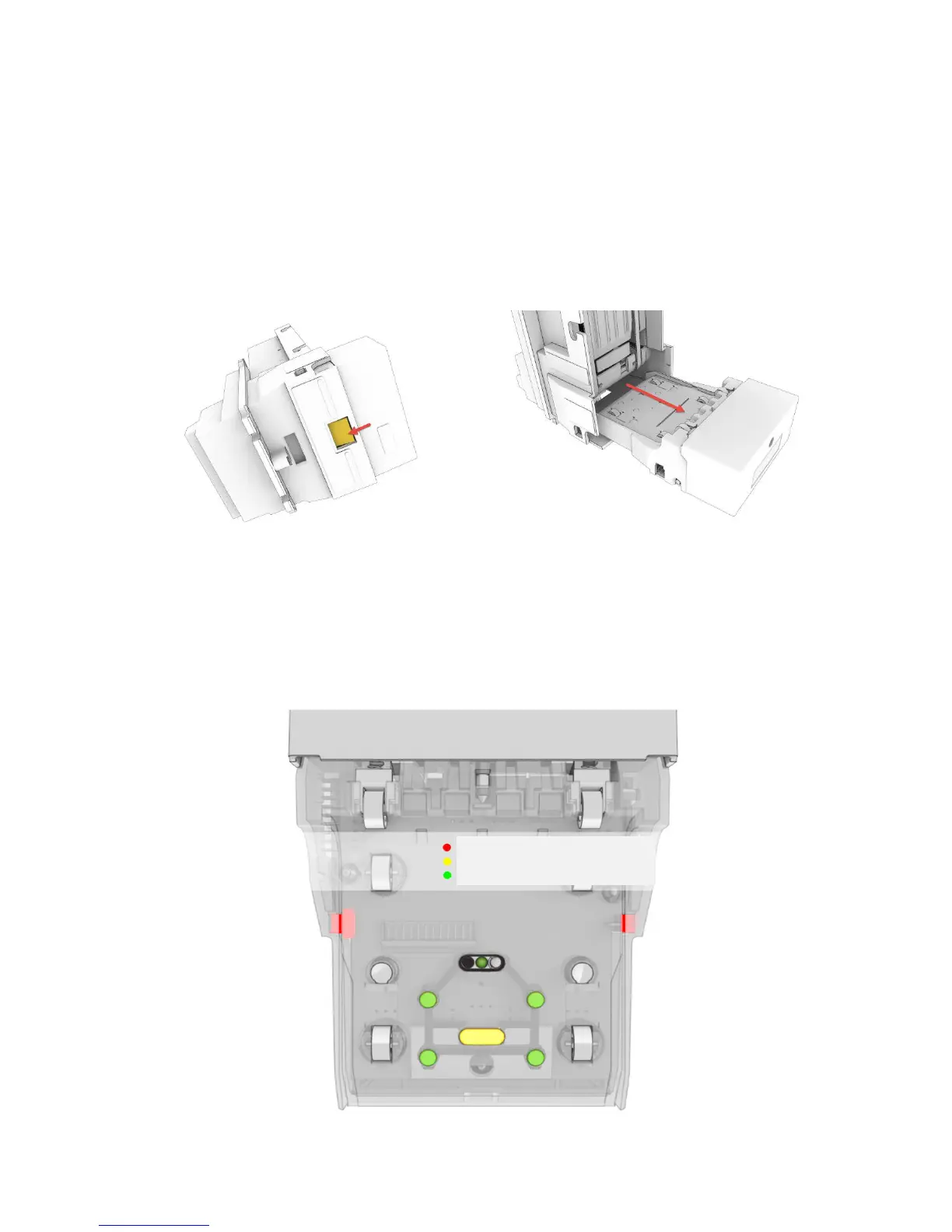
No tools are required to pull the bill path plate out. There is a recessed latch that must be pushed in to release
the plate. While pushing the latch in with your thumb, pull the plate straight back out of the main frame of the bill
acceptor as seen in the image below.
Fase 4: Bill path plate cleaning (2)
Once the plate is fully removed you will have full access to all the validation and side scan anti stringing lenses.
Inspect the plate for dust, dirt, smoke and debris. There are four round lenses and two oval lenses in the plate
that must be cleaned. Dampen a lint free cloth with water, only enough water to pick up dust. Using the damp
cloth wipe it over all lenses and roller until clean.
Side Scan Anti-Stringing
Gray Scale Lens
Validation Lenses


 To Next Page