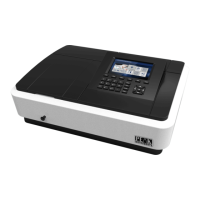
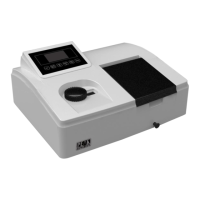
The C-7000 Series Spectrophotometer is a sophisticated instrument designed for various analytical applications, utilizing spectrophotometric analysis to measure the absorption characteristics of substances across different wavelengths. This device is crucial for qualitative, quantitative, and structural analysis in fields such as physics, chemistry, medicine, biology, pharmacology, geology, and various industries including chemical, pharmaceutical, metallurgical, light industry, materials, and environmental protection. It serves as an essential quality control instrument for routine laboratory work.
Function Description
The spectrophotometer operates on the principle that substances exhibit selective absorption of light at specific wavelengths. It uses a prism or grating to generate monochromatic light, which then passes through a continuous monochromatic solution. The instrument measures the absorption at each wavelength, generating an absorption spectrum curve. The device adheres to the Lambert-Beer law, stating that the absorbance of monochromatic light is directly proportional to the solution's concentration and thickness.
The C-7000 Series offers a range of measurement functions:
- Photometric Measurement: Measures absorbance, transmittance, or energy values at a single wavelength. Users can set the measurement mode and wavelength, perform 100%T/0Abs correction, and save/open measurement data files.
- Quantitative Measurement: Allows for the creation and use of standard curves to determine sample concentrations. It supports various fitting modes (first order, first order through zero, second order) and calibration methods (standard sample, coefficient method). Users can measure standard samples, perform sample tests, and open previously established standard curves.
- Time Scan (Kinetics): Measures the trend in absorbance or transmittance over fixed time intervals, displaying the data graphically. Users can set scanning parameters such as time interval, test time, measurement mode, and display limits, and perform data smoothing and slope calculations.
- Multi-wavelength Test: Enables simultaneous measurement of transmittance or absorbance at multiple user-defined wavelengths, simplifying complex analytical processes.
Important Technical Specifications
The C-7000 Series comes in two models: C-7000V and C-7000UV, both featuring a 7-inch TFT screen.
| Specification |
C-7000V |
C-7000UV |
| Wavelength Range |
320 - 1100nm |
190 - 1100nm |
| Slit Width |
2nm |
2nm |
| Wavelength Accuracy |
±0.3nm |
±0.3nm |
| Wavelength Repeatability |
≤0.2nm |
≤0.2nm |
| Photometric Accuracy |
0.3%T (0-100%T), ±0.002A(0-0.5A), ±0.004A(0.5-1A) |
0.3%T (0-100%T), ±0.002A(0-0.5A), ±0.004A(0.5-1A) |
| Photometric Repeatability |
≤0.15%T (0-100%T), 0.001A(0-0.5A), 0.002A(0.5-1A) |
≤0.15%T (0-100%T), 0.001A(0-0.5A), 0.002A(0.5-1A) |
| Stray Light |
≤0.05%T@360nm |
≤0.05%T@220nm,360nm |
| Stability |
±0.001A/h@500nm |
±0.001A/h@500nm |
| Baseline Flatness |
±0.0015A |
±0.001A |
| Noise |
±0.0005A |
±0.0005A |
| Working Mode |
T,A,C,E |
T,A,C,E |
| Wavelength Setting |
Automatic |
Automatic |
| Photometric Range |
0-200%T, -0.3 - 3A |
0-200%T, -0.3 - 3A |
| Detector |
Solid Silicon Photodiode |
Solid Silicon Photodiode |
| Software |
Optional with scanning function |
Optional with scanning function |
| Printer |
Optional |
Optional |
| Keypad |
Silicone buttons |
Silicone buttons |
| Data Port |
USB |
USB |
| Light Source |
Tungsten Halogen Lamp |
Tungsten Halogen/Deuterium Lamp |
| Power Requirements |
AC110-220V 50-60Hz |
AC110-220V 50-60Hz |
| Humidity Range |
Less than 85% |
Less than 85% |
| Shipping Dimensions |
770630340mm |
770630340mm |
| Weight |
27kg |
27kg |
The optical system typically uses a double-beam optical monochromator structure, ensuring good stability, reproducibility, and accuracy. It features automatic 0% T and 100% T settings, concentration computing, and data processing functions. The instrument's internal structure includes a signal board, light room, power board, sample chamber, spectroscopic room, monochromator, and main board.
Important Parts of the Instrument:
- Power Board: Converts and regulates external power (220V50Hz/110V60Hz) to supply various internal components, including the tungsten lamp, fan, electrical circuits, computer system, signal board, and deuterium lamp preheating/ignition.
- Light Room: Houses the tungsten halogen lamp and deuterium lamp, which automatically switch.
- Tungsten Halogen Lamp: Suitable for visible and near-infrared spectral regions (250-2000nm). It uses a halogen cycle for greater light intensity and longer life, typically made of quartz or high-temperature glass.
- Deuterium Lamp: Suitable for ultraviolet spectral regions (185-400nm). It has characteristic lines near 230nm, 486.0nm, and 656.1nm, useful for wavelength calibration.
- Monochromator: Contains spectral components (grating, slits, mirrors, focusing lenses, and wavelength filter drive system) to decompose composite light into monochromatic light.
- Grating: A 1200/mm holographic grating ensures high resolution and low stray light.
- Filter: Used to eliminate spectral overlap issues from the grating spectrum.
- Slits: The size of the slits affects spectral purity, resolution, and absorbance measurement accuracy.
- Spectroscopic Room: Contains a half-mirror, focusing lens, and reflector to split the monochromator's output into two beams.
- Sample Chamber: Fixed 2-cell holder for reference and sample solutions, with an optional 8-cell changer.
- Signal Board: Processes and amplifies the detected light signal.
- Main Board: Micro-control unit for the instrument, managing light source switching, motor rotation, and signal processor display.
Usage Features
- User-Friendly Interface: Large graphic LCD display shows data and maps. The extensive software supports quantitative, qualitative, kinetics, DNA/Protein analysis, and other tests.
- Self-Test and Initialization: Upon power-on, the instrument performs an automatic self-test and initialization, followed by a 20-minute warm-up period (which can be skipped). This process includes re-calibration of dark current and setting working parameters.
- Blank Adjustment: In any test interface, place the reference solution in the cuvette slot and press the [Zero] key to adjust the blank.
- Wavelength Setting: Press the [Goλ] key to set the current working wavelength (190nm-1100nm).
- Data Management: Files can be saved in txt or cvs format (compatible with Excel) and opened from local storage or USB.
- System Setup: Allows configuration of various parameters including dark current measurements, deuterium lamp curve finding, time and date settings, light source management, general settings (language, data precision, beep, wallpaper, screen luminance, print key option, font), file system management, and USB storage device settings.
- Factory Reset: Restores all system configuration information without affecting system baseline or data files.
Maintenance Features
- Routine Precautions:
- Maintain a clean environment and cover the instrument when not in use to prevent dust.
- Handle samples carefully to avoid spills in the sample chamber, which can cause corrosion. Use cuvette lids for volatile samples.
- Ensure all optical path screws and nuts are tight to prevent deviations.
- Avoid touching mirrors with hard or soft objects to prevent damage and stray light.
- Handle the instrument with care; do not place heavy objects on its shell.
- Operate in low light conditions for accurate measurements.
- Perform wavelength calibration once a week to maintain data accuracy.
- If unused for a long time, power on the instrument 1-2 times a week for about half an hour to extend its life.
- Instrument Care and Maintenance:
- Sample Chamber Lens Check: Regularly inspect quartz lenses for fingerprints or stains. Clean with an alcohol-moistened cloth once a month.
- Wavelength Accuracy Check: Annually check wavelength accuracy using a calibrated holmium oxide solution.
- Wavelength Accuracy Cursory Examination: After self-test, set wavelength to 546nm, open the sample chamber, and place white paper on the left side of the lens. Observe if the display shows green light, indicating correct wavelength.
- Troubleshooting: The manual provides a detailed guide for identifying and resolving common issues, categorized by power failure, self-test failure, and other failures. It offers solutions ranging from re-seating power cords and replacing fuses to contacting the manufacturer or local dealer for more complex problems.
- Light Source Replacement: Detailed instructions are provided for replacing both the tungsten lamp and the deuterium lamp, including steps for safely disassembling the instrument, replacing the lamps, and re-calibrating the system. Users are advised to use original parts and contact sales staff if issues persist after replacement.

 Need help?
 General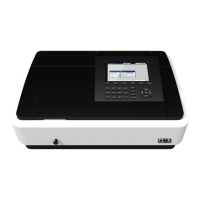

 To Next Page