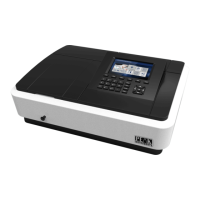
The P-510 pH Meter is a portable pH meter designed for various applications, including industrial, mining, power plant, environment protection, and outdoor use. It features a built-in microprocessor chip with a beautiful design, variable functions, and advanced electronics, sensors, and software.
Function Description:
The device measures pH and mV values. It incorporates digital filtering and slip techniques to improve measurement speed and data accuracy. It is equipped with a new type of pH electrode and temperature probe, providing automatic and manual temperature compensation functions for accurate and easier measurements. The meter supports automatic recognition of 15 buffers with three kinds of options: European & USA, NIST, and China. It also supports 1, 2, or 3 point calibration. The circuit board adopts Surface Mounted Technology to improve the reliability of product processing.
Important Technical Specifications:
pH Measurement:
- Measuring Range: -2.00 ~ 19.99 pH
- Resolution: 0.1/0.01 pH
- Accuracy: Electrode: ±0.01pH, Instrument: ±0.02 pH
- Input Current: ≤2x10⁻¹² A
- Input Impedance: ≥1x10¹² Ω
- Stability: ±0.01 pH/3h
- Temperature Compensation: (0 ~ 100)°C (automatic/manual)
mV Measurement:
- Measuring Range: -1999 mV ~ 1999 mV
- Resolution: 1mV
- Accuracy: ±0.1%FS
Others:
- Data Storage: 150 sets
- Storage Contents: Series number, measuring value, unit, temperature
- Power: Two pieces of AA battery
- Size & Weight: 165x90x32 mm/310g
- Certificate: ISO, CE
- IP Grade: IP57
Working Conditions:
- Ambient Temperature: 5 ~ 35°C
- Humidity: ≤85%
Usage Features:
The P-510 pH Meter has a white backlit LCD screen for clear display. It features seven operating buttons for various functions:
- On/Off Button: Switches the device on/off in measuring mode.
- Calibration Key (CAL): Enters calibration mode from measuring mode and returns from other modes.
- Function Key (MODE): Short press (less than 1.5 seconds) in measuring mode changes the measuring unit between pH and mV. Long press (more than 5 seconds) saves data.
- Backlight and Delete Key (Res): Short press (less than 1.5 seconds) turns on or off the backlight. Long press (more than 5 seconds) deletes saved data.
- Increase and Data View Key (RM): Increases data view in measuring mode. In data viewing mode, long press (more than 5 seconds) displays saved records.
- Decrease and Data Saving Key (M+): Decreases data view in measuring mode. In data viewing mode, long press (more than 5 seconds) saves records.
- Set and Confirm/Return Key (OK): Enters parameter settings in measuring status (long press for more than 2 seconds) and confirms current selection in other status.
The device supports data storage and replay, with a capacity of 150 sets of records. It also includes auto shutdown timers for both the backlight (P6) and the device itself (P7), which can be set from 0-20 minutes or disabled. The device can restore default settings (P8).
pH Measurement Process:
- Preparation: Switch on the device, choose pH measuring mode, ensure the glass bulb of the pH electrode is moist and complete, and connect the pH electrode and temperature probe.
- Calibration:
- Press CAL to enter calibration mode (C1 for the first point).
- Wash and dry electrodes, then dip them into pH 6.86 buffer solution. Wait for stability (stability symbol appears), then press OK to confirm.
- The screen will show C2 for the second point. Wash and dry electrodes, then dip them into pH 4.00 buffer solution. Wait for stability, then press OK to confirm.
- The screen will show C3 for the third point. Wash and dry electrodes, then dip them into pH 9.18 buffer solution. Wait for stability, then press OK to confirm.
- Press CAL to quit calibration mode.
- The device supports one, two, or three-point calibration. The "L", "LM", or "LMH" symbols indicate the number of calibration points.
- pH Solution Measurement: Wash and dry electrodes, put them into the solution, shake, and wait for stability. The reading is the pH value. It is recommended to keep the temperature of the tested solution close to that of the buffer solution for higher accuracy.
Parameter Setup:
The device allows setting various parameters:
- P1: Manual Temperature Compensation: (0-99.9)°C
- P2: pH Resolution Setup: 0.1pH/0.01pH
- P3: pH Buffer Setup: CH, USA, NIST (different buffer sets available)
- P4: Temperature Unit Setup: °C/°F
- P5: Ammonia Pure Water Compensation Setup: OFF, H2O, NH3
- P6: Backlight Time Closing Setting: 0-20 minutes or 0 for no function
- P7: Automatic Shutdown Time Setting: 0-20 minutes or 0 for no function
- P8: System Restore Setup: OFF or ON
mV Measurement Process:
- Switch on the instrument and press MODE to choose mV measuring mode.
- Connect an ORP or ion composite electrode (optional). Wash and dry it, then put it into the tested solution, stir, and wait for stability. The reading is the mV value.
Maintenance Features:
- Calibration Frequency: Depends on the test sample, electrode, and desired accuracy. For high accuracy (≤±0.02pH), calibrate in time with high accuracy buffers. For normal accuracy (≥ ±0.1pH), one calibration can last for a week or longer.
- Recalibration Situations: New electrode, long unused electrode, after testing strong acidic (pH<2) or strong alkaline (pH>12) solutions, after testing fluoride or high concentration organic solutions, or when there is a significant temperature difference between the tested solution and calibration solution.
- Electrode Storage: The electrode probe should be soaked in electrode immersion solution in the protection bottle to keep the glass bulb moist and liquid interface activated. After use, return the electrode to the bottle and tighten the cap to prevent leakage. If the immersion solution is turbid or moldy, clean the bottle and change the soaked liquid.
- Forbidden Soaking: Do not soak the electrode for a long time in pure water, protein solution, or acidic fluoride solution, and avoid contact with organic fat.
- Cleanliness: Keep the instrument clean and dry, especially the connection interfaces, to ensure accurate measurements.
- Electrode Handling: The glass bulb must not touch solid objects to prevent damage. Wash the electrode before and after use, wave or absorb it dry; do not wipe with paper tissue as it can destabilize electric potential and prolong response time. For viscous samples, wash the electrode multiple times or use a suitable solvent.
- Electrode Passivation: If the electrode becomes passivated (polluted bulb or blocked liquid interface), leading to slow response or inaccurate readings, specific cleaning methods can be applied:
- Glass bulb passivation: Soak in 0.1mol/L dilute hydrochloric acid for 24 hours, then wash with pure water, and soak in electrode immersion solution for 24 hours. For severe passivation, use 4%HF (hydrofluoric acid) for 3-5 seconds, then wash and soak in immersion solution.
- Reference cleaning for glass bulb and liquid interface:
- Inorganic metal oxide: Less than 1mol/L dilute hydrochloric acid
- Organic fat: Dilute detergent (alkalescent)
- Resin polymer substance: Dilute alcohol, acetone, aether
- Protein blood cell sediment: Acid enzyme solution (like Saccharated Yeast Tablets)
- Pigment substance: Dilute bleach solution, hyperoxide
- Electrode Lifespan: Typically one year, but can be shortened by poor working conditions, misuse, or improper maintenance. Replace if passivated or not working well.
- Troubleshooting: If the instrument is abnormal, restore default settings (P7), then recalibrate and test.
- Self-diagnosis Information:
- "Static -2.00 pH" or "-19.99pH": Measured value exceeds measuring range, or electrode is not connected/in the air.
- "Err 1": Electrode zero potential is excessive (<-60mv or >60mv).
- "Err 2": Electrode slope is excessive (<50% or >105%).
- If error symbols appear, check for bubbles in the electrode bulb, spoiled buffers, or significant buffer errors. Restore default settings and recalibrate. If problems persist, change the pH electrode.

 Need help?
 General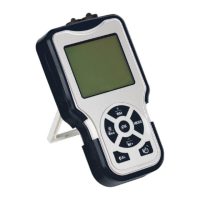

 To Next Page