User Manual PEAK INSTRUMENTS INC
Address: 16223 Park Row, Houston, TX-77084, USA. Website: www.peakii.com. Tel: +1 2819353455
water compensation. Press to confirm the change and back.
4.6.3. Press to enter next parameter setting or press to back to
measuring mode.
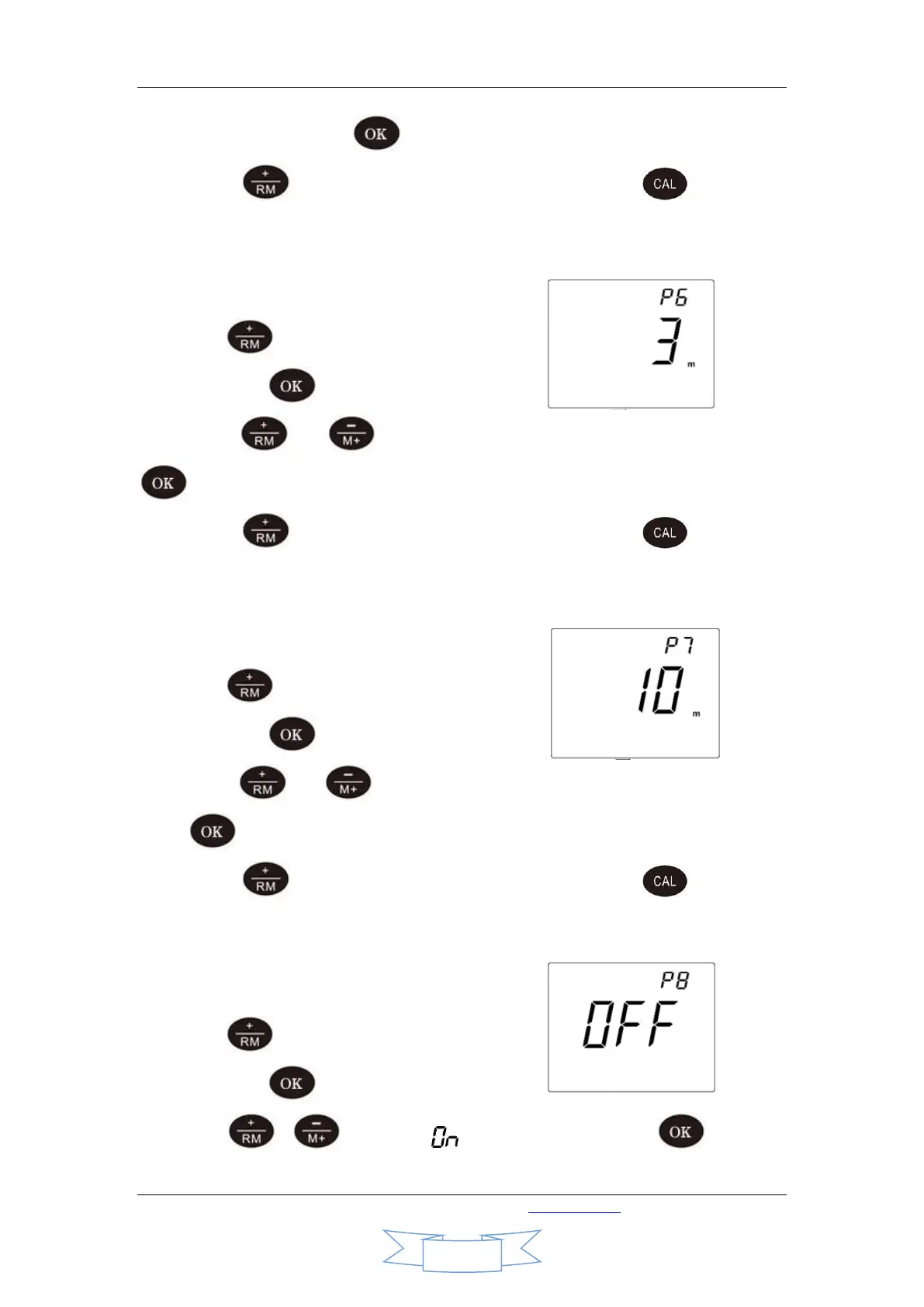
4.7. Auto shutdown timer of backlight(P6)
4.7.1. Press to choose P6 in mode P5,
Then press to enter P6.
4.7.2. Press or to choose auto shutdown time of backlight. Press
to confirm the change and back.
4.7.3. Press to enter next parameter setting or press to back to
measuring mode.
4.8. Auto shutdown timer setting of the device(P7)
4.8.1. Press to choose P7 in mode P6,
Then press to enter P7.
4.8.2. Press or to set the automatic shutdown time of the device.
Press to confirm the change and back. “0” means disabling this function.
4.8.3. Press to enter next parameter setting or press to back to
measuring mode.
4.9. Restore default settings(P8)
4.9.1. Press to choose P8 in mode P7,
Then press to enter P8.
4.9.2. Press or to choose “ ” and confirm by pressing and “888”


 To Next Page