PCAN-USB (ISO) – User Manual
20
Appendix B Quick Reference
Software/Hardware Installation under Windows
Before connecting the PCAN-USB adapter to the PC please set up
the corresponding software package from the supplied CD-ROM
(under 2000 and XP with administrator priviliges). Afterwards
connect the PCAN-USB adpater to an USB port at your PC. The
adapter is recognized by Windows and the driver is initialized. After
the installation process is finished successfully the red LED on the
adapter is illuminated.
Getting Started under Windows
Run the CAN monitor PCAN-View from the Windows Start menu as
a sample application for accessing the PCAN-USB adapter. The
preset parameters for initialization of adapter can be used without
changes.
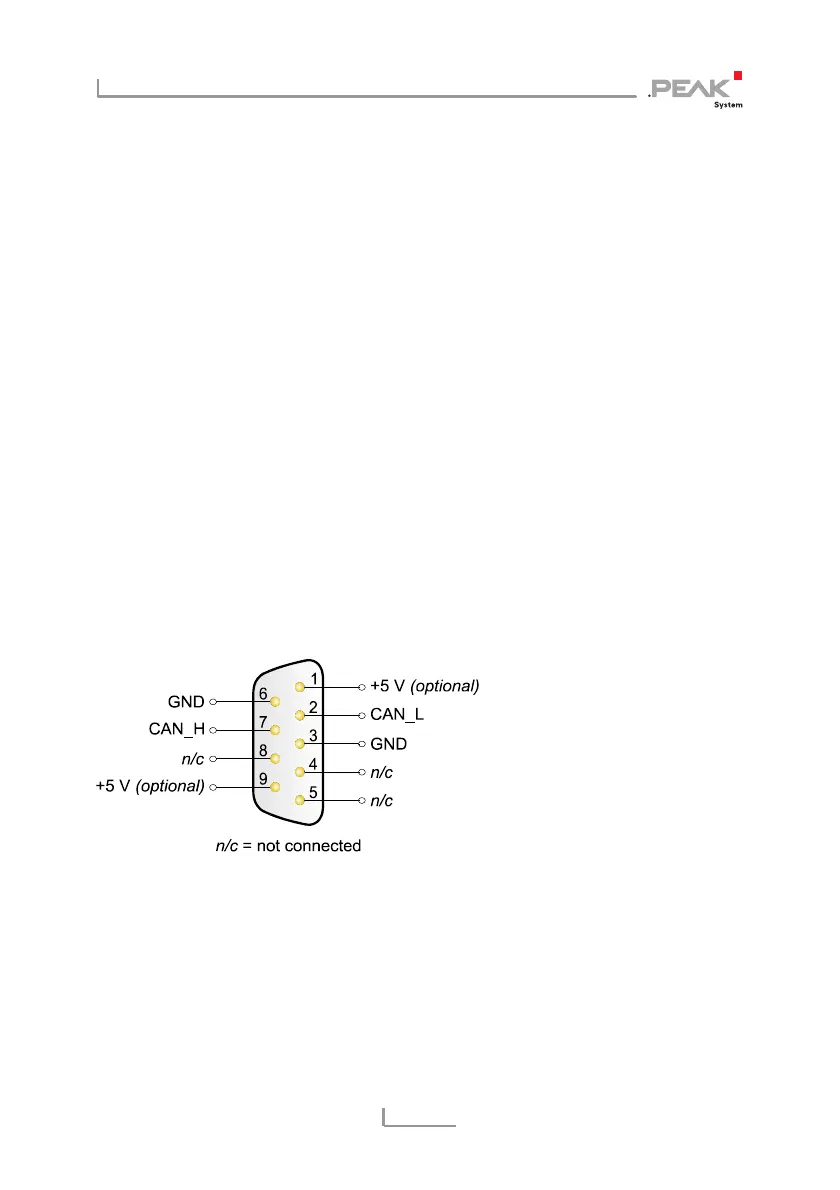
HS-CAN connector (Sub-D, 9 pins)



 To Previous Page