PCAN-USB (ISO) – User Manual
2.2 Connecting a HS-CAN
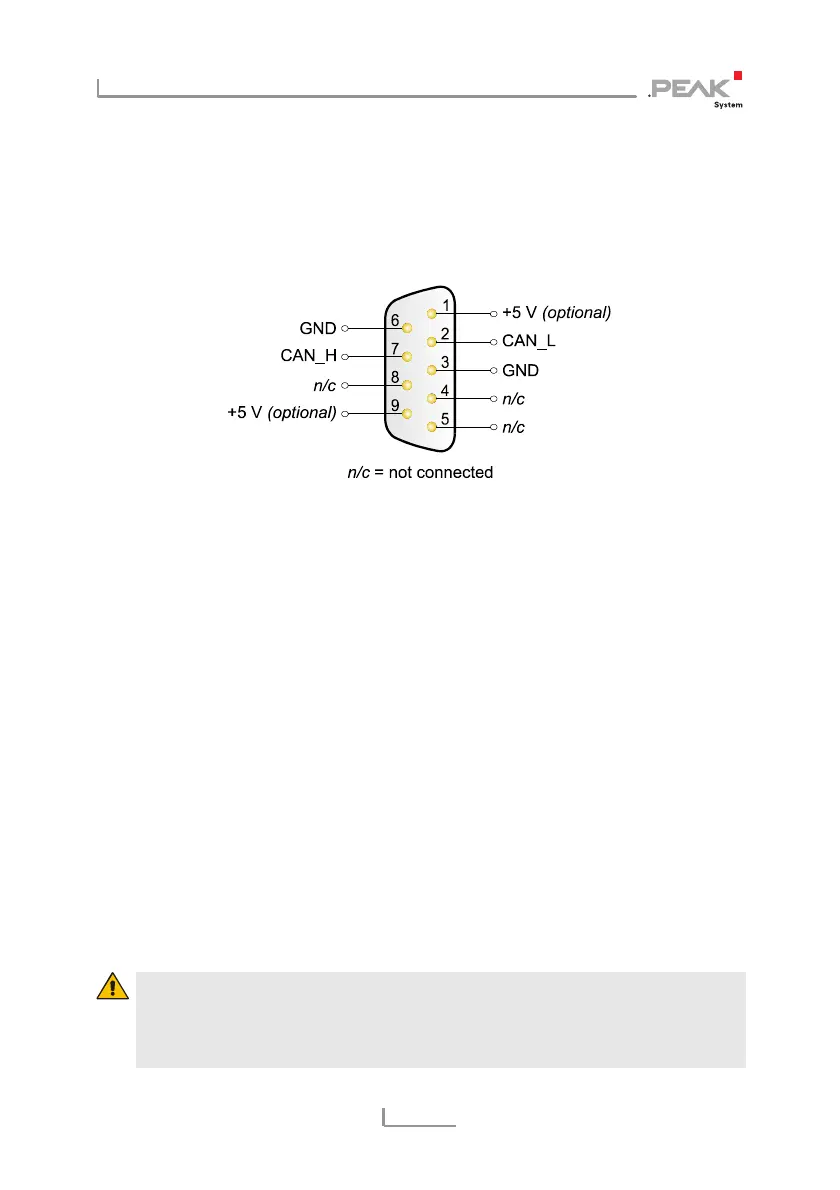
A CAN is connected to the 9-pin Sub-D port on the PCAN-Dongle.
The pin assignment corresponds to the CiA recommendation DS
102-1.
Figure 1: Pin assignment HS-CAN
(view onto male connector of the PCAN-USB adapter)
2.3 5-Volt Supply at the CAN Connector
A 5-Volt supply can optionally be routed to pin 1 and/or pin 9 of the
CAN connector (PCAN-USB ISO: pin 1 only) by setting solder
bridges on the PCAN-USB PCB (PCAN-USB case opened). Thus
devices with low power consumption (external transceivers or
optocouplers, for example) can be directly supplied via the CAN
connector.
When using this option, the 5-Volt supply is directly connected to
the power supply of the PCAN-USB adapter (coming from the PC)
and is not fused separately. The ISO version of the adapter contains
an interconnected DC/DC converter. Therefore the current output is
limited to about 50 mA.
Attention! At this procedure a special care is indispensable
since there is a short circuit danger. The PCAN-USB-Adapter
could be destroyed and/or the power supply or electronics of
the PC or other components connected could be damaged.
8



 To Next Page