5
OPERATION
Checking Jump-Starter Battery Status
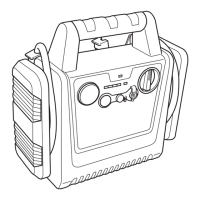
Press and hold the battery status button, located on the front of the unit, to check the Jump-Starter
battery charge level. The battery indicator display will indicate battery charge state as a percentage of
the full battery capacity.
Low Charge Alert (LCA)
On the front of the unit there is a Low Charge Alert port. There is a red plug in this port. With the plug
removed, when the battery level drops to LO, an alarm will sound to remind the user to recharge the
Jump-Starter.
The alarm can be turned oŮ one of three ways:
x Placing the pin back into the Low Charge Alert port
x Recharging the battery immediately to bring it to the capacity of 10% or more
x Pressing the battery indicator display button. If the alarm is turned off by pressing the battery
display button, the alarm will sound automatically again in approximately 1 hour.
The alarm will only be turned oŮ permanently if the battery is in a fully charged state, or the pin is
inserted in the Low Charge Alert port. There is a storage port on the back of the Jump-Starter for the
LCA plug. When the plug is removed from the LCA port, it should be installed in the storage port on the
back of the Jump-Starter.
Charging Jump-Starter Battery
All rechargeable batteries gradually discharge when left idle, and you need to recharge them
periodically to maintain maximum battery capacity. The AC charger plug within the Jump-Starter is
designed to charge using a 110/120-volt outlet.
x Fully charge unit to the recommended maximum and initial charge time of 36 hours. Thereafter, an
AC typical charge time is 18 to 24 hours.
x Recharge the unit fully after each use. This will prolong the life of the battery because frequent
discharges between recharges will reduce battery life.
x Make sure all functions of the Jump-Starter are turned oŮ during recharging.
Due to inherent self-discharge, lead-acid batteries should be charged at least every
4 months, especially in a warm environment. Leaving a battery in a discharged state, or if not
recharged every 4 months, may result in permanent battery damage and poor jump-starting
performance.
Do not attempt to recharge the Jump-Starter battery if it is frozen. Gradually warm
the frozen battery to 0°C (32°F) before recharging.
Do not operate DC appliances with the Jump-Starter while the unit is being
recharged with the AC charger. The AC charger may be permanently damaged if 12-volt DC
appliances are operated while the AC charger is connected.
110/120-Volt AC Charging
DO NOT EXCEED MAXIMUM RECOMMENDED AC CHARGE OF 36 HOURS.
1. Disconnect any DC appliance from the 12-volt DC power socket.
2. Turn all ON/OFF switches to the OFF position.
3. Only charge the Jump-Starter using an approved external AC power cord.
4. Flip out the AC charging plug from the back of the Jump-Starter.
5. Connect the extension plug to the AC charging plug.
6. Plug the extension cord into a 110/120-volt AC outlet. The battery indicator display will gradually
increase as the
Jump-Starter is charging.
7. When the Jump-Starter is fully charged, the display will read FL. Disconnect the AC extension
cord from the 110/120-volt AC outlet, and then disconnect it from the Jump-Starter AC charging
plug.
Jump-Starting (Negative Ground Systems Only)
This Jump-Starter is equipped with a manual jump-starter/USB ON/OFF switch. Before turning this
switch on, check the power/polarity indicator after both jump-start cable clamps have been connected.
If the light is RED and an alarm sounds, the clamp connections are incorrect and need to be reversed.
If the light is GREEN, the clamp connections are correct. When the jump-start cable clamps are
connected and the power/polarity indicator is lit green, it is safe to turn the jump-starter ON/OFF switch
to ON.
EXPLOSION HAZARD
Never allow the jump-start cable clamps (red and black) to touch each other or another
common metal conductor. This could cause damage to the unit and/or create a sparking/
explosion hazard. Always switch oŮ the jump-starter ON/OFF switch and store the jump-start
clamps on the appropriate case clamp posts on the back of the unit after use.
5
OPERACIÓN
Chequeo de Estado de la Batería de Arranque con Cables de Puente
Oprima y sostenga el botón de estado de la batería, ubicado en la parte frontal de la unidad, para chequear
el nivel de carga de la batería del Arranque con Cables de Puente. La pantalla indicadora de nivel de
batería mostrará el estado de carga de la batería como un porcentaje de la capacidad total de la batería.
Alerta de Carga Baja (LCA según sus siglas en Inglés)
En el frente de la unidad hay un puerto de Alerta de Carga Baja. Hay un tapón rojo en este puerto.
Con el tapón removido, cuando el nivel de la batería desciende a LO, sonará una alarma para
recordarle que debe recargar el Arranque con Cables de Puente.
La alarma se puede apagar de una de tres maneras:
x Colocando el pasador de nuevo en el puerto de Alerta de Carga Baja
x Recargar inmediatamente la batería para subirla a una capacidad del 10% o más.
x Oprimiendo el botón de la pantalla indicadora de nivel de la batería. Si la alarma es apagada
oprimiendo el botón de la pantalla de la batería, la alarma sonará de nuevo automáticamente en
aproximadamente 1 hora.
La alarma sólo será apagada permanentemente si la batería está en un estado de carga total, o el
pasador es insertado en el Puerto de Alerta de Carga Baja. Hay un puerto de almacenaje en la parte
trasera del Arranque con Cables de Puente para el enchufe LCA. Cuando el enchufe es removido del
puerto LCA, deberá ser instalado en el puerto de almacenaje ubicado en la parte trasera del Arranque
con Cables de Puente.
Carga de la Batería de Arranque con Cables de Puente
Todas las baterías recargables se descargan gradualmente cuando se dejan sin usar y usted
necesita recargarlas periódicamente para mantener la capacidad máxima de la batería. El enchufe
del cargador de CA del Arranque con Cables de Puente fue diseñado para cargar usando un
tomacorriente de 110/120 voltios.
x Cargue la unidad completamente al máximo recomendado y el tiempo de carga inicial es de 36
horas. De ahí en adelante, un tiempo de carga típico CA es de 18 a 24 horas.
x Recargue completamente la unidad después de cada uso. Esta acción prolongará la vida de la
batería ya que descargas frecuentes entre cargadas reducirán la vida de la batería.
x Asegúrese de que todas las funciones del Arranque con Cables de Puente estén apagadas durante
la recarga.
AVISO
Por causa de la auto descarga inherente, las baterías de plomo-ácido se deben
cargar cada 4 meses, especialmente en un medio cálido. El dejar la batería descargada,
o si no se carga cada 4 meses, podrá resultar en daños permanentes a la batería y pobre
rendimiento del arranque con cables de puente.
AVISO
No intente recargar la batería del Arranque con Cables de Puente si está congelada.
Caliente gradualmente la batería congelada a 0°C (32°F) antes de cargarla.
AVISO
No opere artefactos de corriente CC con el Arranque con Cables de Puente
mientras la unidad está siendo cargada con el cargador de CA. Pueda que el cargador CA se
dañe permanentemente si se operan artefactos de 12 voltios CC mientras el cargador de CA
está conectado.
Carga de 110/120 Voltios CA
AVISO
NO EXCEDA EL TIEMPO DE CARGA MÁXIMO RECOMENDADO DE CA DE 36 HORAS.
1. Desconecte cualquier artefacto CC del enchufe hembra de 12 voltios CC.
2. Ponga todos los interruptores ON/OFF a la posición OFF.
3. Sólo cargue el
Arranque con Cables de Puente usando un cordón de energía externo CA aprobado.
4. Saque el enchufe de carga CA de la parte trasera del
Arranque con Cables de Puente.
5. Conecte el enchufe de la extensión en el enchufe de carga CA.
6. Enchufe el cable de extensión en un tomacorriente de 110/120 voltios CA. La pantalla indicadora
de nivel de batería aumentará gradualmente a medida que el
Arranque con Cables de Puente
esté cargando.
7. Cuando el
Arranque con Cables de Puente esté completamente cargado, la pantalla leerá FL
(llena). Desconecte el cable de extensión CA del tomacorrientes de 110/120 voltios CA y luego
desconéctelo del enchufe de carga CA del
Arranque con Cables de Puente.
Arranque con Cables de Puente (Sólo Sistemas de Tierra Negativa)
Este Arranque con Cables de Puente está equipado con un interruptor manual de ON/OFF de Arranque
con Cables de Puente/USB. Antes de encender este interruptor, veriŰ que el indicador de energía/
polaridad después de haber conectado ambas pinzas de los cables de arranque con cables de puente.
Si la luz es ROJA y la alarma suena, las conexiones de las pinzas están incorrectas y necesitan ser
invertidas. Si la luz es VERDE, las conexiones de las pinzas están correctas. Cuando las pinzas de los
cables de arranque con cables de puente están conectadas y el indicador de energía/polaridad está en
verde, entonces es seguro colocar el interruptor de ON/OFF en la posición ON.


 To Next Page
 Loading...