8
5. Connect the black negative (–) cable to a non-moving metal part on the vehicle. Do not connect
to the negative (–) battery terminal. Make sure the red reverse clamps light is not on. If it is on, the
jump-start cables are not installed correctly. Immediately stop and recheck your connections. Only
continue if the red reverse clamp indicator is NOT lit and the Blue Ready to Jump indicator is lit.
6. If the battery for the vehicle is completely discharged, you will not be able to use the Jump-
Starter. You may be required to charge the battery before jump-starting.
7. After verifying that the connections are correct, the Blue Ready to Jump indicator is lit and the
reverse clamp red indicator is NOT lit, turn the Jump-Starter/USB Ports ON/OFF switch to the
right to turn the Jump-Starter ON. The Jump-Starter ON blue LED indicator will be lit.
8. Crank the engine in 5- to 6-second bursts.
Do not crank the engine for more than 6 seconds. The jump-start feature is designed
for short-term operation only. Operating the jump-start feature for more than 6 seconds may
cause damage to the unit. Allow the Jump-Starter to cool down for at least 3 minutes after
each jump-start.
9. Once engine has started, TURN THE JUMP-STARTER ON/OFF SWITCH TO THE OFF POSITION
AND DISCONNECT THE BLACK NEGATIVE CLAMP FIRST and then the red positive clamp.
10. Recharge the Jump-Starter as soon as possible after each use.
USB Power Ports Operation
The USB power port does not support data communication. The port has a
maximum of 5 volts/2400 mA DC power to an external USB-powered device.
1. Remove the USB port cap.
2. Plug the USB-powered device into the USB power port.
3. Turn the Jump-Starter/USB Ports switch to the right to turn on the USB ports. The Jump-Starter/
USB Ports On blue LED indicator will turn on. This means the USB ports are on.
4. Switch the device on.
5. When shutting down, turn off the power of the device first, and then turn the Jump-Starter/USB
Ports switch to the left. The Jump-Starter/USB Ports On blue LED indicator will turn off. This
means the USB ports are off.
6. Unplug the USB-powered device from the USB power port.
7. Install the USB port cap.
Worklight Operation
• Press the worklight ON/OFF button to turn the worklight on.
• Press the worklight ON/OFF button again to turn the worklight off.
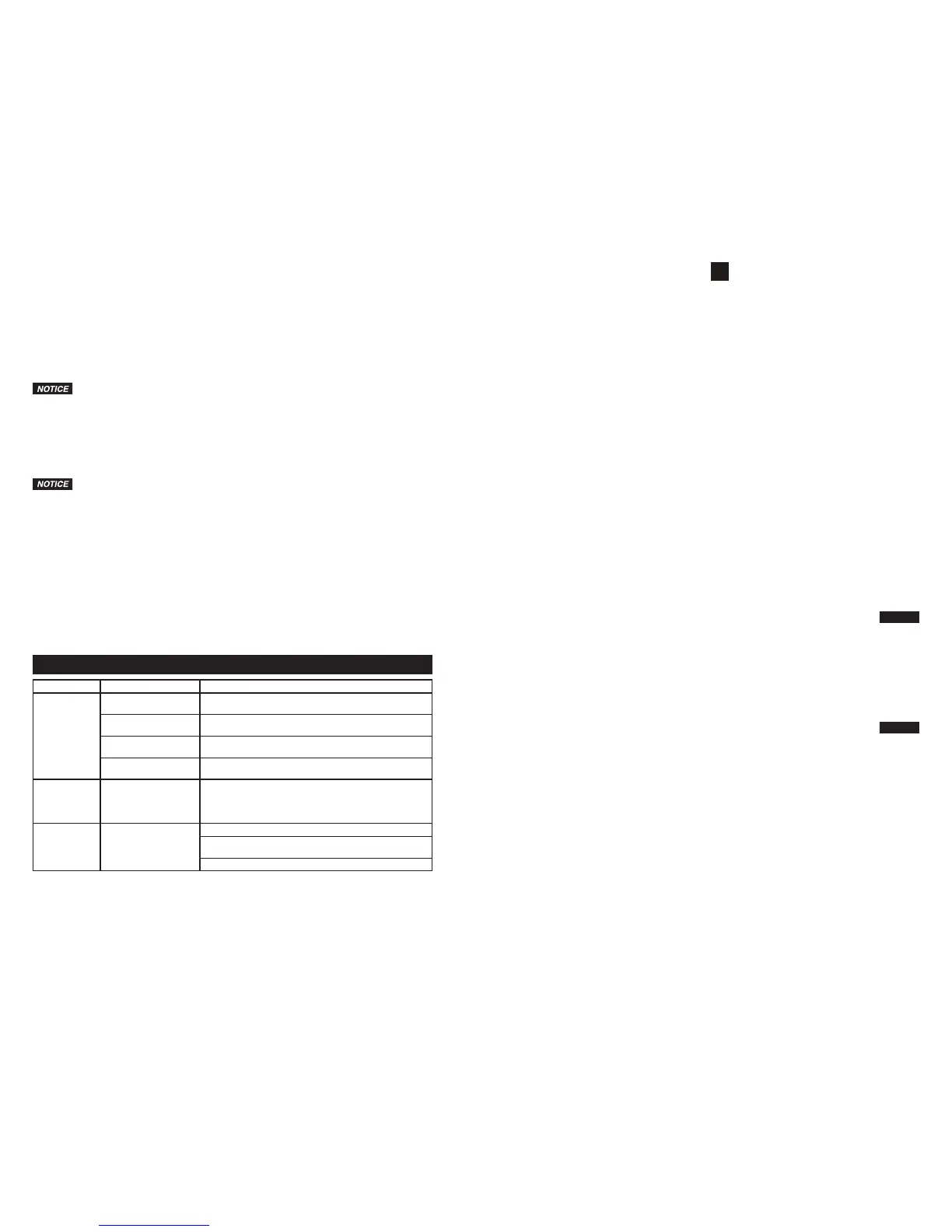
TROUBLESHOOTING
Problem Cause Remedy
Vehicle does
not start
Improper cable clamp
connections
Rotate the cable clamps back and forth to make a good
connection.
Very low vehicle battery
charge
Wait 3 to 4 minutes before starting vehicle again.
Low battery charge on
Jump-Starter
Fully recharge Jump-Starter.
Vehicle battery
defective
Replace with a new battery.
Tablets and
smart phones
are charging
slowly
Tablets or smart
phones do not support
high-speed charging
Check with tablet/smart phone manufacturer.
LCA alarm is
ON
Low battery charge Press the battery status button to snooze for 24 hours.
Press and hold the battery status button to turn off LCA
feature.
Fully charge battery to turn off LCA alarm.
8
1. Apague la ignición y todos los accesorios del vehículo.
2. Asegúrese de que el Arrancador con Cables de Puente esté completamente cargado y que el
interruptor de ON/OFF del Arrancador con Cables de Puente/Puertos USB esté en la posición
OFF. Apague cualquier otra función de su Arrancador con Cables de Puente.
3. Consulte el manual del propietario del vehículo para obtener el procedimiento apropiado para
arrancar con cables de puente. Muchos vehículos recientes tienen una ubicación separada
para arranque con cables de puente, alejada de la batería. Siempre use el procedimiento
recomendado por el fabricante de su vehículo.
4. Conecte firmemente el cable positivo (+) rojo al terminal (+) de puente del vehículo.
5. Conecte el cable negativo negro (–) a una pieza metálica del vehículo que no tenga movimiento.
No lo conecte al terminal negativo (–) de la batería. Asegúrese de que la luz roja de pinzas
invertidas no esté encendida. Si está encendida, los cables de arranque con cables de puente
no están instalados correctamente. Deténgase inmediatamente y revise sus conexiones. Sólo
continúe si el indicador rojo de pinzas invertidas NO ESTÁ encendido y el indicador Azul de
Listo para Puentear está encendido.
6. Si la batería del vehículo está completamente descargada, usted no podrá usar el Arrancador
con Cables de Puente. Pueda que sea necesario cargar la batería entes de usar el arranque
con cables de puente.
7. Después de verificar que las conexiones están correctas, el indicador Azul de Listo para
Puentear está encendido y el indicador de pinzas invertidas NO ESTÁ encendido, gire el
interruptor ON/OFF del Arrancador con Cables de Puente/Puertos USB hacia la derecha para
colocar el Arrancador con Cables de Puente en la posición ON. El indicador LED azul de ON del
Arrancador con Cables de Puente se encenderá.
8. Dele arranque al motor con ráfagas de 5 a 6 segundos.
AVISO
No le dé arranque al motor por más de 6 segundos. La función del arranque con
cables de puente fue diseñada sólo para operación de corto plazo. El operar la función
de arranque con cables de puente durante más de 6 segundos podrá causarle daños a
la unidad. Deje que el Arrancador con Cables de Puente se enfríe durante por lo menos 3
minutos después de cada arrancada con cables de puente.
9. Una vez que el motor encienda, GIRE EL INTERRUPTOR ON/OFF DEL ARRANCADOR CON
CABLES DE PUENTE A LA POSICIÓN OFF Y DESCONECTE PRIMERO LA PINZA NEGRA
NEGATIVA y luego la pinza roja positiva.
10. Después de cada uso, recargue el Arrancador con Cables de Puente tan pronto le sea posible.
Operación de los Puertos de Energía USB
AVISO
El puerto de energía USB no apoya las comunicaciones de datos. El puerto tiene un
máximo de 5 voltios/2.400 mA CC de energía para un dispositivo externo USB energizado.
1. Retire la tapa del puerto USB.
2. Enchufe el dispositivo energizado por USB dentro del puerto de energía USB.
3. Gire el interruptor del Arrancador con Cables de Puente/Puertos USB hacia la derecha para
encender los Puertos USB. El indicador LED azul de ON del Arrancador con Cables de Puente/
Puertos USB se encenderá. Esto significa que los puertos USB están encendidos.
4. Encienda el dispositivo.
5. Cuando apague, primero apague la energía del artefacto y luego gire a la izquierda el
interruptor de ON/OFF del Arrancador con Cables de Puente/Puertos USB. El indicador LED
azul de ON del Arrancador con Cables de Puente/Puertos USB se apagará. Esto significa que
los puertos USB están apagados.
6. Desenchufe el dispositivo energizado por USB del puerto de energía USB.
7. Instale la tapa del puerto USB.
Operación de la Lámpara de Trabajo
• Oprima el botón de ON/OFF de la lámpara de trabajo para encenderla.
• Oprima de nuevo el botón de ON/OFF de la lámpara de trabajo para apagarla.


 To Next Page
 Loading...