5
QUICK START GUIDE
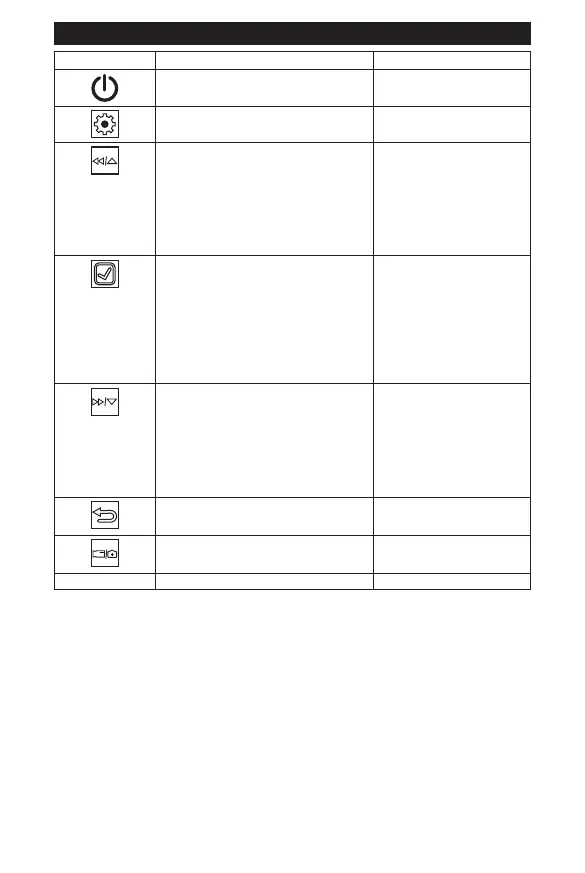
Buttons Description Function
Power ON/OFF ËÈÄÉʾ»·É¾·ÃÅķĺÅŮ
Settings Allows you to set up video and
camera settings
Rewind/Scroll UP In Playback Mode the RW/UP
button allows you scroll to select
the video to view.
In Playback Mode when playing
video, the RW/UP button will
rewind the current video.
When in the Settings menu it
allows you to scroll up through
the menus.
SELECT In Video Mode – the Select
button allows you to start or stop
recording.
In Picture Mode – the Select
button allows you to take a
picture by pressing the button.
In any other mode – It allows you
ÊŹÅÄŰÈÃÏÅËÈɻ»¹Ê¿ÅļÈÅÃ
the menu.
Fast Forward/Scroll DOWN In Playback Mode: the FW/
DOWN button allows you to
select the video to view.
In Playback Mode when playing
video, the FW/DOWN button fast
forwards the current video.
In the Settings menu it allows
you to scroll down through the
menus.
BACK Pressing the Back button will
take you back to the previous
page.
Mode Pressing the Mode button allows
you to choose between Video,
Picture, and Playback Mode.
Reset Helps device to restart



 To Next Page