9
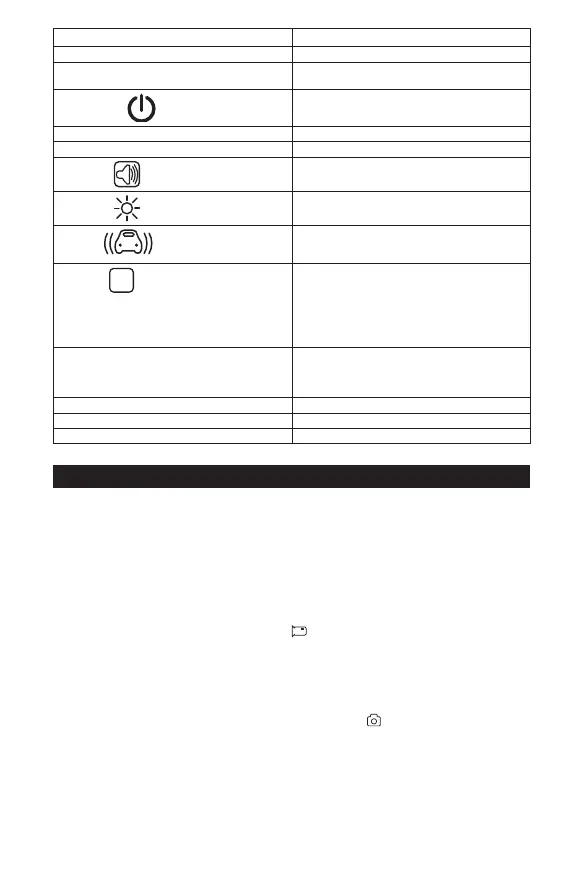
Description Function
Date/Time Sets up Date/Time
Screen Saver »ÊÉʾ»Ê¿Ã»¸»¼ÅÈ»·¸Â·ÄÁɹȻ»Ä·ÆÆ»·ÈÉƔŮƑ
3 min, 5 min, 10 min.
ËÊÅÅÍ»ÈŮ
»ÊÉʾ»Ê¿Ã»¸»¼ÅÈ»·¸Â·ÄÁɹȻ»Ä·ÆÆ»·ÈÉƔŮƑ
1 min, 3 min.
Beep Sound Enables sound when each button is pressed.
Volume Controls the volume of the video. (0 low - 7 high)
Microphone
Enable the ability to record sound.
Night Vision
Enables the ability to record videos in the dark. To
set up simply turn ON, OFF or set in Auto Mode.
G-Sensor
»·ÊËÈ»ÂŹÁÉÌ¿º»ÅŰ»ɺËȿĽ·Ä¿Ä¹¿º»ÄÊƔ¾¿É
É»ÊʿĽ·ÂÂÅÍÉËÉ»ÈÊÅÊËÈÄÅŮƑʹƺÃÅÉÊÉ»ÄÉ¿Ê¿Ì»ÊÅ
acceleration; 4G, 8G least sensitive to acceleration)
Park Mode
P
¾»Äʾ»·É¾·Ã¿ÉÆÅͻȻºÅŮ·Äº¼»»ÂÉ
a sudden acceleration, the Dash Cam will start
recording for 20 seconds if it is not externally
powered and continuous recording if externally
ÆÅͻȻºƔ¾¿ÉÉ»ÊʿĽ·ÂÂÅÍÉÏÅËÊÅÊËÈÄÅŮƑʹ
(most sensitive to acceleration; 4G, 8G least
sensitive to acceleration)
Language Change all text to selected language. English,
È·º¿Ê¿Åķ¾¿Ä»É»Ƒ¿ÃÆÂ¿Ű»º¾¿Ä»É»Ƒ·Æ·Ä»É»Ƒ
French, Dutch, Korean, Italian, Portuguese,
Russian, Spanish.
Format ȷɻɷÂÂŰ»ɿÄʾ»¹·ÈºƔ
Default Setting Reset all settings to factory default settings.
Version Firmware update.
OPERATION
To record a video:
ƓÆÅÄÆÅͻȿĽËÆƑʾ»·É¾·ÃͿ¸»¿Äʾ»º»¼·ËÂÊ¿º»Åź»·ÄºÍ¿ÂÂÉÊ·ÈÊ
È»¹ÅȺ¿Ä½ƔÅ·¹¹»ÉÉÅʾ»ÈûÄËÉƑÆÈ»ÉÉʾ»»Â»¹ÊÁ»ÏÊÅÉÊÅÆÈ»¹ÅȺ¿Ä½Ɣ
To manually start and stop recording a video:
Option 1:
1. Press Power ON/OFF button.
2. If the video is recording it will automatically stop. If the video is stopped it will automatically begin
recording.
Option 2:
1. Press the Mode button and select Video Mode
.
2. Press the Select button to start or stop recording.
Ɠ¾¿Â»È»¹ÅȺ¿Ä½ƑÏÅ˹·Ä·ÂÉÅÂŹÁʾ»Ű»¸ÏÆÈ»ÉɿĽʾ»·¹Á¸ËÊÊÅÄƔ
To take a picture:
ƓÆÅÄÆÅͻȿĽËÆƑʾ»·É¾·ÃͿ¸»¿Äʾ»º»¼·ËÂÊ¿º»Åź»·ÄºÍ¿ÂÂÉÊ·ÈÊ
È»¹ÅȺ¿Ä½ƔÅ·¹¹»ÉÉÅʾ»ÈûÄËÉƑÆÈ»ÉÉʾ»»Â»¹ÊÁ»ÏÊÅÉÊÅÆÈ»¹ÅȺ¿Ä½Ɣ
1. Press the Mode button and continue clicking until Camera Icon
is highlighted on screen. The
Ê»ÎÊơ¹·Ã»È·ƢͿ¸»º¿ÉÆ·ϻºÅÄʾ»É¹È»»ÄƔ
2. È»ÉÉʾ»»Â»¹Ê¸ËÊÊÅÄÊŹÅÄŰÈÃɻ»¹Ê¿ÅÄƔ


 To Next Page