PCAN-USB – User Manual
10
3 Connecting the CAN Bus
3.1 D-Sub Connector
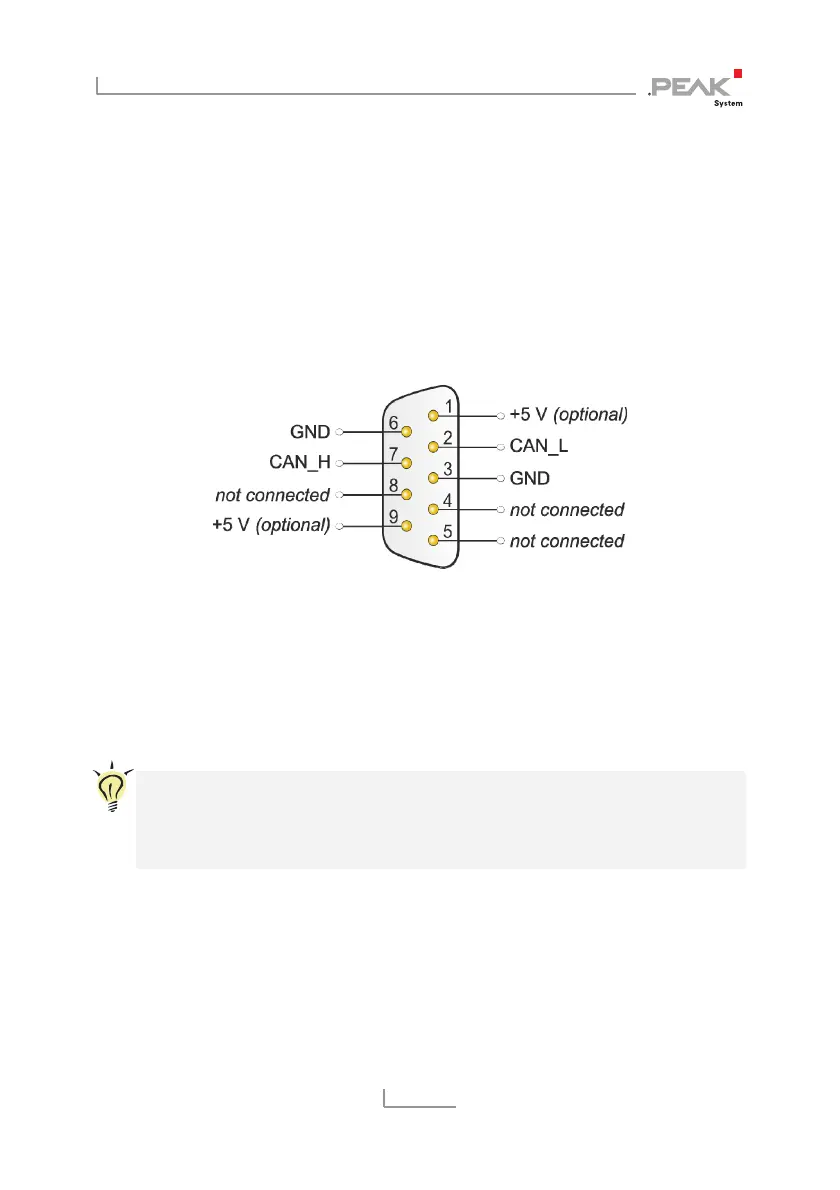
A High-speed CAN bus (ISO 11898-2) is connected to the 9-pin
DSub connector. The pin assignment for CAN corresponds to the
specification CiA® 102.
Figure 1: Pin assignment High-speed CAN
(view onto connector of the PCAN-USB adapter)
With the pins 1 and 9 devices with low power consumption (e.g. bus
converters) can be directly supplied via the CAN connector. At deli-
very these pins are not assigned. You can find a detailed description
about the activation in the following section 3.2.
Tip: You can connect a CAN bus with a different transmission
standard via a bus converter. PEAK-System offers different bus
converter modules (e.g. PCAN-TJA1054 for a Low-speed CAN
bus according to ISO 11898-3).



 To Next Page