EasyManua.ls Logo

Peavey SANPERA I - User Manual

Peavey SANPERA I
12 pages
Print Icon
To Next Page IconTo Next Page
Loading...
®
SANPERA I
SANPERA
TM
I
Player`s Handbook
Question and Answer IconNeed help?

Do you have a question about the Peavey SANPERA I and is the answer not in the manual?

Summary

PRESET MODE

Storing Presets

Store personal amplifier settings by pressing and holding the button corresponding to the desired storage location.

BANK SELECT MODE

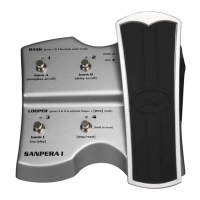
LOOPER CONTROLS

Rec;Play

Record a loop by pressing this button when you want to start recording; press again to stop and begin playback.

Stop;Reset

Stop a loop by pressing this button; press and hold for 3 seconds to erase the stored loop.

Stompbox On;Off

Turn the selected STOMPBOX effect on/off in LOOP mode. Green LED indicates active, off LED indicates inactive.

Delay On;Off

Turn the DELAY effect on/off in LOOP mode. Green LED indicates active, off LED indicates inactive.

CALIBRATION MODE

Peavey Electronics Corporation Limited Warranty

Summary

PRESET MODE

Storing Presets

Store personal amplifier settings by pressing and holding the button corresponding to the desired storage location.

BANK SELECT MODE

LOOPER CONTROLS

Rec;Play

Record a loop by pressing this button when you want to start recording; press again to stop and begin playback.

Stop;Reset

Stop a loop by pressing this button; press and hold for 3 seconds to erase the stored loop.

Stompbox On;Off

Turn the selected STOMPBOX effect on/off in LOOP mode. Green LED indicates active, off LED indicates inactive.

Delay On;Off

Turn the DELAY effect on/off in LOOP mode. Green LED indicates active, off LED indicates inactive.

CALIBRATION MODE

Peavey Electronics Corporation Limited Warranty

Peavey SANPERA I Specifications

General IconGeneral
BrandPeavey
ModelSANPERA I
CategoryController
LanguageEnglish

Related product manuals