EasyManua.ls Logo

Peavey Versamix - Page 16

Peavey Versamix
23 pages
Print Icon
To Next Page IconTo Next Page
To Previous Page IconTo Previous Page
Loading...
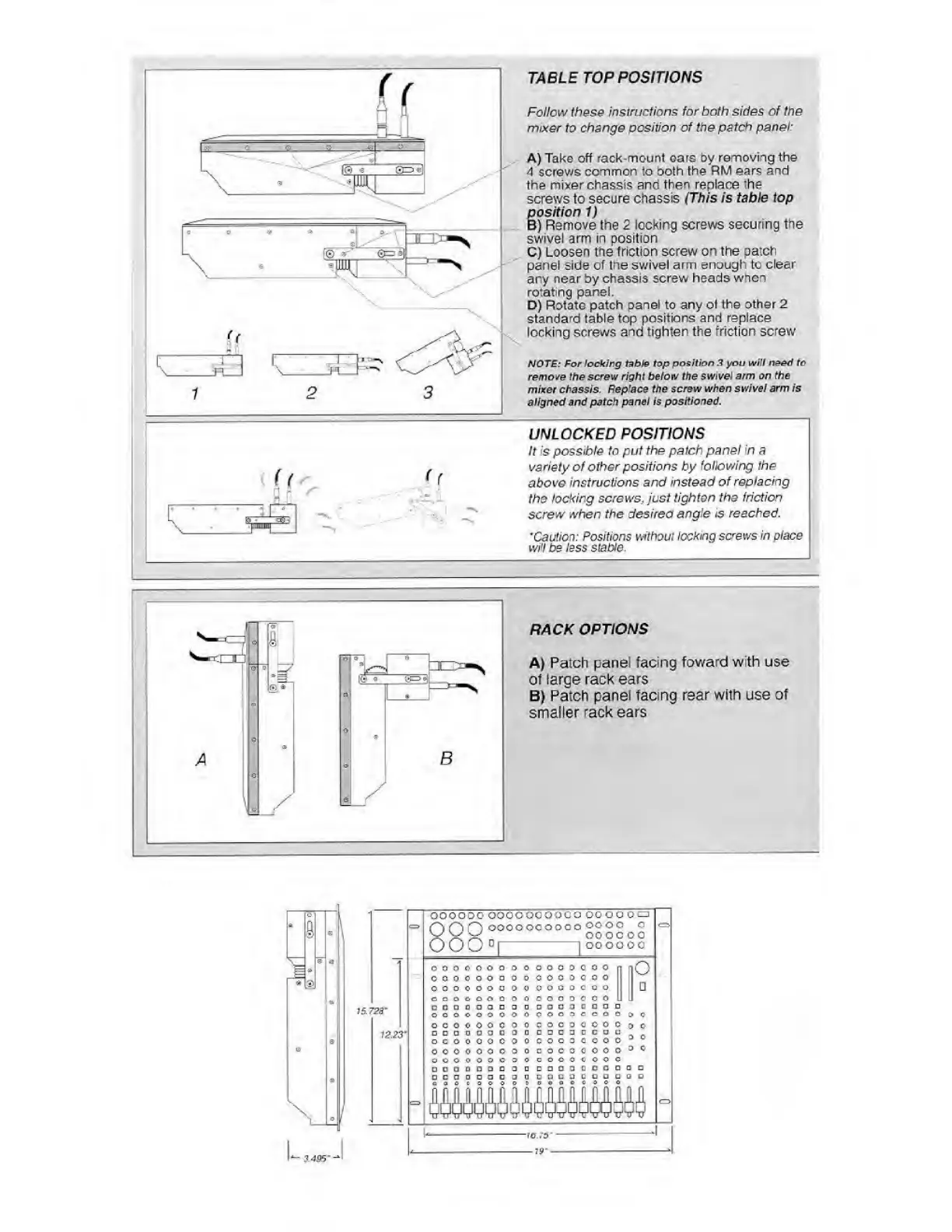
TABLE
TOP
POSITIONS
Follow
these
instructions
for
both
sides
of
the
mixer
to
change
position
of
the
patch
panel:
A)
Take
off
rack-mount
oars
by
removing
the
4
screws
common
to
both
the
RM
ears
and
the
mixer
chassis
and
then
replace
'he
screws
to
secure
chassis
(This
is
table
top
position
1)
B)
Remove
the
2
locking
screws
securing
the
swivel
arm
in
position
C)
Loosen
the
friction
screw
on
the
patch
panel
side
of
the
swivel
arm
enough
to
clear
any
near
by
chassis
screw
heads
when
rotating
panel.
D)
Rotate
patch
panel
to
any
ol
the
other
2
standard
table
top
positions
and
replace
locking
screws
and
tighten
the
friction
screw
NOTE:
For
locking
table
top
position
3
you
will
need
to
remove
the
screw
right
below
the
swivel
arm
on
the
mixer
chassis.
Replace
the
screw
when
swivel
arm
is
aligned
and
patch
panel
is
positioned.
3.495

Related product manuals