EasyManua.ls Logo

Peavey Versamix - Page 5

Peavey Versamix
23 pages
Print Icon
To Next Page IconTo Next Page
To Previous Page IconTo Previous Page
Loading...
1
CHANNEL
CONTROLS:
20
*
TRIM
•:o:-
-15
15
+
HIGH
:
6
:-
-15
15
*
MID
6
:
-15
15
*
LOW
aux
i
n
u
°>.
:
0
:
-15
15
+
AUX
1
'MON
.
o
.
•O:-
15
+
AUX
2
6
:
15
*
AUX
35
-
15
+
AUX
d'6
:
6
-
L
H
PAN
MUTE
SOLO
Q
2A
LIMIT
f
1
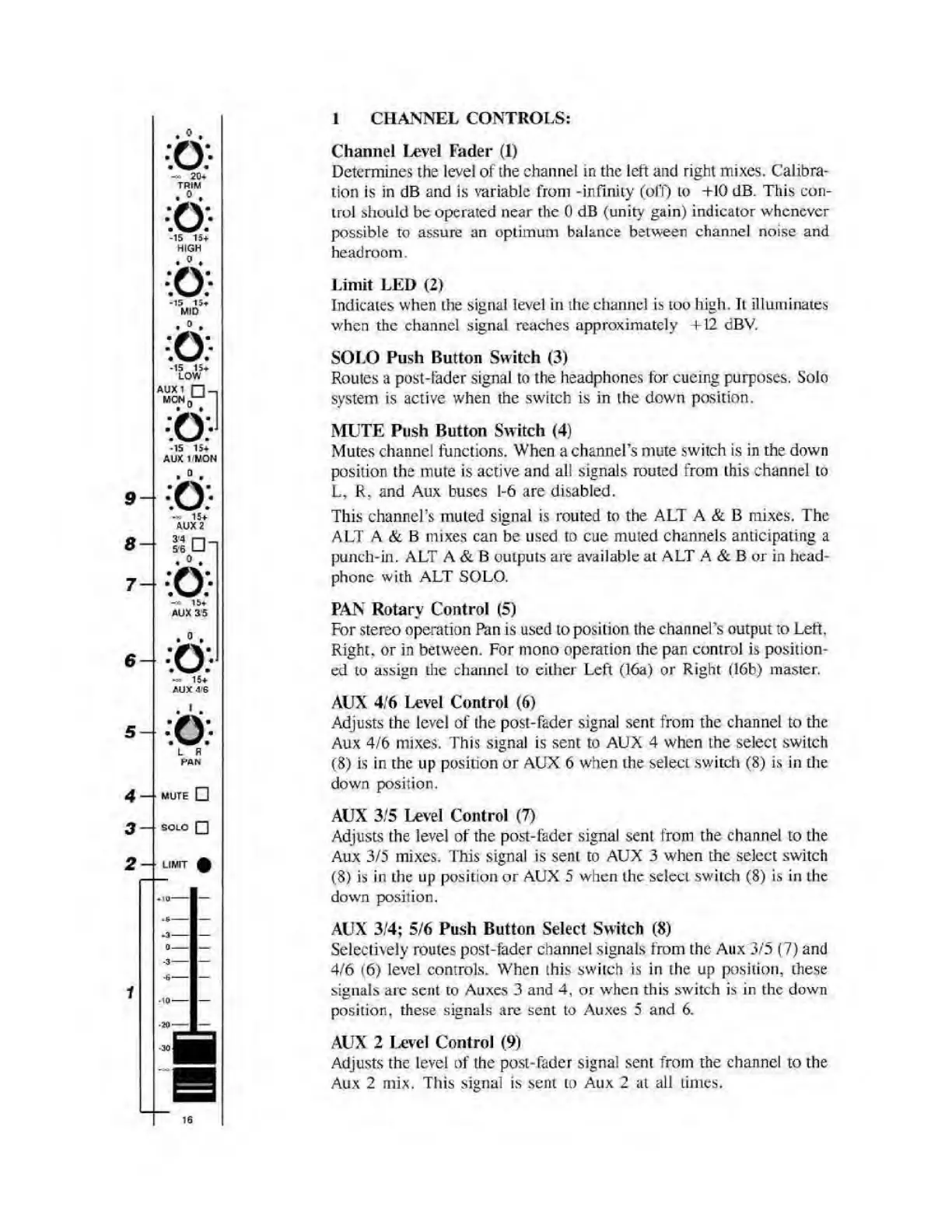
Channel
Level
Fader
(1)
Determines
the
level
of
the
channel
in
the
left
and
right
mixes.
Calibra¬
tion
is
in
dB
and
is
variable
from
-infinity
(off)
to
+10
dB.
This
con¬
trol
should
be
operated
near
the
0
dB
(unity
gain)
indicator
whenever
possible
to
assure
an
optimum
balance
between
channel
noise
and
headroom.
Limit
LED
(2)
Indicates
when
the
signal
level
in
the
channel
is
too
high.
It
illuminates
when
the
channel
signal
reaches
approximately
+12
dBV.
SOLO
Push
Button
Switch
(3)
Routes
a
post-fader
signal
to
the
headphones
tor
cueing
purposes.
Solo
system
is
active
when
the
switch
is
in
the
down
position.
MUTE
Push
Button
Switch
(4)
Mutes
channel
functions.
When
a
channel's
mute
switch
is
in
the
down
position
the
mute
is
active
and
all
signals
routed
from
this
channel
to
L,
R.
and
Aux
buses
1-6
are
disabled.
This
channel’s
muled
signal
is
routed
to
the
ALT
A
&
B
mixes.
The
ALT
A
&
B
mixes
can
be
used
to
cue
muted
channels
anticipating
a
punch-in.
ALT
A
&
B
outputs
are
available
at
ALT
A
&
B
or
in
head¬
phone
with
ALT
SOLO.
PAN
Rotary
Control
(5)
For
stereo
operation
Pan
is
used
to
position
the
channel's
output
to
Left.
Right,
or
in
between.
For
mono
operation
the
pan
control
is
position¬
ed
to
assign
the
channel
to
cither
Left
(16a)
or
Right
(16b)
master.
AUX
4/6
Level
Control
(6)
Adjusts
the
level
of
the
post-fader
signal
sent
from
the
channel
to
the
Aux
4/6
mixes.
This
signal
is
sent
to
AUX
4
when
the
select
switch
(8)
is
in
the
up
position
or
AUX
6
when
the
select
switch
(8)
is
in
the
down
position.
AUX
3/5
Level
Control
(7)
Adjusts
the
level
of
the
post-fader
signal
sent
from
the
channel
to
the
Aux
3/5
mixes.
This
signal
is
sent
to
AUX
3
when
the
select
switch
(8)
is
in
the
up
position
or
AUX
5
when
the
select
switch
(8)
is
in
the
down
position.
AUX
3/4;
5/6
Push
Button
Select
Switch
(8)
Selectively
routes
post-fader
channel
signals
from
the
Aux
3/5
(7)
and
4/6
(6)
level
controls.
When
this
switch
is
in
the
up
position,
these
signals
are
sent
to
Auxes
3
and
4,
or
when
this
switch
is
in
the
down
position,
these
signals
arc
sent
to
Auxes
5
and
6.
AUX
2
Level
Control
(9)
Adjusts
the
level
of
the
post-fader
signal
sent
from
the
channel
to
the
Aux
2
mix.
This
signal
is
sent
to
Aux
2
at
all
times.

Related product manuals