50
| ENGLISH
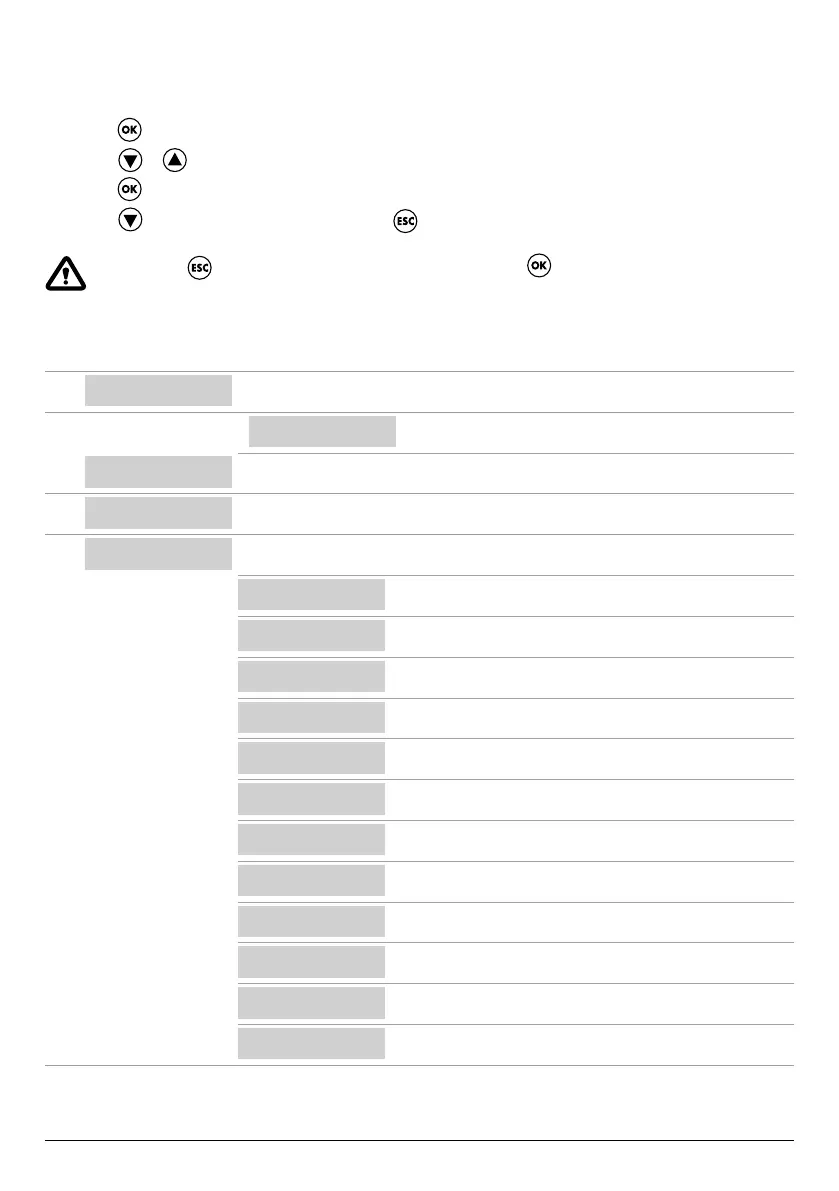
PARAMETER EDITING COMMANDS
After entering the desired menu:
• Press the
key in order to edit the parameter value.
• Press the
or key to edit the parameter value.
• Press the
key to conrm the choice.
• Press the
key to display the next parameter or the key to exit from the menu.
If you press the key while editing a value without rst pressing the key, the parameter will not be saved.
STRUTTURA DEL MENÙ
SELECT
LANG.CONFIG
Set the control panel language
9
LANG.CONFIG
LANGUAGE:ENG
Select the desired language
SELECT
AUTOMATIC
Automatic operating mode
SELECT
MANUAL
Manual operating mode
SELECT
PUMP1 CONFIG
Electric pump no. 1 conguration
9
PUMP1 CONFIG
WIZARD
Self-learn conguration (wizard)
PUMP1 CONFIG
CURRENT:5.0A
Electric pump maximum current
PUMP1 CONFIG
CURR TOUT:7s
Overcurrent trip delay
PUMP1 CONFIG
VOLT MIN
Minimum operating voltage
PUMP1 CONFIG
VOLT MAX
Maximum operating voltage
PUMP1 CONFIG
VOLT TOUT
MAX/MIN voltage trip delay
PUMP1 CONFIG
COSFI MIN:0.50
Electric pump minimum cosφ
PUMP1 CONFIG
COSFI TOUT:5s
Dry running trip delay
PUMP1 CONFIG
CURR MIN
Minimum operating current
PUMP1 CONFIG
CURM TOUT
Undercurrent trip delay
PUMP1 CONFIG
MOT PROT:OFF
Motor thermal cut-out
PUMP1 CONFIG
DISABLE:OFF
Electric pump no. 1 enable/disable
Continued



 To Next Page