58
| ENGLISH
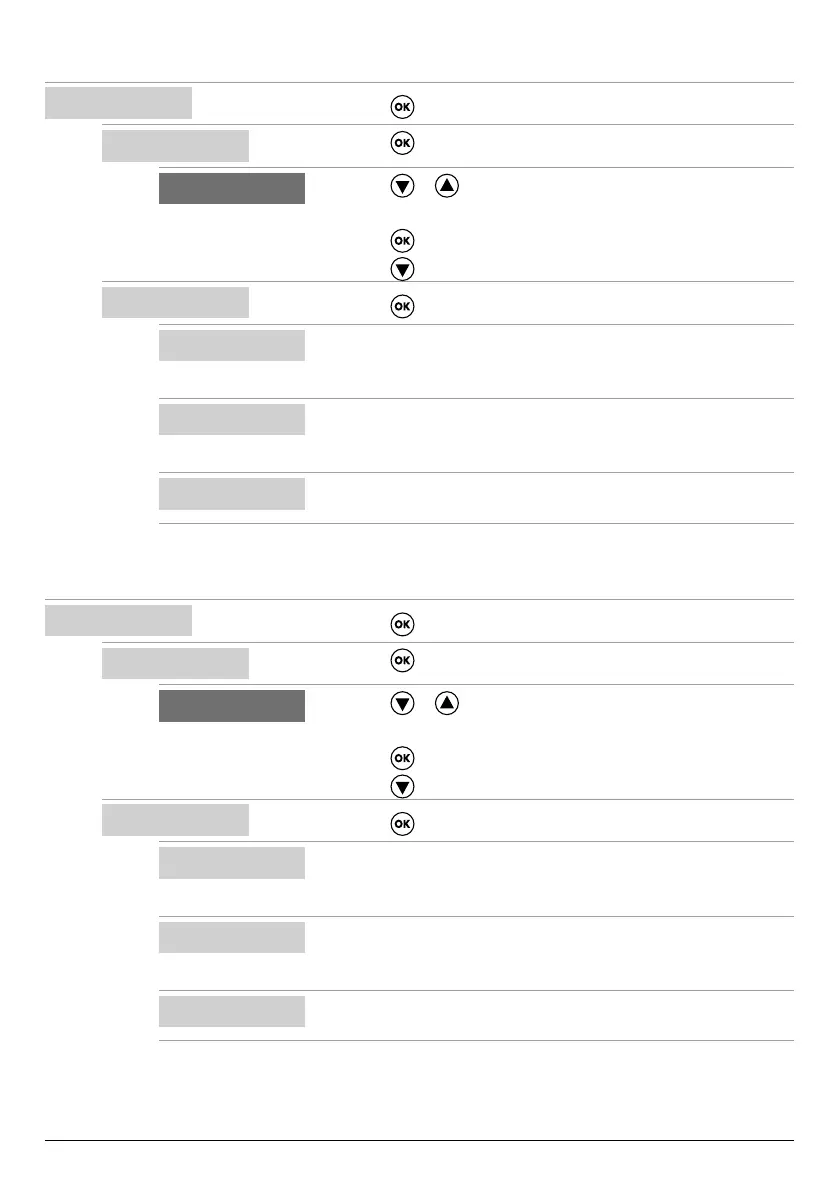
Conguring MODE 2
SELECT
MODE CONFIG
• Press the key to conrm the choice and enter the submenu.
9
MODE CONFIG
MODE:1
• Press the key to enter the submenu and change mode.
6 9
MODE:2
• Press the or key to select mode 2
(from modes 1 to 6)
• Press the
key to conrm the choice of MODE:2
• Press the
key to continue with the conguration
9
MODE CONFIG
SETUP
• Press the key to enter the mode 2 conguration submenu
9
MODE2 CONFIG
IN1:ON
• Enable (ON) or disable (OFF) input IN1
• This input is used to start a single electric pump according to the alternating
logic
MODE2 CONFIG
IN2:ON
• Enable (ON) or disable (OFF) input IN2
• This input is used to start the second electric pump according to the alter-
nating logic, or to start both electric pumps simultaneously
MODE2 CONFIG
LOGIC:ALTERN.
• If the system has two electric pumps, enable (ALTERN.) or disable (SIN-
GLE) the alternating logic.
Conguring MODE 3
SELECT
MODE CONFIG
• Press the key to conrm the choice and enter the submenu.
9
MODE CONFIG
MODE:1
• Press the key to enter the submenu and change mode.
6 9
MODE:3
• Press the or key to select mode 3
(from modes 1 to 6)
• Press the
key to conrm the choice of MODE:3
• Press the
key to continue with the conguration
9
MODE CONFIG
SETUP
• Press the key to enter the mode 3 conguration submenu
9
MODE3 CONFIG
IN1:ON
• Enable (ON) or disable (OFF) input IN1
• This input is used to start a single electric pump according to the alternating
logic
MODE3 CONFIG
IN2:ON
• Enable (ON) or disable (OFF) input IN2
• This input is used to start the second electric pump according to the alter-
nating logic, or to start both electric pumps simultaneously
MODE3 CONFIG
LOGIC:ALTERN.
• If the system has two electric pumps, enable (ALTERN.) or disable (SIN-
GLE) the alternating logic.



 To Next Page