7
2016-04-21 #:220-9010-1
SET UP INSTRUCTIONS
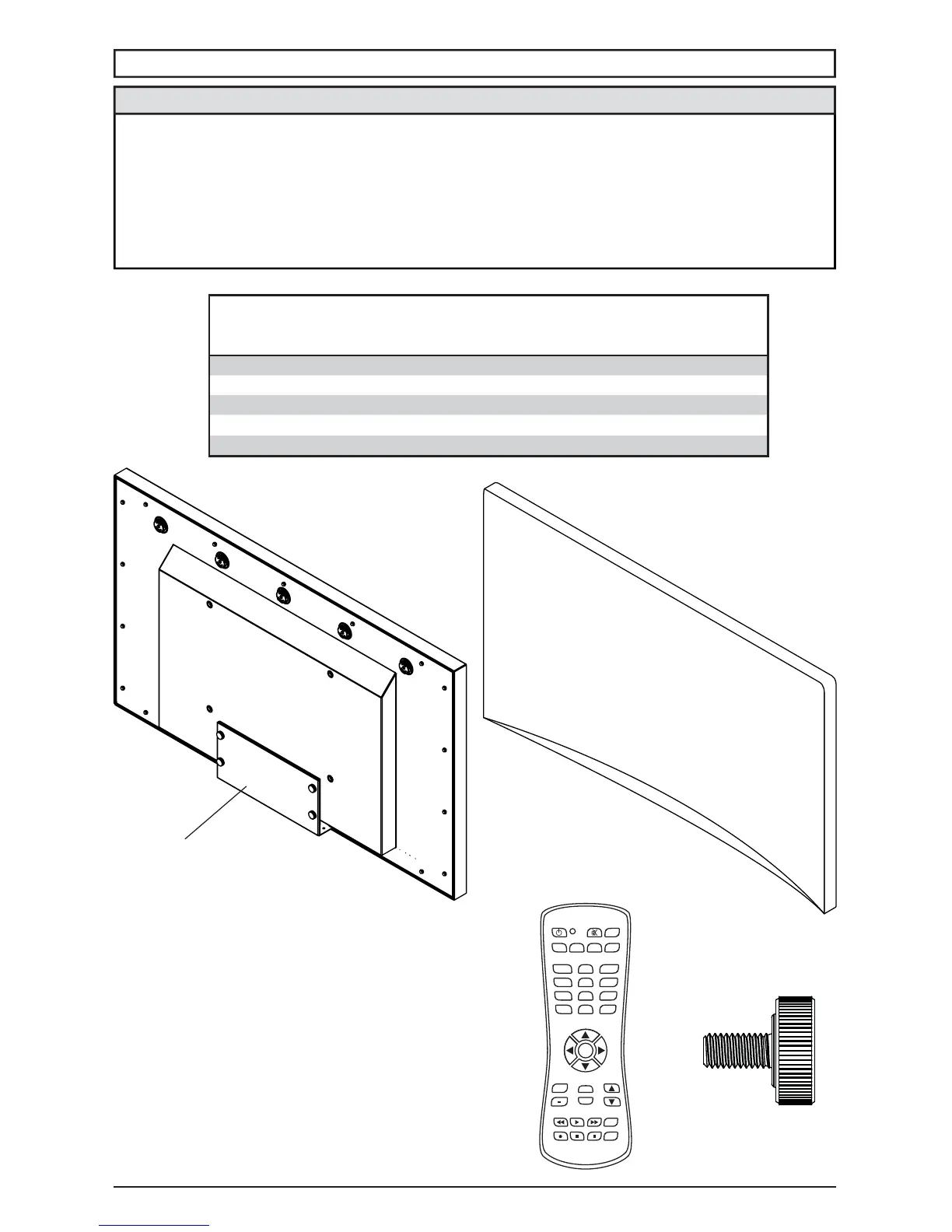
Parts List
UV491
Part #
UV551
Part #Description Qty
A television 1 180-W1338 180-W1339
B cord cover plate 1 180-W1340 180-W1340
C remote 1 410-1032 410-1032
D thumb screw 4 560-1397 560-1397
E display dust cover 1 591-0005 591-0006
C
(
1
)
A
(
1
)
E
(
1
)
B
(
1
)
D
(
4
)
remote
display display dust
cover
cord cover
plate
thumb screw
AUX
LAST
OK
INFO
+
EXIT
CBLDVD
MUTE
POWER
VCR SAT
SOURCE
TV
1
4
7
.
2
5
8
0
3
6
9
VOL
REW PLAY FF MENU
REC STOP PAUSE GUIDE
CH
• Never apply pressure to the exterior of the LCD screen. The manufacturer's warranty does not
cover user abuse or improper installations
• All cables and cable covers MUST be connected and attached prior to installation on mount.
• When routing cables through the cable entry make sure that the cables are formed in such a
way as to remove any stress on the connectors.
• Electrical installation shall be in accordance with the applicable parts of Chapter 8 of ANSI/
NFPA70.
CAUTION



 To Next Page