8
2016-04-21 #:220-9010-1
RS-232C
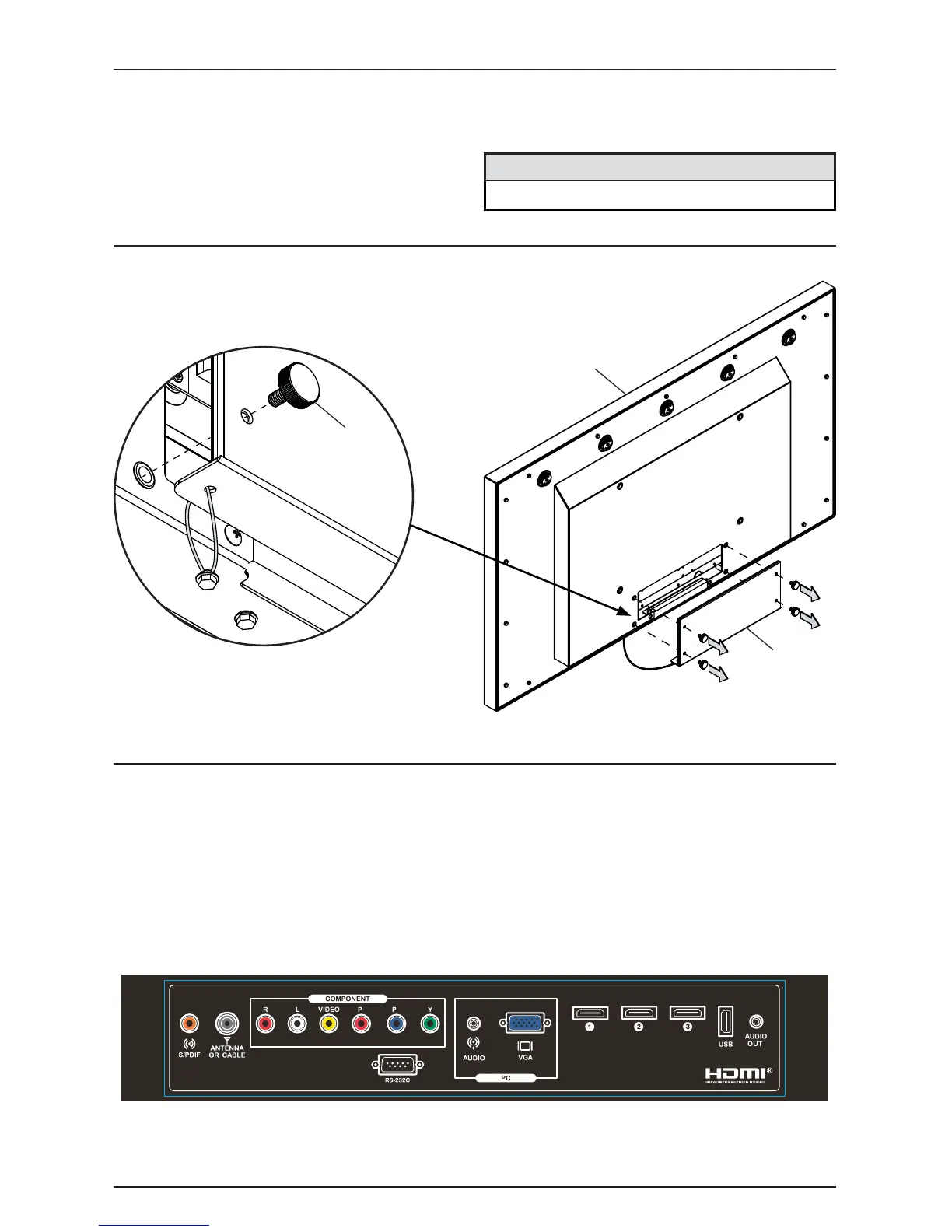
Connecting Cables
Removing Cord Cover
Connect cables from the source devices to their appropriate connector on the display.
Remove (4) thumb screws (D) and cord cover (B) to access source connection panel. Do not
disconnect lanyard.
Antenna or Cable
HDMI 2
Coaxial SPDIF
AV / Video
AV / Audio L
AV / Audio R
Component 1 / PR
Component 1 / PB
Component 1 / Y
HDMI 1
VGA
PC Audio
USB
Audio Out
HDMI 3
A
B
D (4)
br
Choose your TV location
The TV should be installed in a location where the screen will not be facing direct sunlight. Ideal TV
placement is an area that is shaded by landscaping, structures, trees, awnings, or elevated patio
cover. The operating temperature range of the TV is -24° to 122° F. Do NOT use the TV if ambient air
temperature exceeds the operating temperature limits.
Do not install within 5 ft. from a body of water.
CAUTION



 To Next Page