22
Owner’s manual
EN
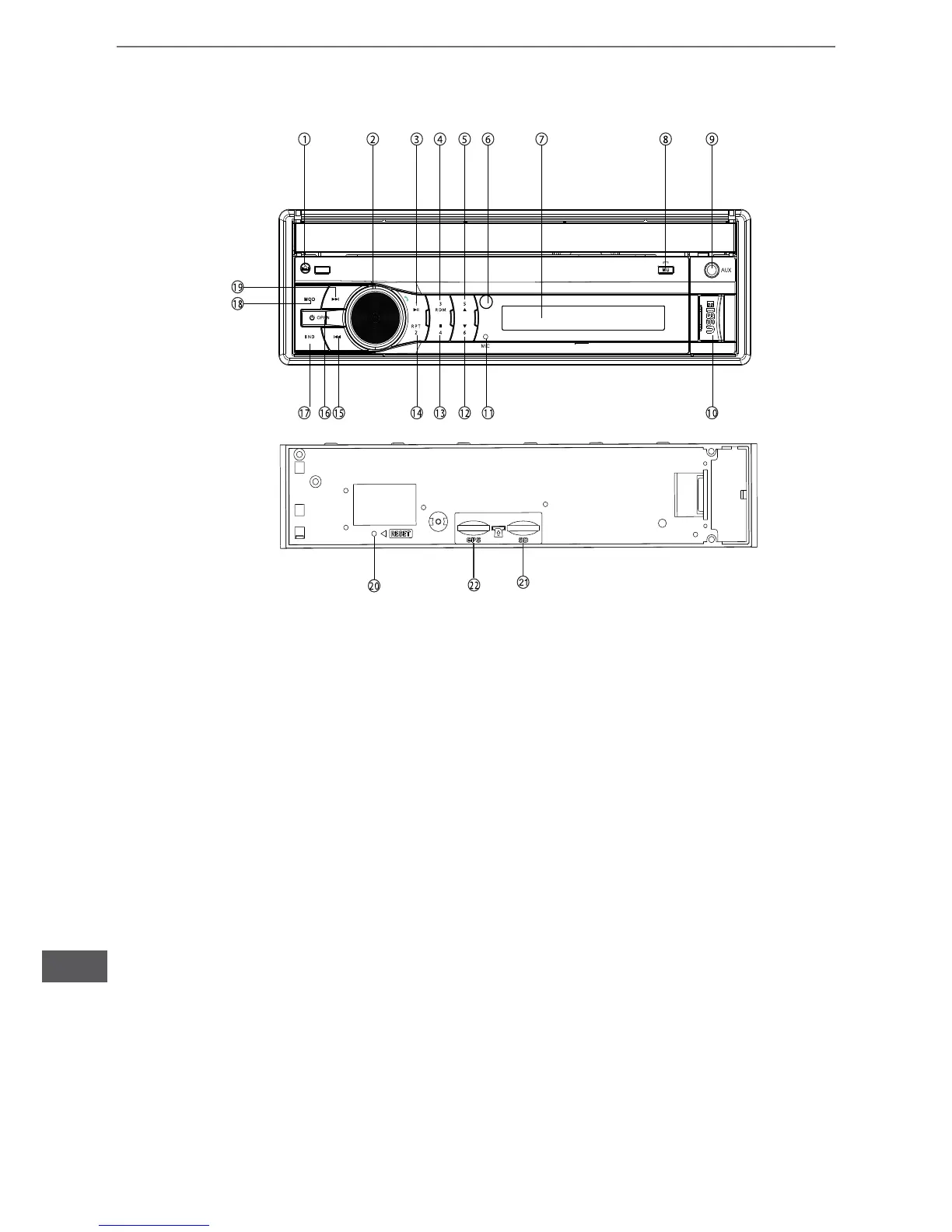
Description of front panel buttons
1. Release buttom
2. Left and right adjustment button: Press this button every time to switch to the adjustment and
control of VOL/BAS/TRE/BAL (left and right balance)/FAD(front and rear balance)/answer for
blueooth mode.
3. Number key 1 / play and pause
4. Number key 3 / random play
5. Number key 5 / adjust the angle of the display screen upwards.
6. IR sensor
7. LCD window
8. Mute / hang up for bluetooth mode
9. AUX input
10. USB slot
11. MIC (bluetooth option only)
12. Number key 6 / adjust the angle of the display screen downwards.
13. Number key 4 / ready-to-be-stop
14. Number key 2 / repeated play
15. Prev
16. Power off (long press) / Press any button to start the unit and in or out of telescopic screen
(short press)
17. Under the radio mode, AM / FM band switch
18. Mode switching
19. Next
20. Reset
21. SD/MMC card slot
22. GPS card slot


 To Next Page