35
Owner’s manual
EN
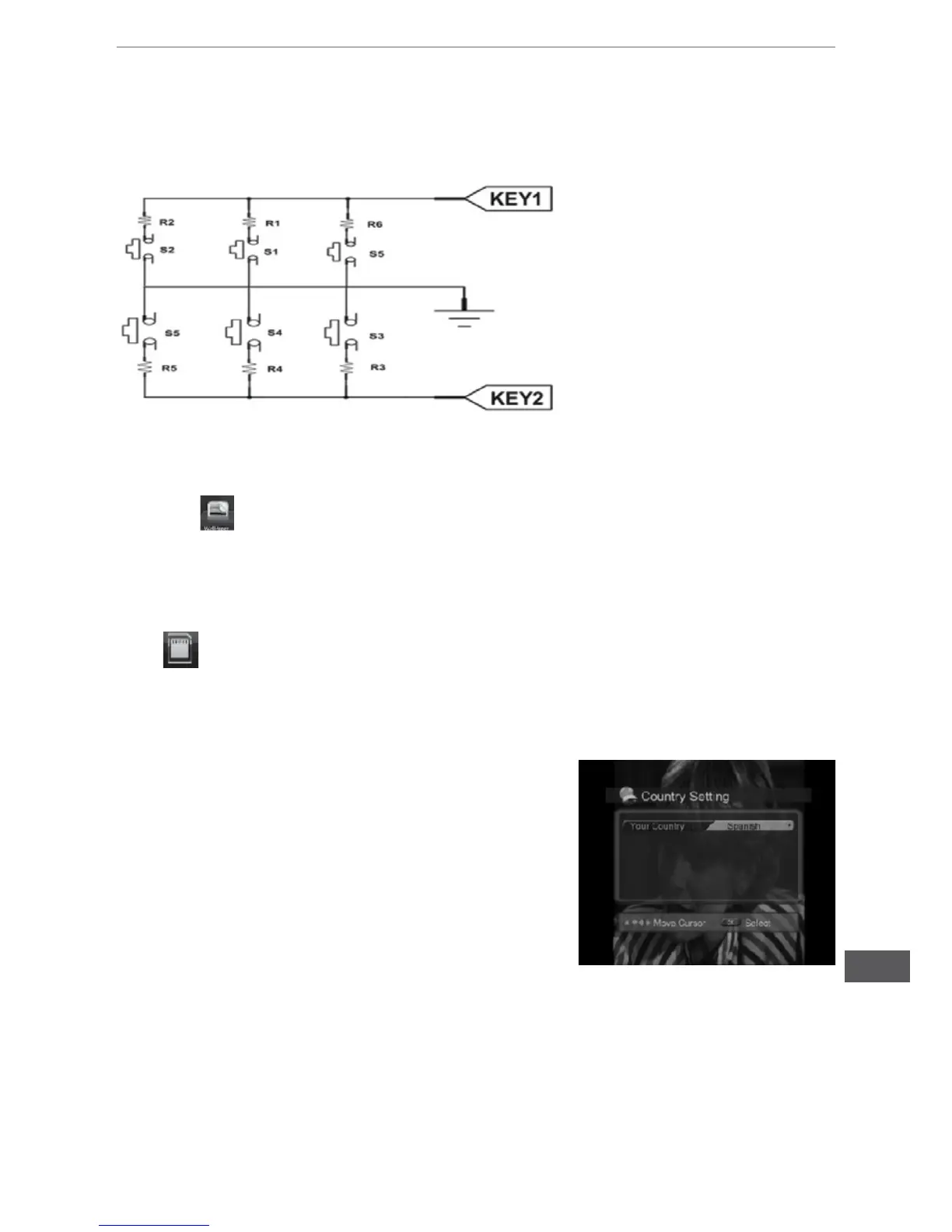
Double wiring for steering wheel control: connect KEY1 (brown) KEY2 (brownish black), KEYGND
(black) in the wire bundle of power cord with KEY1 (brown), KEY2 (brownish black) and KEYGND
(black) in steering wheel of cars.The schematic diagram is as the following:
Instruction for the TV operation
Search channel
Country setting
You can set the country for Menu. Default country is England.
a. Enter to the installation menu.
b. Press the [OK] / [RIGHT] button to display the available
Country List.
c. Select your desired country using the [UP] / [DOWN]
button,andpressthe[OK]buttontoconrm
Automatic Search
a. Use the [UP] / [DOWN] button to select automatic search and press the [OK] button, Into the
automatic search interface, Wait while the receiver searches for the channels, this may take
a few minutes.
b. In automatic search period, the progress instructed that the strip will have the search progress
indication, in search period, if will press the [OK] key operation to pause, press [UP]/[DOWN]
button to select Save button and exit.
c. If search operation is successfully completed, and the channel does not exist, press the [EXIT]
Wallpaper picture menu operation
• Touch icon on setting menu to enter wallpaper picture menu.
• Conduct switching between previous and next pages by sliding the touching screen.
• After selecting background wallpaper, touch return button to return to the main menu to save
the wallpaper.
• setting wallpaper from SD card
upload the picture with resolution (at least) 800x480 px to SD card, insert the SD card, touch
to choose target wallpaper.
Steering wheel control KEY1
Steering wheel control GND
Steering wheel control KEY2



 To Next Page