EN 8
• When cooking larger chunks of meat or pastry, a lot of steam will
be generated inside the oven, which in turn may condense on the
oven door. This is a normal phenomenon which will not affect the
operation of the appliance. After the cooking process, wipe the
door and the door glass dry.
• To prevent condensation (dew) do not leave heated food cool off in
a closed oven.
Oven settings
Consult the table to select the right oven function. Also consult the
instructions for preparation on the dish packaging.
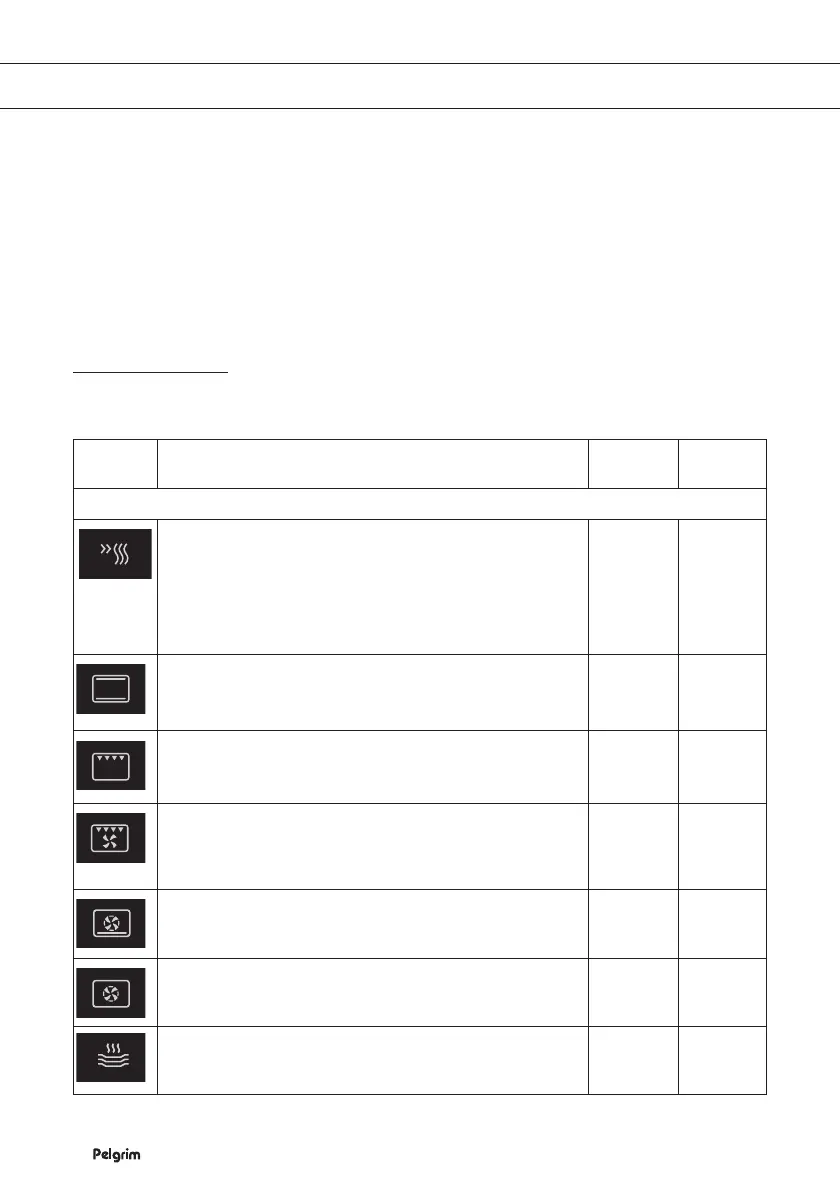
Function Description Suggested
temp. °C
Suggested
power (W)
Oven mode
Fast preheat
Use this function if you wish to heat the oven to the desired
temperature as quickly as possible. This function is not
appropriate for cooking food! When the oven is heated
up to the desired temperature, the heating process is
completed.
Top Heat + Bottom Heat Setting
Heat comes from top and bottom heating elements.
This setting is suitable for baking and roasting.
200
Grill Setting
Food is heated by the top heating element.
240
Top heat + Fan setting
The heat generated by the top heating elements is
distributed by the fan. This mode can be used for grilling
meat and fi sh.
200
Hot Air + Bottom Heat Setting
Hot air and the bottom heating element combine so food
can be crisped and browned.
160
Hot Air Setting
Food is heated by hot air from the back of the oven. This
setting provides uniform heating and is ideal for baking.
180
Plate warmer
Use this function to warm plates and cups before serving
food in it, to keep the food warm longer.
60
USE


 To Next Page