EN 17
USE
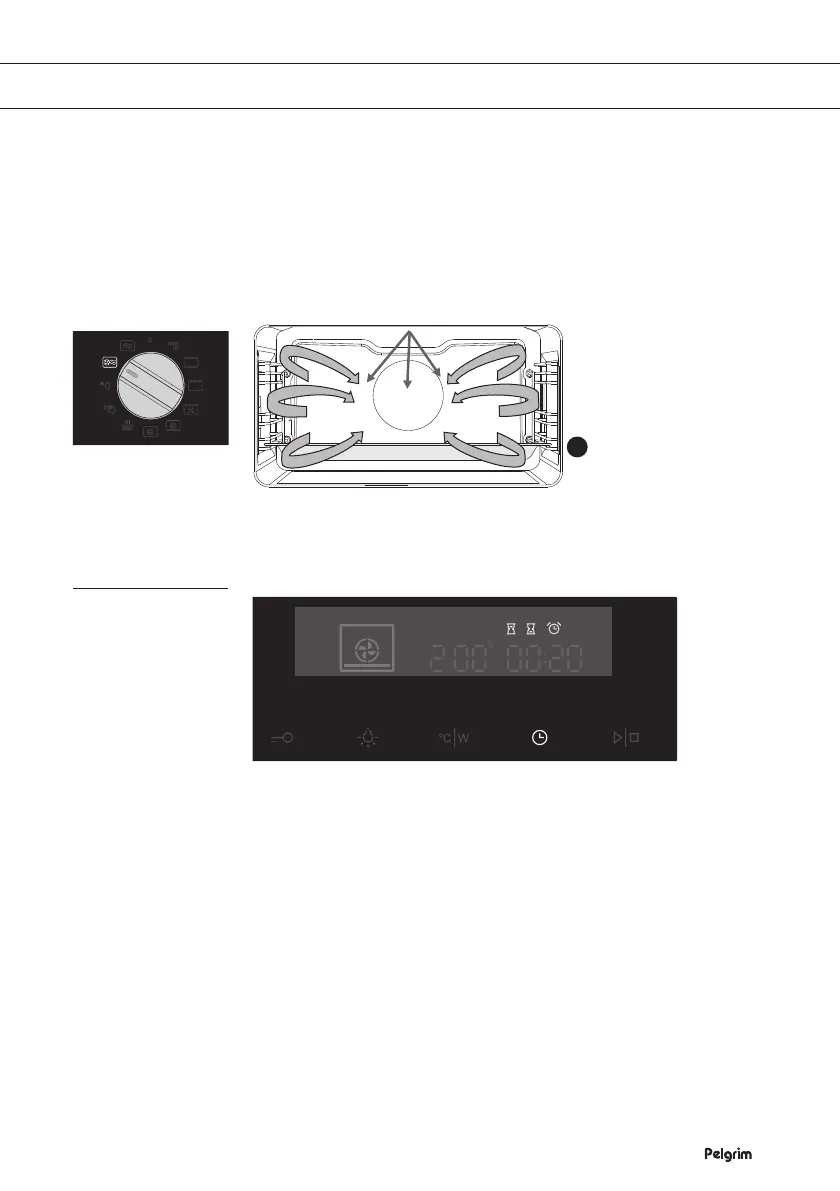
Microwave + hot air
This mode combines hot air and microwave and is therefore reducing
the cooking time while giving the food a brown and crispy surface.
This fuction is suitable for all kind of meat and poultry as well as
casseroles and gratin dishes, sponge cakes and light fruit cakes, pies
and crumbles, roast beef and chicken.
• Power levels: 90, 180, 360 and 600 W
• Insert the glass tray into the first guide.
Using the timer
Setting the timer clock
• Press the ‘Timer key’ twice.
• Set the time of day by turning the ‘Multi function selector’ to the
current time
Using the timer function
• Select a oven function with the ‘Mode selector’ and set the
temperature.
• Touch the ‘Timer key’ several times to select a timer function.
The icon for the selected timer function will light up and the
adjustable cooking start/end time will flash on the display.
Other icons are dimly lit.
• Press the ‘Start / stop key’ to start the cooking process.
The elapsed cooking time will be displayed.
Microwave with
hot air
1


 To Next Page