OPERATION
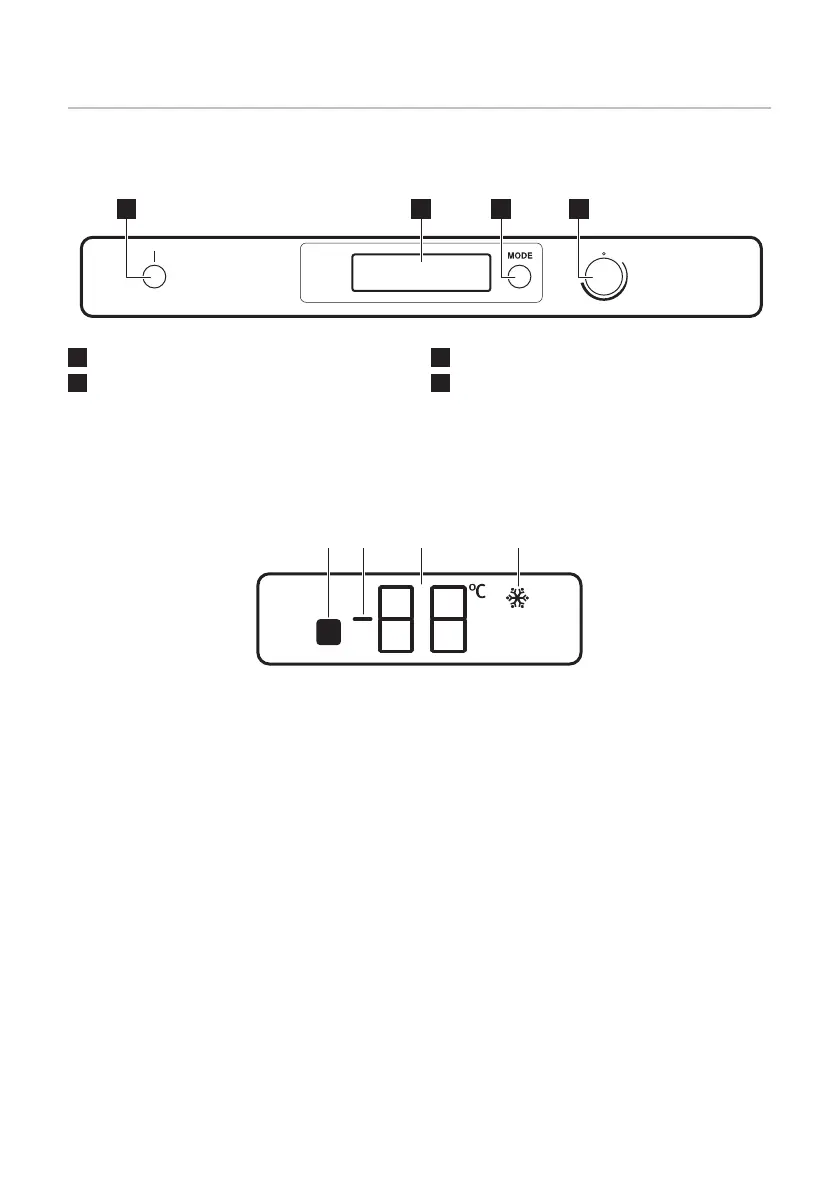
Control Panel
1
ON/OFF switch
2
Display
3
Mode button
4
Temperature regulator
Display
A. Door open alarm indicator
B. Positive / negative temperature indicator
C. Temperature indicator
D. FastFreeze indicator
Switching on
After inserting the plug into the power
outlet, if the display is not illuminated, press
ON/OFF to switch the appliance on.
As soon as the appliance is operating, the
following signals will appear on the control
panel:
• Positive / negative temperature indicator
will indicate temperature above 0°C.
• The temperature indicator will flash, the
background of the display will be red
and buzzer will sound.
Press Mode button to turn off the buzzer
(refer to: "High temperature alarm").
Turn the temperature regulator to a medium
position so that the appliance will be set up
to provide approximately -18°C which is the
best temperature for storing frozen food.
Functions Menu
Each time Mode button is pressed, the
following functions are activated:
• FastFreeze function
• No symbol: normal operation.
16



 To Next Page