PELLENC POWER TOOL BATTERY OLIVION +
56_131087-H
Only use batteries with electric supply tool (3) connectors the same color as those present on the battery
connector of the tool.
In any other event, please seek confirmation with your approved dealer of compatibilty of the battery with the
tools.
4.3. CHARGING THE BATTERY
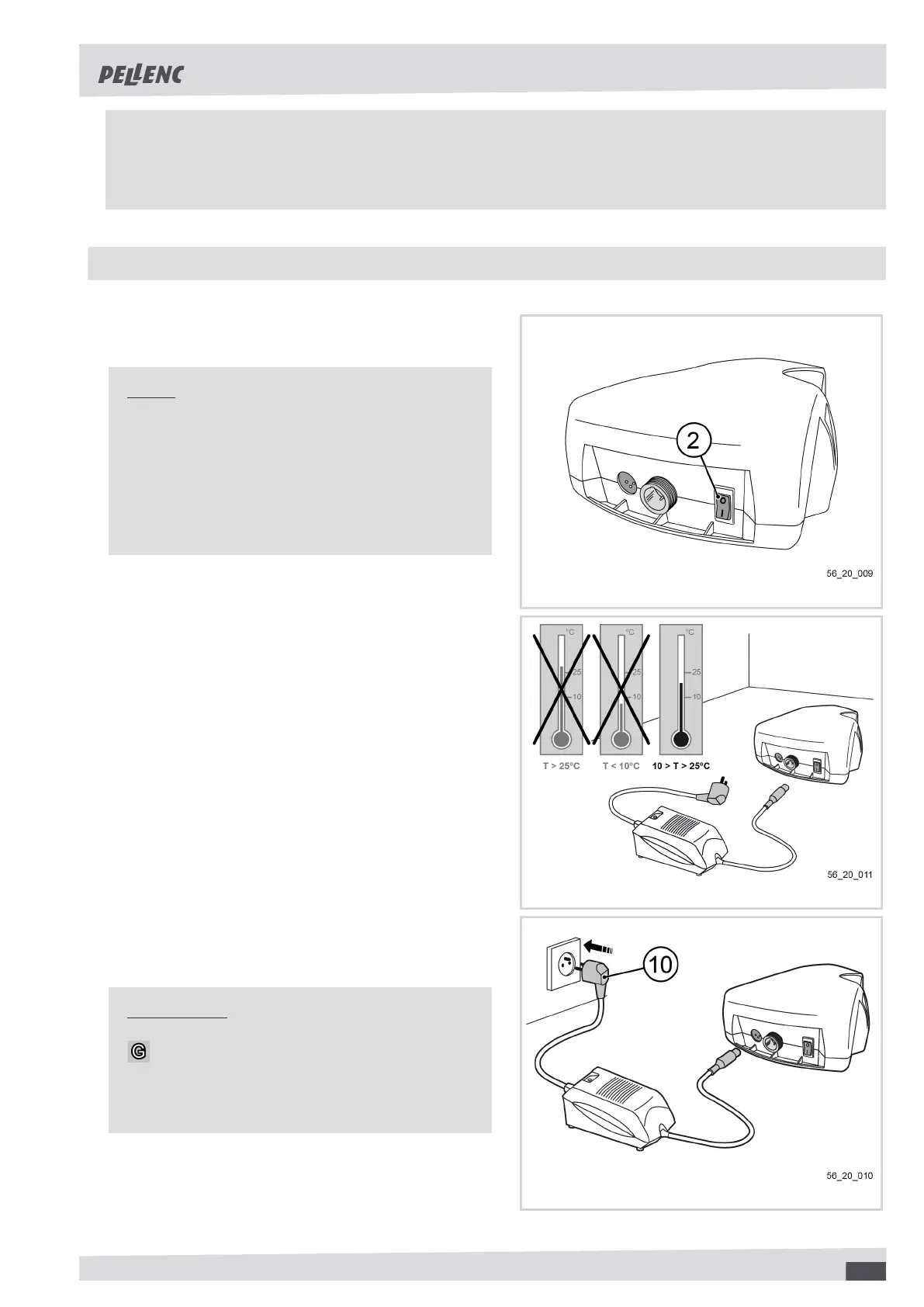
1. Check that the battery switch (2) is turned to off (po-
sition '0').
Note
The battery must be fully charged (99 % on gauge
display) before use the first time in the new season.
When the battery is discharged, the tool stops auto-
matically, the battery gauge display (6) shows 0 %
and the buzzer beeps intermittently (see Section 6,
“Incidents and troubleshooting”).
56_20_009
2. Place the charger and battery in a dry, ventilated and
dust-free room at 10#25°C. Place the battery lying
in a horizontal position.
56_20_011
3. Connect the charger power connector (14) to the
electrical power outlet. The charger LED lights up
green.
Important
Before connecting the charger to the mains,
check that your power system characteristics com-
ply with the specifications given on the charger (see
Section 3.2, “Technical characteristics - Charger”).
56_20_010
15



 To Next Page