Page 8
OPERATION INSTRUCTIONS
Remote Control Description and Operation
NOTICE
• The remote control should be normally used within 6 meters of the front of the
product and 30 degrees of the deviation angle.
• The battery contains many heavy metals, acids and bases, etc., which may
threaten human’s health. Waste batteries should be recycled separately.
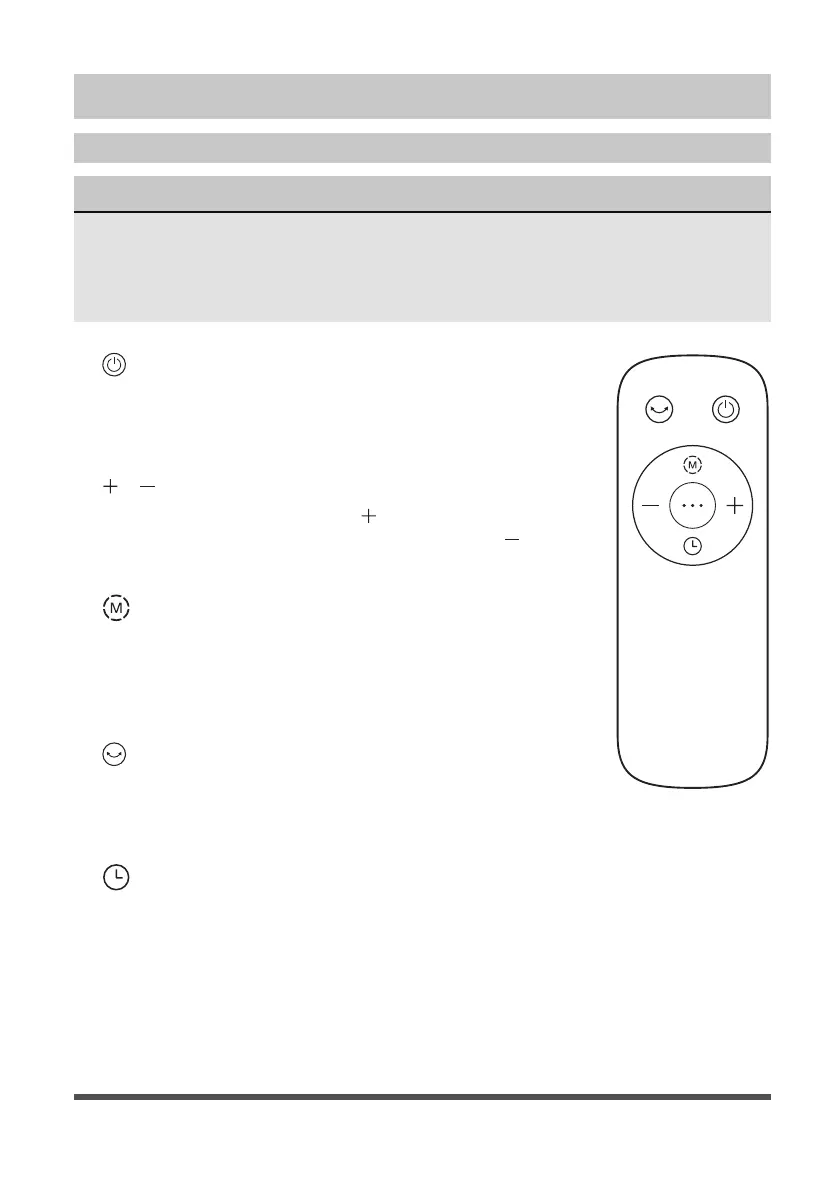
1. ON/OFF KEY:
The “ON” key is for switching on the fan .The fan will
be started at breeze step. Press the “OFF” key if the
fan needs to switch off.
2.
/ SPEED KEY:
When the fan started, press “
” key repeated, the fan
will work with “1-2-3-4-5-1” circulatory. Press “ ” key
repeated, the fan will work with “5-4-3-2-1-5” circulatory.
3.
MODE KEY:
When the machine is on, short press this button
to select “normal wind”, “wind changes with
temperature”, “sleep wind”, “natural wind”......
Circulating between the four wind classes.
4.
OSC/LOUVER KEY:
After the fan has started, press this key to select
oscillation mode. The lights on the display can
indicate fan oscillation mode.
5.
TIMING KEY:
Press this timer key repeatedly to set the time for air
delivery. Increase in increments up to “1-2-3-4-5-6-7-
8-9” hours.



 To Next Page