73
Compool/EasyTouch Pool and Spa Control System Upgrade Installation and User’s Guide
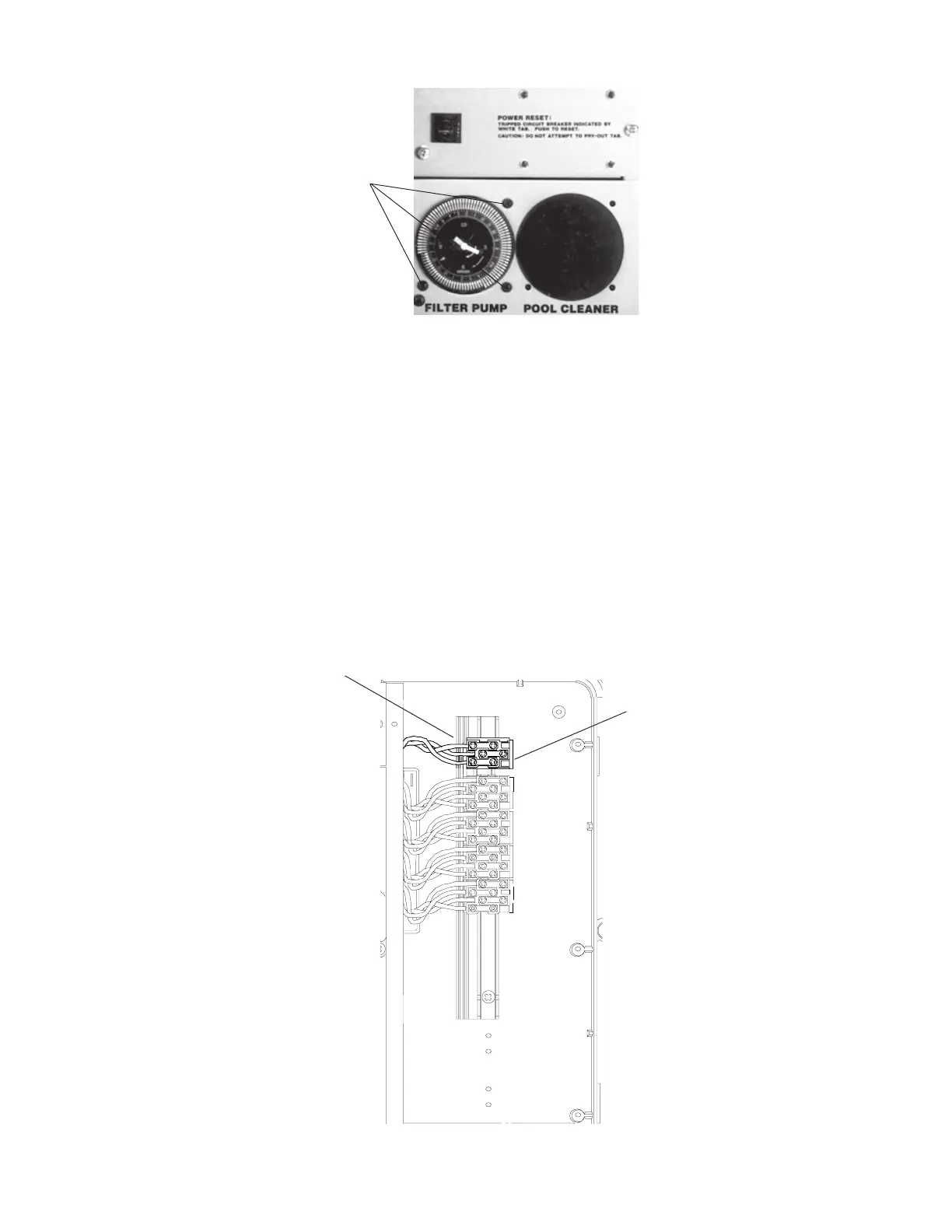
5. For Compool CP2000 and older systems remove the existing Compool transformer and replace it
with the Compool/EasyTouch Upgrade Transformer (P/N 521247).
a) Remove the three (3) screws securing the service panel to expose the high voltage compartment in
the right side of the load center.
b) Disconnect the transformer wire and the main input AC power wires from the BLUE TERMINAL
BLOCK located in the high voltage compartment of the power center.
c) Remove the terminal block by lifting the tab on the right side of the block. Remove the terminal block
and the transformer with attached wires from the power center.
6. To install the Compool/EasyTouch upgrade control panel (and transformer), see “Installing
the Compool/EasyTouch control panel in a Compool Load Center with sub-panel” on page
74.
Removal of Compool transformer assembly:
Compool load center high voltage compartment
Remove terminal block (wires
are connected to transformer)
Terminal block
(Lift tab on right side to remove)
Remove (3)
screws
Compool TimeMaster/ CP100 power
center with time clock (TimeMaster)



 To Next Page