Installation
Tip!
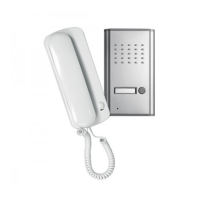
Outdoorunit
Indoorunit (seeFig.B)
Nameplate window
Doorrelease (optional)
Powersupply
mounttheoutdoorunitatacomfortableheightforvisitorstouse.
Make a recess inthewallof approx.110x17 x4mm(w xhxd) at the
required installation position for the outdoor unit. It is important that
the recess is not too large, as this would make it difficult to secure the
outdoor unit. Make sure that the twin-core cable is inside the wall
recess.
Fittheflush mountbox[19] exactlyintothe wallrecess.Make surethat
thefrontouteredgeoftheflushmountboxisflushwiththesurfaceofthe
wall (fixing clip [22] at the bottom). If necessary, fill any spaces
betweenthewallrecessandtheflushmountbox withsilicone.
Place the housing of the outdoor unit onto the flush mount box
withthetopedgeontheretainingscrew2 (seeFig.D-1).
Pushthe housing[14] upto thestop inthe flushmount box(see Fig.D-
2).
Pressthehousing tightlyontothefixingclip[22]oftheflushmount
box (see Fig. D-3)andscrewitinplace with the retaining screw 1 [23]
(seeFig.D-4).
Mark the screw openings [13] in the mounting plate [10] at the
installationposition.
Fastenthemountingplateas requiredwiththe fasteningscrewsand the
wallplugs ontothe flatsurfaceinthechoseninstallationposition. Make
sure that the fastening lugs [11] (4 x) are pointing away from the
surface.
Push the indoor unit with the connected cable (optionally two) from
above onto the fasteninglugs of the mounting plate. Then push it
downuntilitclicksinplace.
Carefullypush thelefthand sideofthenameplate window inwards
andthentotheleft.
Openthenameplatewindowandremovethenameinsert.
Write your name on the insert and replace it behind the name plate
window.
Close the name plate window inwards and push it to the right until it
clicksinplace.
Toinstalla12VDCdoorrelease,follow theinstructionsandinformation
providedintheoperatingmanualforthedoorrelease.
Pushtheplugofthe mainscable[5]completelyintoamainssocket.The
two red LEDs behind the name insert on the name plate window [17]
lightup.If thetwored LEDsdonot light up,the connection betweenthe
indoorunitandtheoutdoorunithasnotbeenmadeproperly.
Connecttheindoorunitand theoutdoorunitproperly.Thedoorintercom
isnowreadyforoperation.
!
!
!
!
!
!
!
!
!
!
!
!
!
!
!
[14]
[20]
[14]
[11]
[17]
Operation
Troubleshooting
Maintenanceandcleaning
A visitor presses the bell button [16] on the outdoor unit. The two red LEDs
behindthename inserton thename platewindoware notilluminated foras
longasthebellbutton remainspressed. Atwo-tone signalrings twiceonthe
indoor unit. If the visitor holds the bell button r down longer, the ring tone
occursacorrespondingnumberoftimes.
Removethereceiver[2]fromtheindoorunit.
Speak to the visitor into the bottom part (mouthpiece) of the receiver.
Thevisitor canhearyouthroughthe loudspeaker[15] andanswerswith
theaidofthemicrophone[18]ontheoutdoorunit.
Youcanhearthevisitorthroughtheupperpart(earpiece)ofthereceiver.
Whenyouhavefinishedyourconversation,replacethereceiver.
If a door release is connected, you canunlockthedoor/the gate in the
followingway:
Adoorreleasewith functionisunlockedwhenthesignalisgiven.
PressthedoorreleasebuttonE.Thegateor thedooris lockedonceit has
beenopenedandclosedagain.
Keep the door release button E pressed until the visitor has opened the
door. It is possible to open the door during the time in which you are
pressingthedoorreleasebutton.
When you let go of the door release button, the door is locked
immediately. It is also possible to unlock the door / the gate when the
receiverishookedupontheindoorunit.
Fault Cause Remedy
Thecablebetween theindoorunitandoutdoorunitisfaulty.Thetwored
LEDsbehindthenameplatewindowtdonotlightup.
Correctthefaultinthecable.Observethepolaritymarkingonthecable.
Thevisitorisstandingtoofarawayfromtheoutdoorunit.
Askthevisitortomoveclosertotheoutdoorunit.
Disconnect the indoor unit from the power supply before maintenance
andcleaning.
Checkthetechnicalsafetyandfunctionofthedeviceregularly.
Use a soft clothand a mild agent, if necessary mildsoap suds, to clean
theplasticandmetallicsurfaces.
Neverusesolvents,thinnerorsimilarchemicalsubstances.
Removedeposits ofdustfromtheairventswith abrushorusea vacuum
cleaneratmin.5cmdistancefromthecomponents.
!
!
!
!
!
!
!
!
!
!
!
!
!
Doorrelease (optional)
The door intercom is not working or is not working
properly...
Thesound ofthevisitor‘svoiceisweak.
Doorreleasewithlatchingfunction
Doorreleasewithout function
latching
latching
GB - 16


 To Next Page
 Loading...