EasyManua.ls Logo

Pentax 645 - FILM HOLDERS 645 AND ATTACHING;DETACHING; Attaching; detaching of 120;220 film holders

Pentax 645
75 pages
Print Icon
To Next Page IconTo Next Page
To Previous Page IconTo Previous Page
Loading...
FILM
HOLDERS
646
AND
ATTACHING/DETACHiNG
The
following
film
holders
are
available,
depending
upon
your
photographic
requirements;
each
provided
with
its
own
exclusive
case
for
carrying
convenience
and
protective
purposes.
120
film
holder:
For
120
film
(15
frames
per
roll)
220
film
holder:
For
220
film
(30
frames
per
roll)
70mm
film
holder:
For
70mm
film
(approx.
90
frames
per
roll)
Attaching
/
detaching
of
120/220
film
holders
When
inserting
the
film
holder
into
the
camera
body,
be
careful
not
to
make
its
upside
down
to
avoid
any
serious
damage.
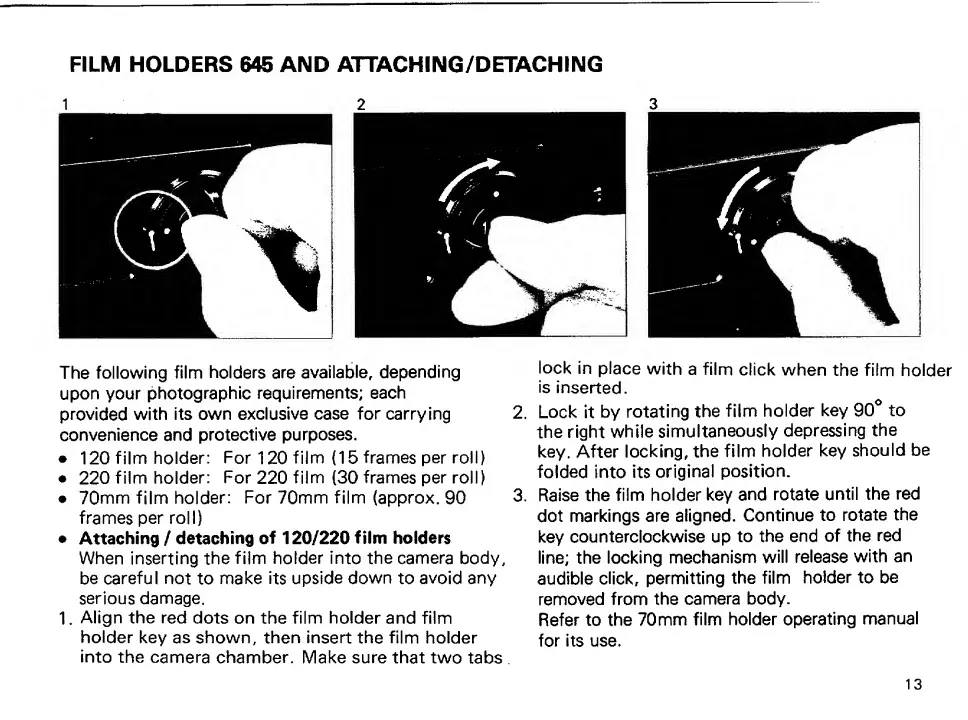
1.
Align
the
red
dots
on
the
film
holder
and
film
holder
key
as
shown,
then
insert
the
film
holder
into
the
camera
chamber.
Make
sure
that
two
tabs,
lock
in
place
with
a
film
click
when
the
film
holder
is
inserted.
2.
Lock
it
by
rotating
the
film
holder
key
90*
to
the
right
while
simultaneously
depressing
the
key.
After
locking,
the
film
holder
key
should
be
folded
into
its
original
position.
3.
Raise
the
film
holder
key
and
rotate
until
the
red
dot
markings
are
aligned.
Continue
to
rotate
the
key
counterclockwise
up
to
the
end
of
the
red
line;
the
locking
mechanism
will
release
with
an
audible
click,
permitting
the
film
holder
to
be
removed
from
the
camera
body.
Refer
to
the
70mm
film
holder
operating
manual
for
its
use.
13

Other manuals for Pentax 645

Related product manuals