EasyManua.ls Logo

Pentax espio 80V - Basic Operation Outline; Step-by-Step Camera Operation

Pentax espio 80V
7 pages
Print Icon
To Next Page IconTo Next Page
To Previous Page IconTo Previous Page
Loading...
3
4.
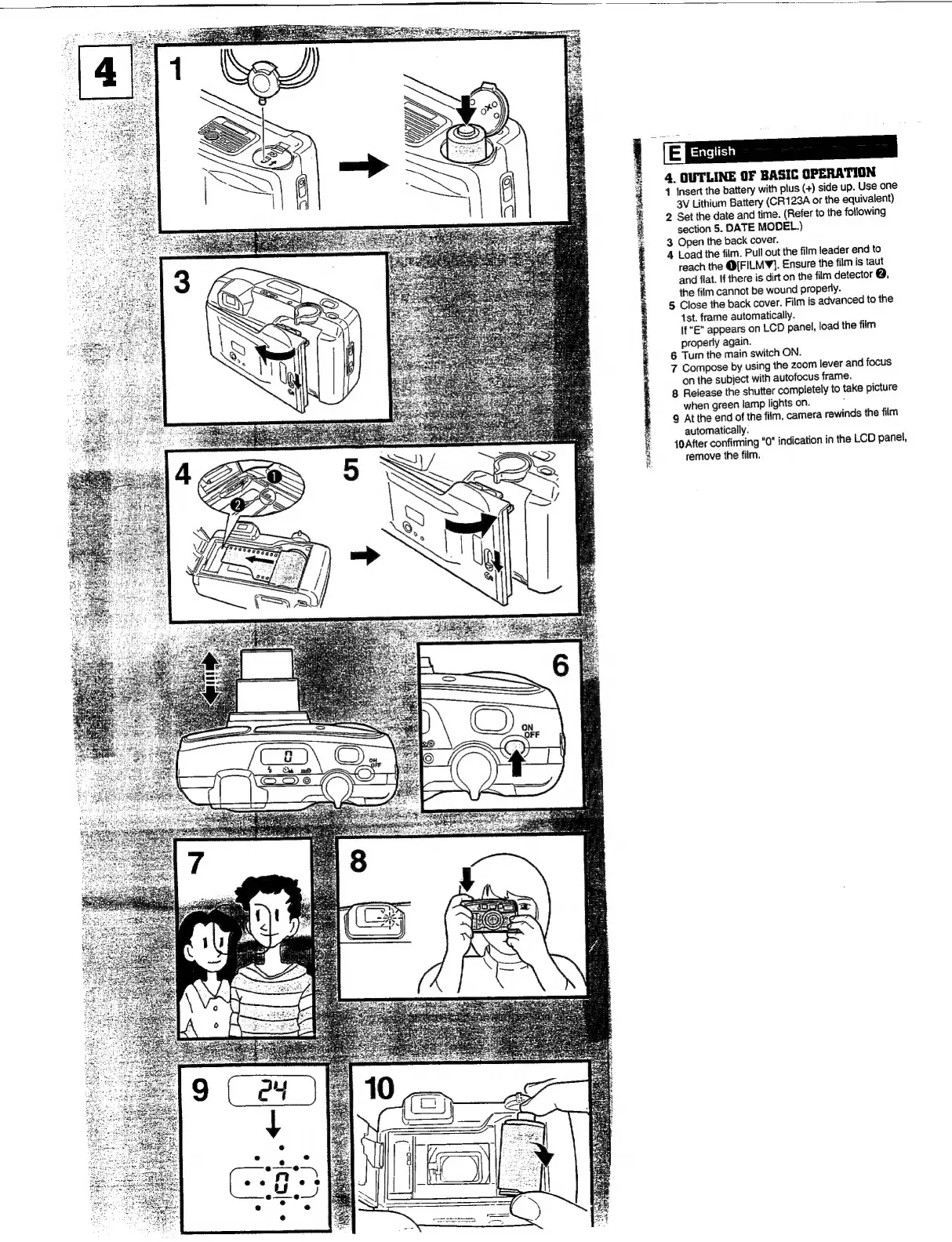
OUTLINE
OF
BASIC
OPERATION
1
Insert
the
battery
with
plus
(+)
side
up.
Use
one
3V
Lithium
Battery
(CR123A
or
the
equivalent)
2
Set
the
date
and
time.
(Refer
to
the
following
section
5.
DATE
MODEL.)
3
Open
the
back
cover.
4
Load
the
film.
Pull
out
the
film
leader
end
to
reach
the
@[FILM¥}.
Ensure
the
film
is
taut
and
flat,
If
there
is
dirt
on
the
film
detector
@,
the
film
cannot
be
wound
properly.
5
Close
the
back
cover.
Film
is
advanced
to
the
1st.
frame
automatically.
If
"E"
appears
on
LCD
panel,
load
the
film
properly
again.
6
Tum
the
main
switch
ON.
7
Compose
by
using
the
zoom
lever
and
focus
on
the
subject
with
autofocus
frame.
8
Release
the
shutter
completely
to
take
picture
when
green
lamp
lights
on.
;
9
At
the
end
of
the
film,
camera
rewinds
the
film
automatically.
{0
After
confirming
"0"
indication
in
the
LCD
panel,
remove
the
film.

Other manuals for Pentax espio 80V

Related product manuals