EasyManua.ls Logo

Pentax espio 80V - Taking Pictures with Various Modes; Exposure Modes Explained; Shooting Modes Explained

Pentax espio 80V
7 pages
Print Icon
To Next Page IconTo Next Page
To Previous Page IconTo Previous Page
Loading...
|
so
|
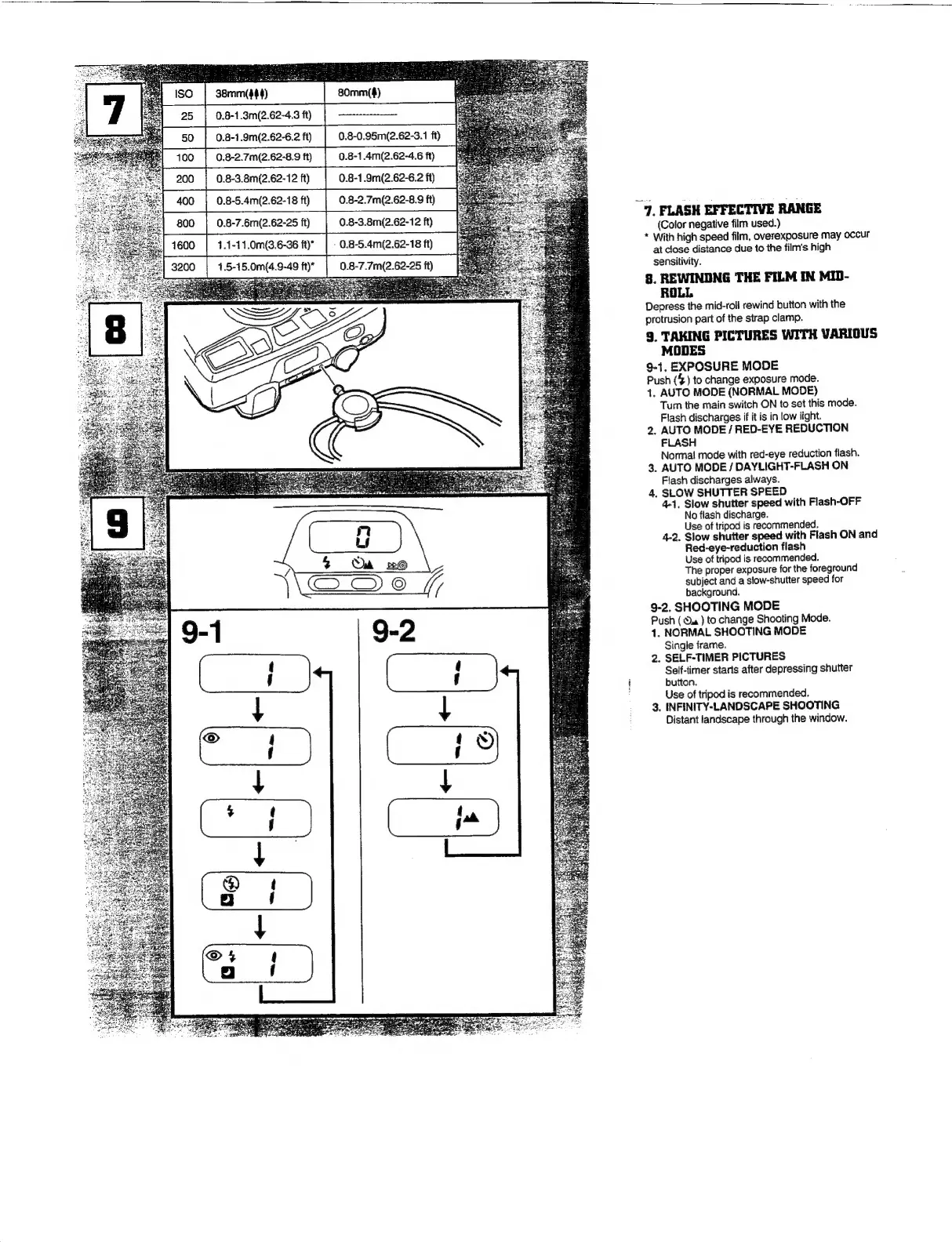
0.8-1.9m(2.62-6.2
11)
|
0.8-0.95m(2.62-3.11)
ff
0.8-2.7m(2.62-8.9
ft)
|
0.8-1.4m(2.62-4.6i)
0.8-3.8m(2.62-12
ft)
|
0.8-1.9m(2.62-6.2
fi)
0.8-5.4m(2.62-18
ft)
|
0.8-2.7m(2.62-8.9
fi)
3200
0.8-7.6m(2.62-25
ft)
0.8-3.8m(2.62-12
ft)
1.1-11.0m(3.6-36
ft)”
1,.5-15.0m
2
œ
i
n
ws
3
N
Q
D
a
œ
=
(4.9-49
ft)*
~7,
FLASH
EFFECTIVE
RANGE
(Color
negative
film
used.)
*
With
high
speed
film,
overexposure
may
occur
at
close
distance
due
to
the
film's
high
sensitivity.
8.
REWINDNG
THE
FILM
IN
MID-
ROLL
Depress
the
mid-roll
rewind
button
with
the
protrusion
part
of
the
strap
clamp.
9.
TAKING
PICTURES
WITH
VARIOUS
MODES
9-1.
EXPOSURE
MODE
Push
(4)
to
change
exposure
mode.
1,
AUTO
MODE
(NORMAL
MODE)
Tum
the
main
switch
ON
to
set
this
mode.
Flash
discharges
if
it
is
in
low
light.
2.
AUTO
MODE
/
RED-EYE
REDUCTION
FLASH
Normal
mode
with
red-eye
reduction
fiash.
3.
AUTO
MODE
/
DAYLIGHT-FLASH
ON
Flash
discharges
always.
4.
SLOW
SHUTTER
SPEED
4-1,
Slow
shutter
speed
with
Flash-OFF
No
flash
discharge.
Use
of
tripod
is
recommended.
4-2.
Slow
shutter
speed
with
Flash
ON
and
Red-eye-reduction
flash
Use
of
tripod
is
recommended.
The
proper
exposure
for
the
foreground
subject
and
a
slow-shutter
speed
for
background.
9-2.
SHOOTING
MODE
Push
(
Oa
)
to
change
Shooting
Mode.
1.
NORMAL
SHOOTING
MODE
Single
frame.
2.
SELF-TIMER
PICTURES
Self-timer
starts
after
depressing
shutter
button.
Use
of
tripod
is
recommended.
3.
INFINITY-LANDSCAPE
SHOOTING
Distant
landscape
through
the
window.

Other manuals for Pentax espio 80V

Related product manuals