EasyManua.ls Logo

Pentax IQZoom 80-E - Film and Film Speed Setting

Pentax IQZoom 80-E
44 pages
Print Icon
To Next Page IconTo Next Page
To Previous Page IconTo Previous Page
Loading...
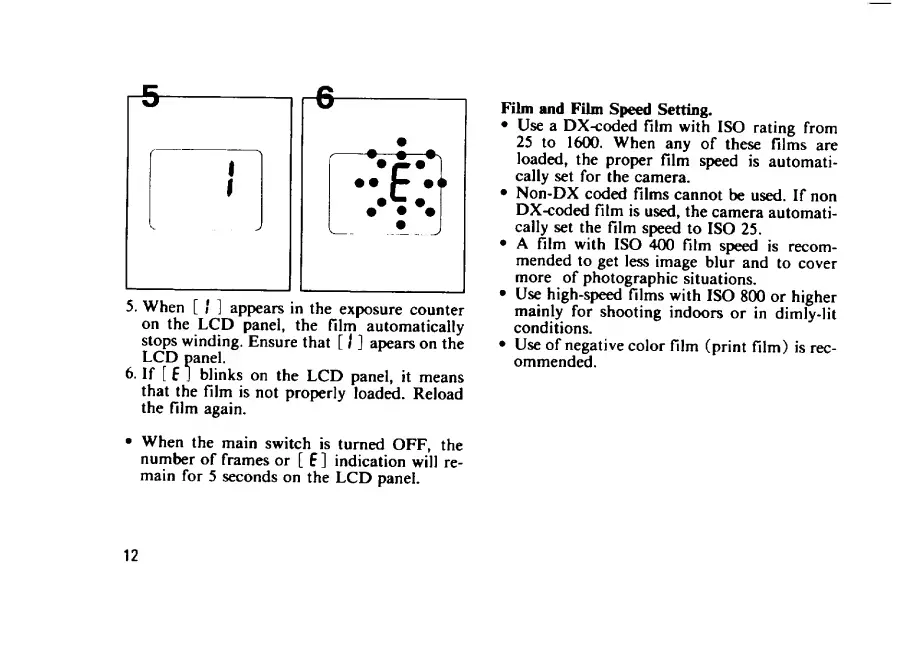
5.
When
[
/
]
appears
in
the
exposure
counter
on
the
LCD
panel,
the
film
automatically
stops
winding.
Ensure
that
[
I
]
apears
on
the
LCD
panel.
6.
If
[
5
J
blinks
on
the
LCD
panel,
it
means
that
the
film
is
not
properly
loaded.
Reload
the
film
again.
When
the
main
switch
is
turned
OFF,
the
number
of
frames
or
[
E
]
indication
will
re¬
main
for
5
seconds
on
the
LCD
panel.
Film
and
Film
Speed
Setting.
Use
a
DX-coded
film
with
ISO
rating
from
25
to
1600.
When
any
of
these
films
are
loaded,
the
proper
film
speed
is
automati¬
cally
set
for
the
camera.
Non-DX
coded
films
cannot
be
used.
If
non
DX-coded
film
is
used,
the
camera
automati¬
cally
set
the
film
speed
to
ISO
25.
A
film
with
ISO
400
film
spjeed
is
recom¬
mended
to
get
less
image
blur
and
to
cover
more
of
photographic
situations.
Use
high-speed
films
with
ISO
800
or
higher
mainly
for
shooting
indoors
or
in
dimly-lit
conditions.
Use
of
negative
color
film
(print
film)
is
rec¬
ommended.
12

Related product manuals