EasyManua.ls Logo

Pentax IQZoom 80-E - Viewfinder Displays and Lamp Indications

Pentax IQZoom 80-E
44 pages
Print Icon
To Next Page IconTo Next Page
To Previous Page IconTo Previous Page
Loading...
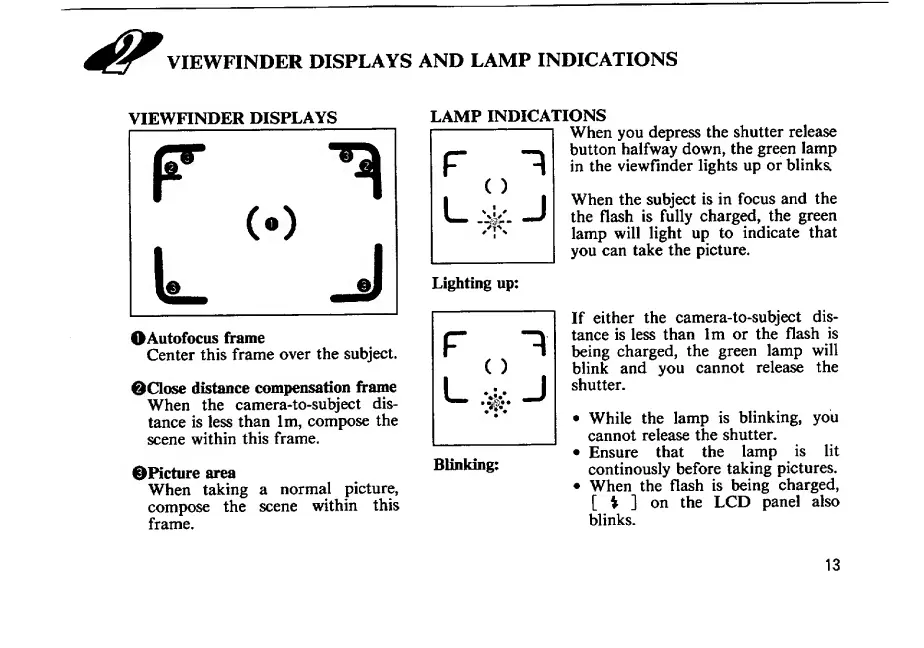
VIEWFINDER
DISPLAYS
VIEWFINDER
DISPLAYS
OAutofocus
frame
Center
this
frame
over
the
subject.
0Close
distance
compensation
frame
When
the
camera-to-subject
dis¬
tance
is
less
than
Im,
compose
the
scene
within
this
frame.
^Picture
area
When
taking
a
normal
picture,
compose
the
scene
within
this
frame.
LAMP
INDICATIONS
LAMP
INDICATIONS
When
you
depress
the
shutter
release
button
halfway
down,
the
green
lamp
in
the
viewfinder
lights
up
or
blinks,
When
the
subject
is
in
focus
and
the
the
flash
is
fully
charged,
the
green
lamp
will
light
up
to
indicate
that
you
can
take
the
picture.
If
either
the
camera-to-subject
dis¬
tance
is
less
than
Im
or
the
flash
is
being
charged,
the
green
lamp
will
blink
and
you
cannot
releEise
the
shutter.
While
the
lamp
is
blinking,
you
cannot
release
the
shutter.
Ensure
that
the
lamp
is
lit
continously
before
taking
pictures.
When
the
flash
is
being
charged,
[
i
]
on
the
LCD
panel
also
blinks.
Blinking:
13

Related product manuals