EasyManua.ls Logo

Pentax IQZoom 80-E - Taking Pictures

Pentax IQZoom 80-E
44 pages
Print Icon
To Next Page IconTo Next Page
To Previous Page IconTo Previous Page
Loading...
TAKING
PICTURES
[Shooting
distance:
0.6ni
(2ft)
-
(infinity)
]
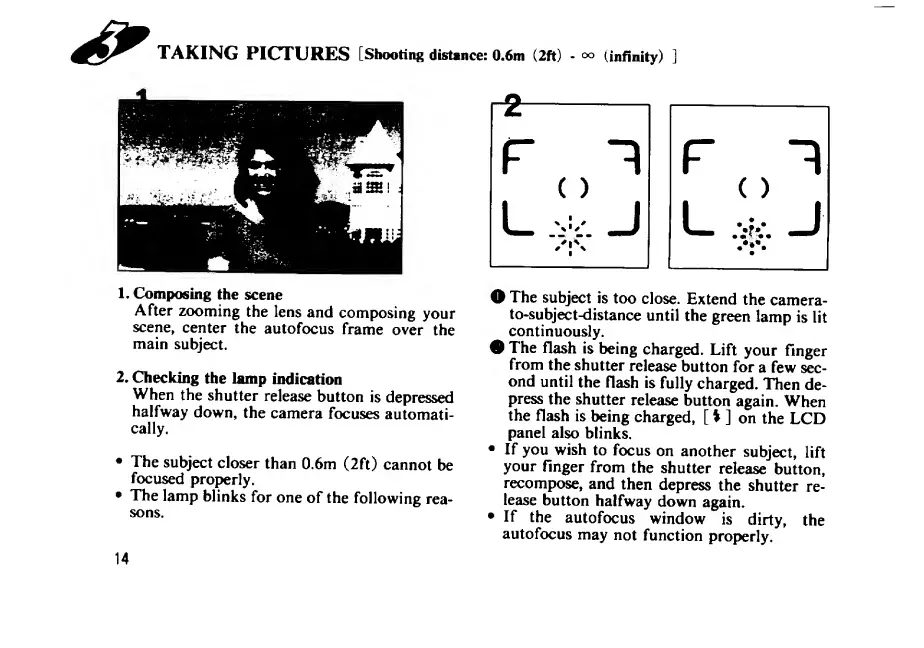
1.
Composing
the
scene
After
zooming
the
lens
and
composing
your
scene,
center
the
autofocus
frame
over
the
main
subject.
2.
Checking
the
lamp
indication
When
the
shutter
release
button
is
depressed
halfway
down,
the
camera
focuses
automati¬
cally.
The
subject
closer
than
0.6m
(2ft)
cannot
be
focused
proi>erly.
The
lamp
blinks
for
one
of
the
following
rea¬
sons.
O
The
subject
is
too
close.
Extend
the
camera-
to-subject-distance
until
the
green
lamp
is
lit
continuously.
The
flash
is
being
charged.
Lift
your
finger
from
the
shutter
release
button
for
a
few
sec¬
ond
until
the
flash
is
fully
charged.
Then
de¬
press
the
shutter
release
button
again.
When
the
flash
is
being
charged,
[
V
]
on
the
LCD
panel
also
blinks.
If
you
wish
to
focus
on
another
subject,
lift
your
finger
from
the
shutter
release
button,
recompose,
and
then
depress
the
shutter
re¬
lease
button
halfway
down
again.
If
the
autofocus
window
is
dirty,
the
autofocus
may
not
function
properly.
14

Related product manuals