211
8
Connecting to a Computer
5
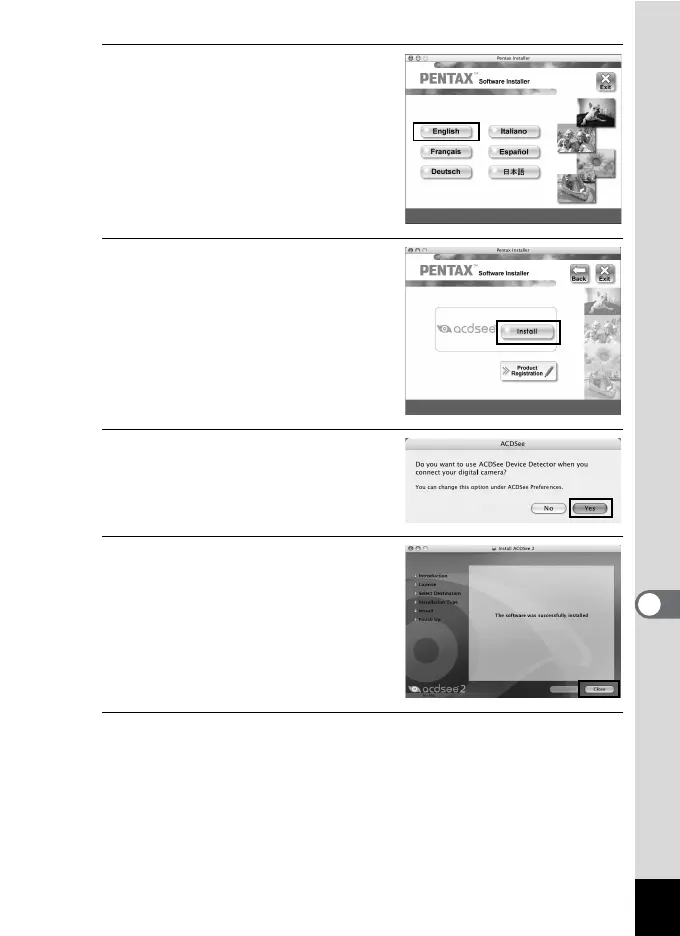
Choose a language from the
displayed screen.
The “ACDSee 2 for Mac” installer
screen appears.
6
Click [Install].
The setup screen appears.
Follow the on-screen guidance to input
registration information and install the
software.
7
When the screen shown on the
right appears, click [Yes].
8
Click [Close].
“ACDSee 2 for Mac” installation is
complete.
9
Click [Exit] on the installation screen.
The window closes.



 To Next Page