118
7
Settings
You can change the initial date and time settings. You can also set the
style in which the date and time appears on the camera.
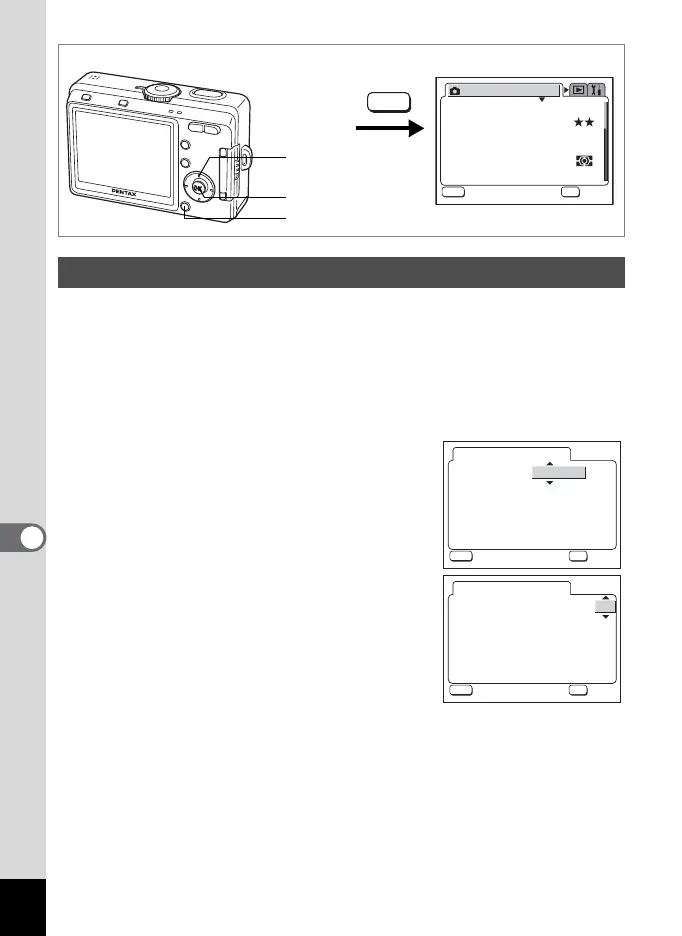
1 Select [Date Adjust] on the [B Set-up] menu.
2 Press the four-way controller (5).
The Date Adjust screen appears.
3 Press the four-way controller (23),
to select the date display style.
Choose [mm/dd/yy], [dd/mm/yy] or
[yy/mm/dd].
4 Press the four-way controller (5).
The frame moves to [24H].
5 Press the four-way controller (23),
to select the time display style.
Select [12H] to display the time in a 12 hour
format, or select [24] to display the time in a
24 hour format.
Changing the Date and Time
MENU button
OK button
Four-way controller
How to call the [B Set-up] menu
MENU
AWB
2304
Recorded Pixels
Quality Level
Focusing Area
Multi
Auto
AE Metering
Sensitivity
Rec. Mode
MENU
OK
OK
OK
Exit
Exit
White Balance
Date Adjust
mm/dd/yy
24H
Date Style
//
01
00 00
:
01 2005
MENU
OK
OK
OK
Exit
Exit
24H
//
01
00 00
:
Date Adjust
mm/dd/yy
Date Style
01 2005
MENU
OK
OK
OK
Exit
Exit











 To Next Page