EasyManua.ls Logo

Pentax P3 - Strap and Soft Case Usage

Pentax P3
52 pages
Print Icon
To Next Page IconTo Next Page
To Previous Page IconTo Previous Page
Loading...
STRAP
AND
SOFT
CASE
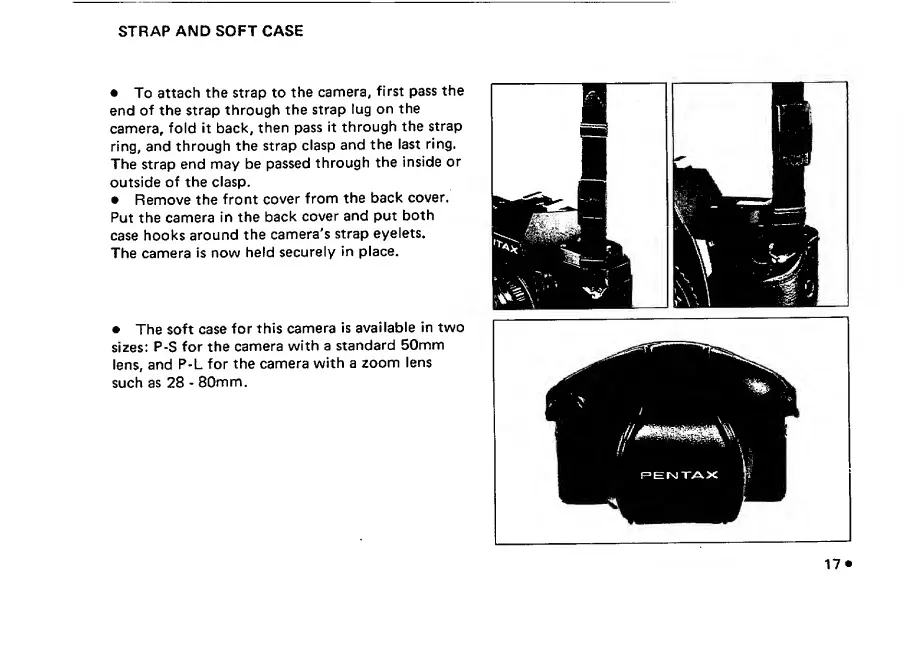
To
attach
the
strap
to
the
camera,
first
pass
the
end
of
the
strap
through
the
strap
lug
on
the
camera,
fold
it
back,
then
pass
it
through
the
strap
ring,
and
through
the
strap
clasp
and
the
last
ring.
The
strap
end
may
be
passed
through
the
inside
or
outside
of
the
clasp.
Remove
the
front
cover
from
the
back
cover.
Put
the
camera
in
the
back
cover
and
put
both
case
hooks
around
the
camera's
strap
eyelets.
The
camera
is
now
held
securely
in
place.
The
soft
case
for
this
camera
is
available
in
two
sizes:
P-S
for
the
camera
with
a
standard
50mm
lens,
and
P-L
for
the
camera
with
a
zoom
lens
such
as
28
-
80mm.

Other manuals for Pentax P3

Related product manuals