EasyManua.ls Logo

Pentax Zoom 280-P - SPECIALIZED FEATURES; Remote Control and Date Model

Pentax Zoom 280-P
56 pages
Print Icon
To Next Page IconTo Next Page
To Previous Page IconTo Previous Page
Loading...
USING
THE
WIRELESS
REMOTE
CONTROL
This
camera
is
equipped
with
a
Wireless
Remote
Control,
allowing
you
to
adjust
the
focal
length
In
steps
of
28,
50,
80mm
and
trip
the
shutter
at
a
dis¬
tance.
Use
a
tripod
when
shooting
with
the
Wireless
Remote
Control.
When
the
Remote
Control
is
used
to
take
pic¬
tures,
either
shooting
mode
of
the
Auto
and
Single-Frame,
Self-Timer
or
Multi-Exposure
mode
can
be
used
in
combination
with
any
of
the
exposure
modes
and
auto
focus
modes.
Attach
the
Remote
Control
to
the
camera
when
not
in
use.
Use
the
Remote
Control
to
take
pictures
in
the
Bulb
mode
to
avoid
camera
shake.
While
holding
the
Remote
Control's
shutter
release
button,
the
shutter
remains
open.
When
the
Remote
Control
Projector
is
not
aimed
at
the
camera's
Remote
Control
Receiver
or
you
lift
your
finger
off
the
Remote
Control's
shutter
release
button,
the
shutter
is
closed.
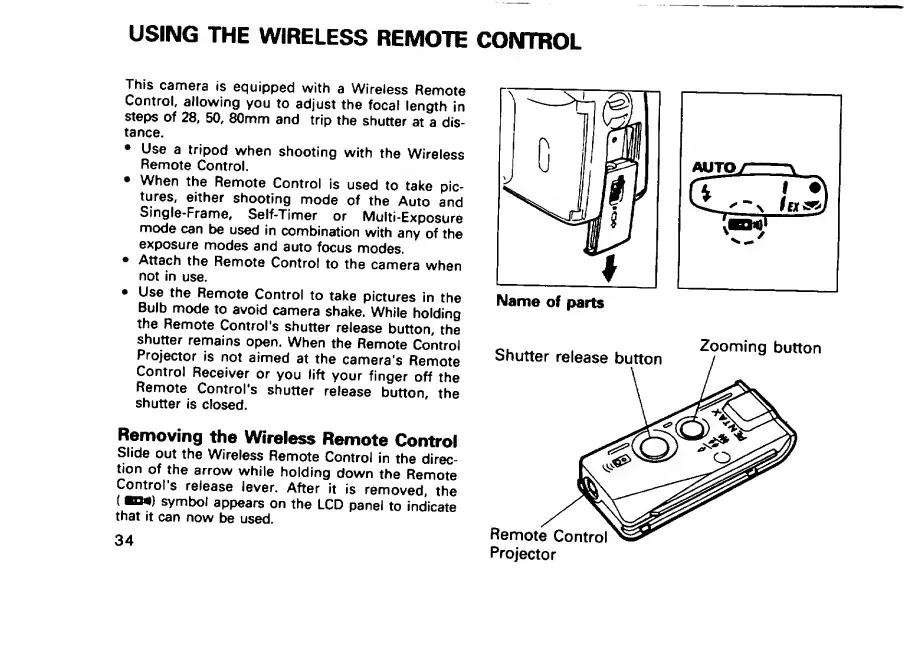
Removing
the
Wireless
Remote
Control
Slide
out
the
Wireless
Remote
Control
in
the
direc¬
tion
of
the
arrow
while
holding
down
the
Remote
Control's
release
lever.
After
it
is
removed,
the
(
KM)
symbol
appears
on
the
LCD
panel
to
indicate
that
it
can
now
be
used.
34

Related product manuals