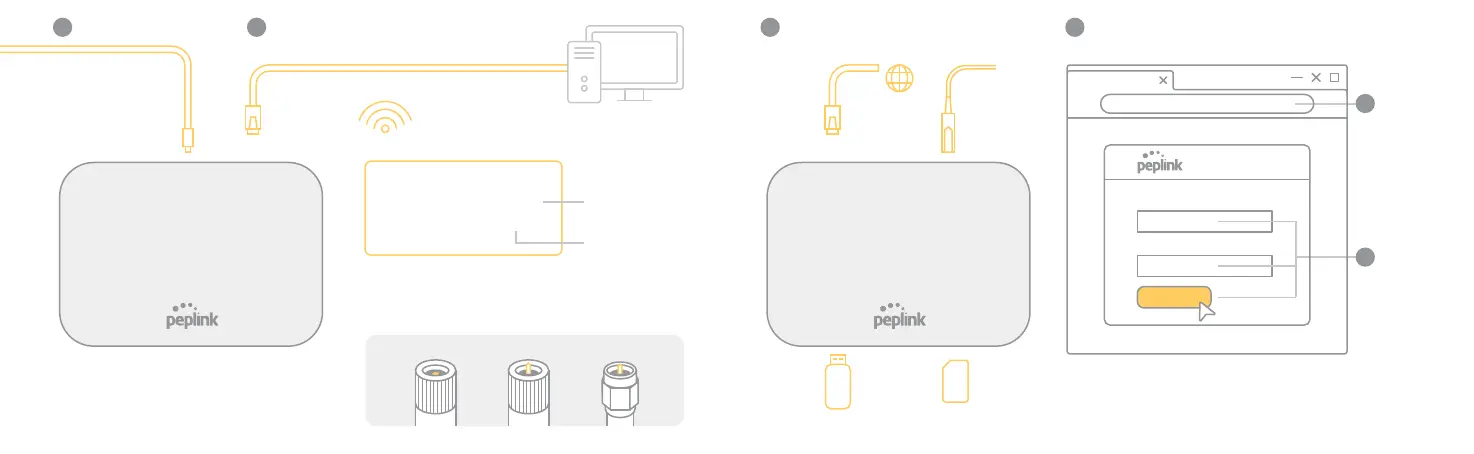
1
OR
Wi-Fi
* Check the Silver label at the bottom
of the device
* Please refer to antenna or cable ends
* Ethernet cable
not provided
LAN 1
Plug in Power
2
Connect to Computer
Wi-Fi Cellular
GPS
3
WAN Set Up
4
Open a Web browser
Wi-Fi name (SSID):
Peplink-CDEF
Password:
C3D4E5F6
xxxxxxxx
xxxxxxxxxx
xxxxxxx
Serial No: 1234-56AB-CDEF
LAN MAC: A1-B2-C3-D4-E5-F6
BY Ethernet Cable OR Wi-Fi
BY Ethernet OR Fiber OR USB OR SIM card
SIM
Insert to
SIM slot 1
WAN 1
USB
Modem
http://192.168.1.1
admin
admin
Username:
Password:
Login
Types of Antenna Connectors
:
Router IP
address
Login
5
6
Fiber








 To Previous Page