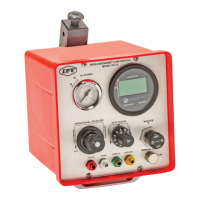
What to do if my Percussionaire Bronchotron® shuts down?
- HhudsontonyaAug 8, 2025
If your Percussionaire Bronchotron® shuts down, first check the tubing for any obstructions. If you find no obstruction, the device requires servicing.
What to do if my Percussionaire Bronchotron® shuts down?
If your Percussionaire Bronchotron® shuts down, first check the tubing for any obstructions. If you find no obstruction, the device requires servicing.
What to do if my Percussionaire Bronchotron Transport System Medical Equipment fails to maintain pressure?
If your Percussionaire Medical Equipment fails to maintain pressure, first adjust the mask or airway to ensure there are no leaks. If the issue persists, there may be an internal leak, requiring professional servicing.
Why is the pressure or frequency of percussion not correct on my Percussionaire Bronchotron Transport System?
If the pressure or frequency of percussion is incorrect on your Percussionaire Medical Equipment, the device likely requires calibration, and servicing is necessary.
How to troubleshoot a Percussionaire Bronchotron® that will not start?
If your Percussionaire Bronchotron® will not start, make sure it is connected to a gas source. If it's connected, check that the regulator is on by rotating the regulator knob clockwise.

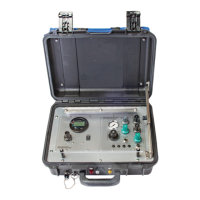
Overview of the Bronchotron® Transport device, a pneumatically powered, high-frequency percussive ventilator.
Defines device indications and target patient groups for neonatal, pediatric, and adult use.
Lists absolute and relative conditions preventing device use, including pneumothorax and operator training.
Details potential negative effects like pneumothorax and positive physiological impacts such as lung recruitment.
Outlines constraints on device use, emphasizing the need for proper training for operators.
Warns about using non-Percussionaire® accessories and the importance of clearing airway obstructions.
Highlights the need for daily checks of circuit disconnect function and drive pressure settings.
Stresses clinician availability for HFPV® use and advises against using malfunctioning devices.
Emphasizes trained personnel, physician supervision, and clinician duties for safe operation.
Mandates pre-use checks, adherence to manual instructions, and compliance with safety regulations.
Advises against modifications, restricts servicing to authorized personnel, and stresses manual adherence.
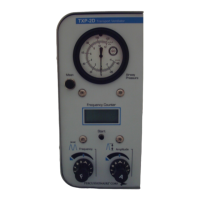
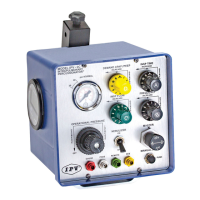
Details the primary functions of the Bronchotron® controller unit, including pressure, frequency, and flow controls.
Explains control of breath timing for inspiration and expiration intervals, adjustable from <0.8 to 6 seconds.
Describes controls for system pressure and breath amplitude delivered to the patient during inspiration.
Covers manual gas delivery through the Phasitron® venturi and identifies tubing connection purposes.
Explains the function for aerosol delivery, providing constant flow for nebulization or humidification.
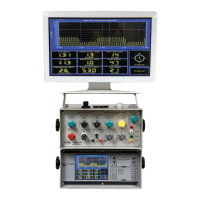
Describes the system providing digital readouts of frequency, airway pressure, and alarm functions.
Details the various operating modes of the Digital Multimeter: POST, Wake, Active, Report, Sleep, and Fault.
Explains the initial diagnostic test performed by the DM upon battery installation, checking hardware and software.
Describes the DM's state when activated by ventilator pressure, displaying bar-graph timer for 15 seconds.
Details the DM's primary operational display mode, showing pulse frequency rate, airway pressure, and usage timer.
Explains the visual representation of pressure amplitude, reflecting Average Inspiratory Pressure (AIP).
Describes the mode for reviewing session data, alternating between timer and system information displays.
Describes the DM's low-power display state where the LCD is off but monitoring continues.
Details the DM's error state, indicating a system failure and requiring factory contact.
Explains the DM's hardware and software error detection mechanisms, including a watchdog timer.
Describes how system faults are recorded in memory and retained, providing data for manufacturing and repair.
Instructions for connecting the Bronchotron® to a 50 psi medical gas source, such as O2 or a high-flow blender.
Procedure for connecting the paired red and white/clear hoses of the Phasitron® breathing circuit to the device.
Steps for performing a pre-use check involving connecting and listening for alarms from a gas blender.
General procedure for verifying device readiness before use, including connecting a test lung and setting controls.
Procedure for testing the device's failsafe and low-pressure alarm functions by manipulating the breathing circuit.
Connect gas source, set operational pressure to 30 psi, and start ventilation cycling.
Set I/E time for rate 30, adjust pulsatile flowrate for 20 cmH2O AIP.
Set pulse frequency control knob to 12:00 position for a frequency of 500.
Set oscillatory CPAP control knob to 12:00 position.
Connect patient interface, adjust flowrate for chest excursion and CPAP for chest oscillation.
| Brand | Percussionaire |
|---|---|
| Model | Bronchotron Transport System |
| Category | Medical Equipment |
| Language | English |