4
Section 2. SLALOM MODE
USING SLALOM MODE
The Slalom mode is designed to give a skier an optimum and consistent pull through a Slalom course while producing
perfect timing passes. This section covers the various Slalom Modes within the PerfectPass system.
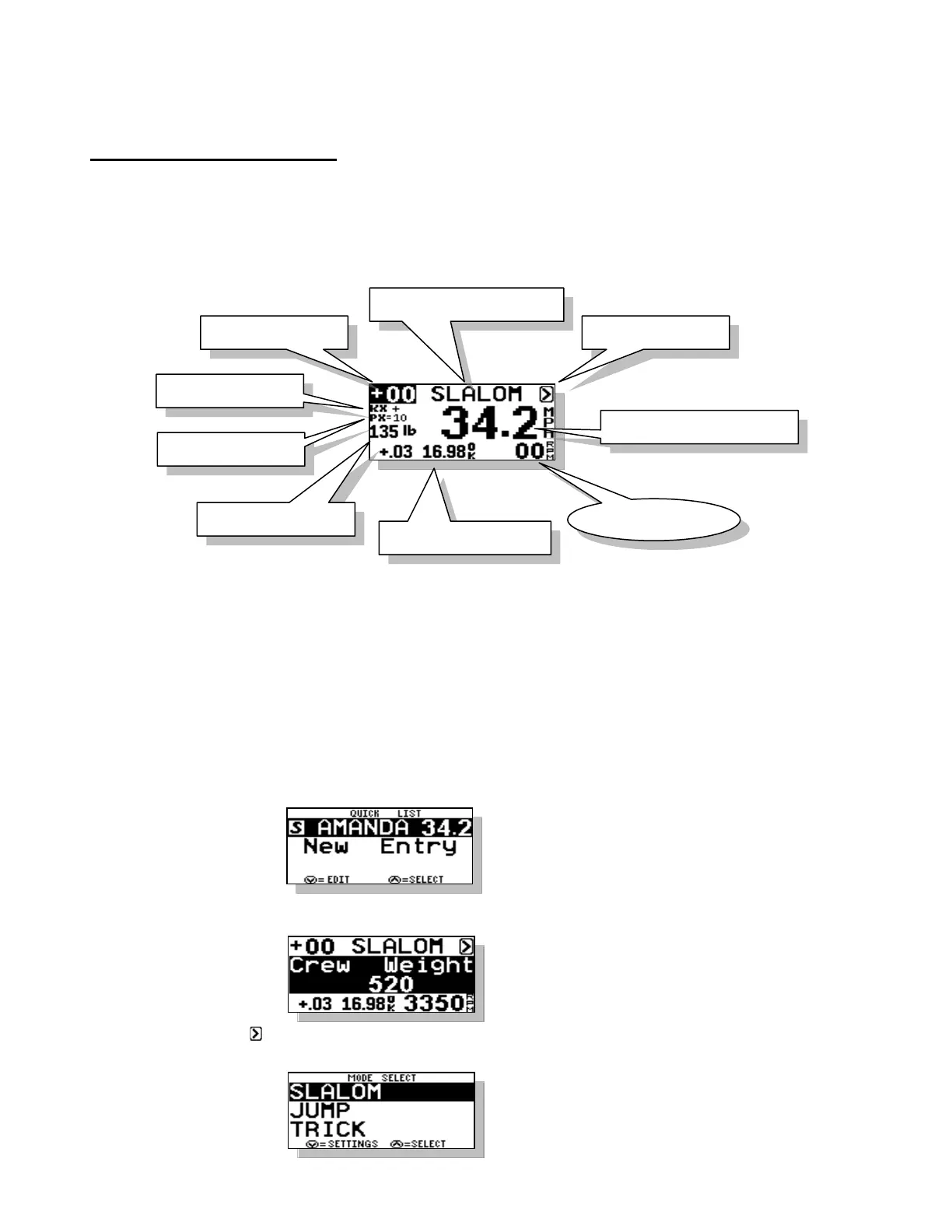
The main RPM based Slalom (36 mph – 24.9 mph) screen appears as follows:
As you press the MENU key you will move around the circle following the numbers above.
1. RPM Adjust
This value directly adjusts the RPM/Speed value the system is trying to hold. If a time is fast or slow, you can
enter an RPM value for the next pass. Example: A time was a little fast and PerfectPass suggested “-20 RPM”.
Enter –20 on RPM Adjust. You may also use this in a headwind/tailwind situation.
2. Name/Mode/Crew Weight
This section of the screen displays either the Mode, Slalom or a Skier’s Name pulled from the Name List.
Press UP key to access the Name List:
Name List is discussed in Section 10.
Press DOWN key to access the Crew Weight
Enter the Crew Weight in pounds using the
UP and DOWN keys. Press the MENU
key to confirm and continue.
3. Menu Arrow
Press UP key to change modes or mode settings:
Change between modes using Menu Key.



 To Next Page