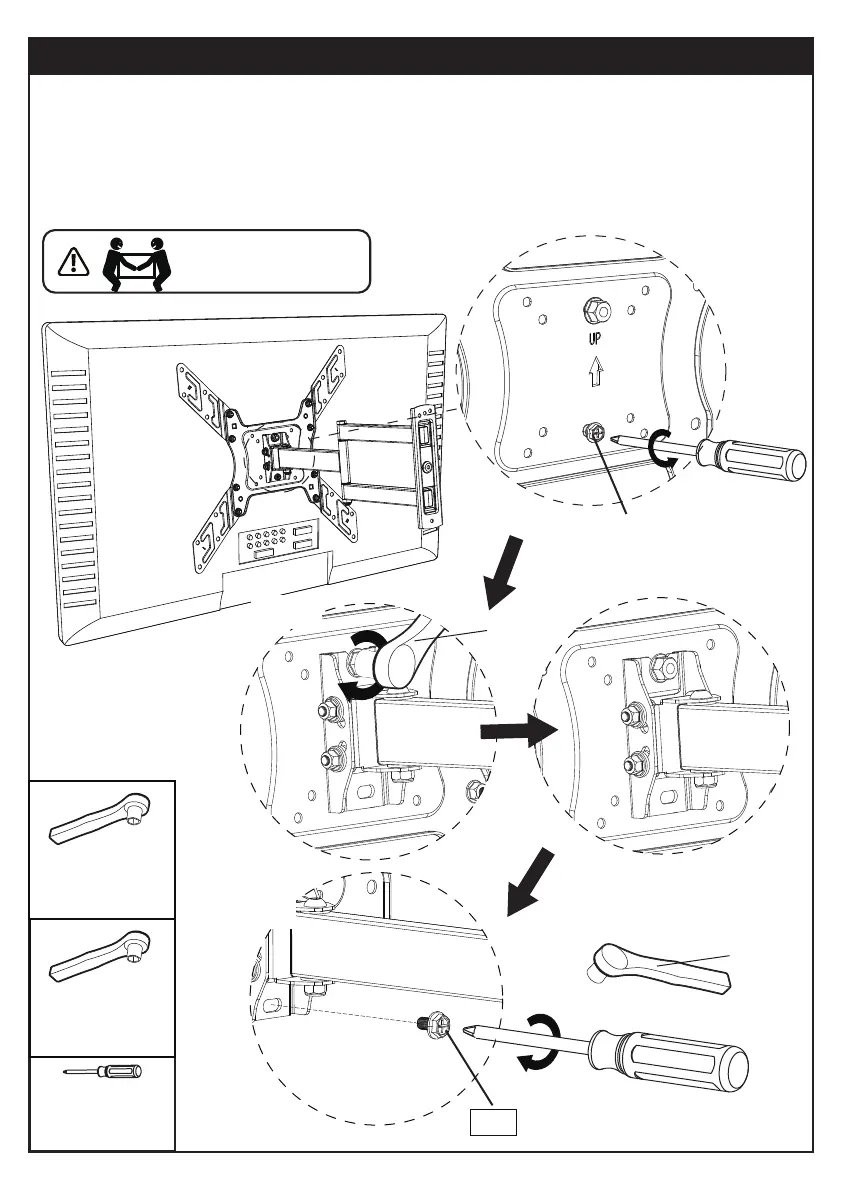
Step 5 Secure the TV onto the Arm Assembly / Wall Plate [01B]
5-1 Loosen the preassembled bolt [S1] and keep it for use in step 5-3.
5-2 Hang the TV to the arm assembly / wall plate [01B], making sure the upper nut hangs
on the hook on the arm assembly / wall plate [01B]. Then tighten the upper nut using a
socket wrench.
5-3 Tighten the bolt [S1] to secure the TV to the arm assembly / wall plate [01B].
HEAVY! You may need
assistance with this step.
Phillips
Screwdriver
(Not Included)
1/2” (13mm)
Socket Wrench
(Not Included)
S1
5-1
5-2
S1
11mm
5-3
7/16” (11mm)
Socket Wrench
(Not Included)
OR
13mm
01 02 03 04 05 06 07 08 09 10 11
12 13 14 15 16 17 18 19 20 21 22
23 24 25 26 27 28 29 30 31 32 33
34 35 36 37 38 39 40 41 42 43 44
45 46 47 48 49 50 51 52 53 54 55



 To Next Page