Loosen
Tighten
T
Loosen
Tighten
S1
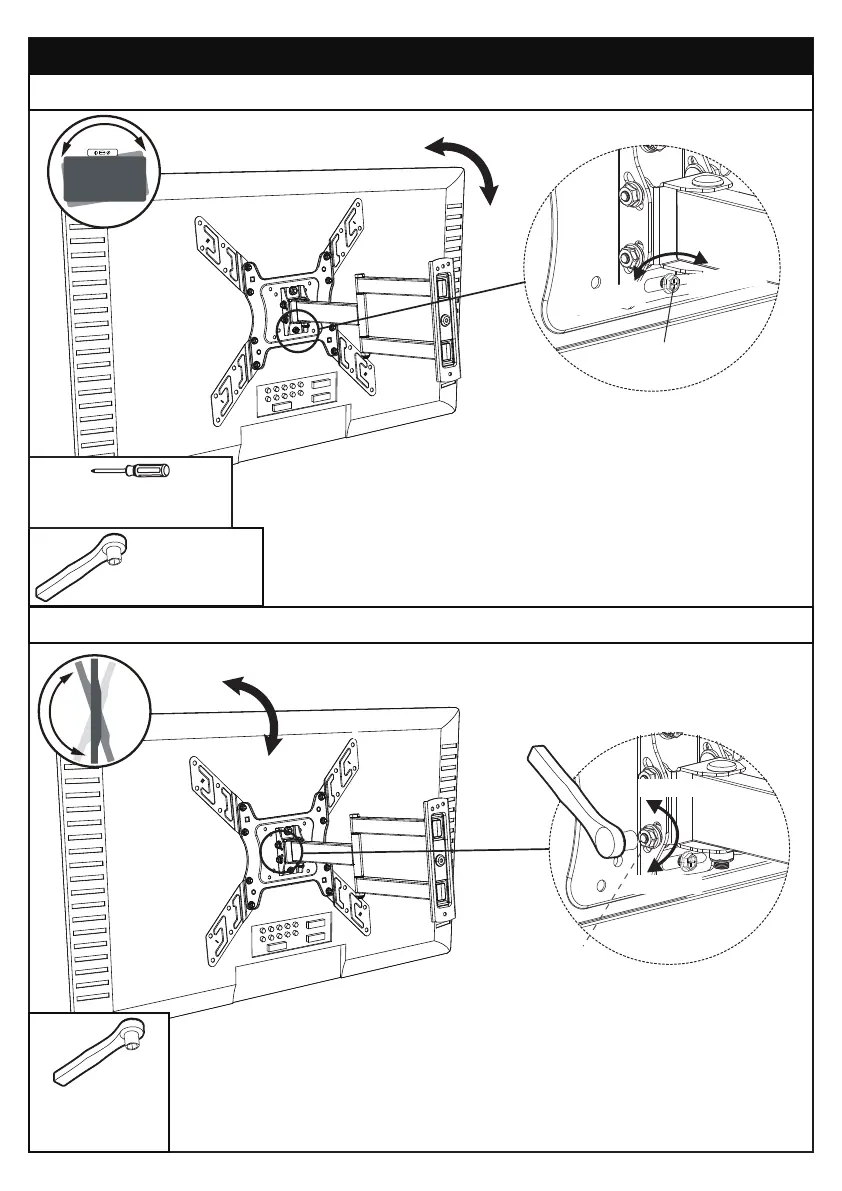
Step 6 Adjustments
6-1 Level Adjustment
6-2 Tilt Adjustment
1. Slightly loosen the tilting nuts [T].
2. Adjust TV to your desired tilt angle.
3. Retighten the tilting nuts [T] to fix the tilt angle.
If needed, the TV can be levelled.
7/16” (11mm)
Socket Wrench
(Not Included)
7/16” (11mm)
Socket Wrench
(Not Included)
1. Slightly loosen the bolt [S1].
2. Level your TV.
3. Retighten the bolt [S1] to hold TV in place.
Phillips Screwdriver
(Not Included)
01 02 03 04 05 06 07 08 09 10 11
12 13 14 15 16 17 18 19 20 21 22
23 24 25 26 27 28 29 30 31 32 33
34 35 36 37 38 39 40 41 42 43 44
45 46 47 48 49 50 51 52 53 54 55



 To Previous Page