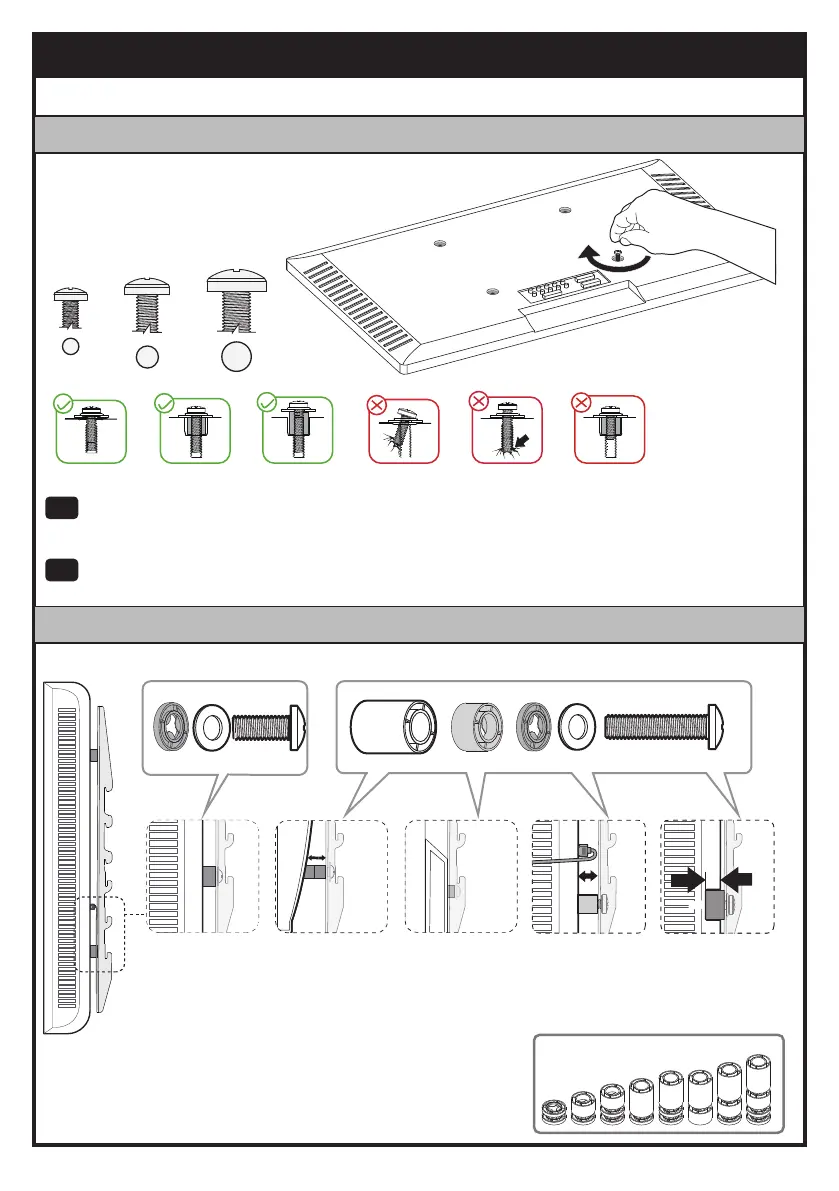
1-1 Select TV Bolts
· Étape 1 Fixer les équerres TV à la TV
· 1-1 Prendre les boulons TV
Step 1 Attach TV Brackets to TV
M6
M8
M4
Hand thread bolts into the threaded inserts on the back of your TV to determine which bolt
(M4, M6 or M8) to use. A minimum of 4-5 turns into the threading is required. Do not turn
past the bottom of the hole.
Amener les boulons filetés dans les inserts filetés à l'arrière de votre TV afin de définir quel
boulon (M4, M6 ou M8) utiliser. Un minimum de 4-5 tours dans le filetage est requis. Ne
tournez pas au-delà du fond du trou.
EN
FR
1-2 Spacer and Bolt Configurations
Arrière TV plat
(voir option A)
· 1-2 Abstandshalter und Bolzenkonfigurationen
Bump
See Option C
Cables
See Option D
Recessed Holes
See Option E
Curved TV
See Option B
Flat Back TV
See Option A
· TV incurvée
(voir option B)
· Bosse
(voir option C)
· Câbles
(voir option D)
· Trous encastrés
(voir option E)
·
05


 To Next Page