EasyManua.ls Logo

Permutit 825 - Programming Your Softener 9·10; Testing Your Water Hardness; Programming the 825 Model

Default Icon
16 pages
Print Icon
To Next Page IconTo Next Page
To Previous Page IconTo Previous Page
Loading...
Programming
your
Softener
The
tables
on
page
14
specify
the
necessary
settings
for
your
softener
related
to
the
size
of
your
family
and
the
hardness
of
your
water
supply.
The
figures
given
are
based
on
eacll
person
in
a
family
using
an
average
of
160
litres
(35
gallons)
of
water
each
day
for
washing,
cooking,
bathing
and
toilet
requirements.
Individual
households
may
find
they
use
more
or
less
water
than
average
and
may
therefore
need
to alter
the
settings
accordingly.
TESTING
YOUR
WATER
HARDNESS
Use
your
water
hardness
test
kit,
following
the
instructions
carefully,
to
measure
the
hardness
of
your
water.
PROGRAMMING
THE
825
MODEL
The
programming
of
the
12-day
timer for
the
825
model
is
straightforward.
The
timer
can
be
set
to trigger
your
softener
to
regenerate
everyone,
two,
three,
four,
six
or
twelve
days.
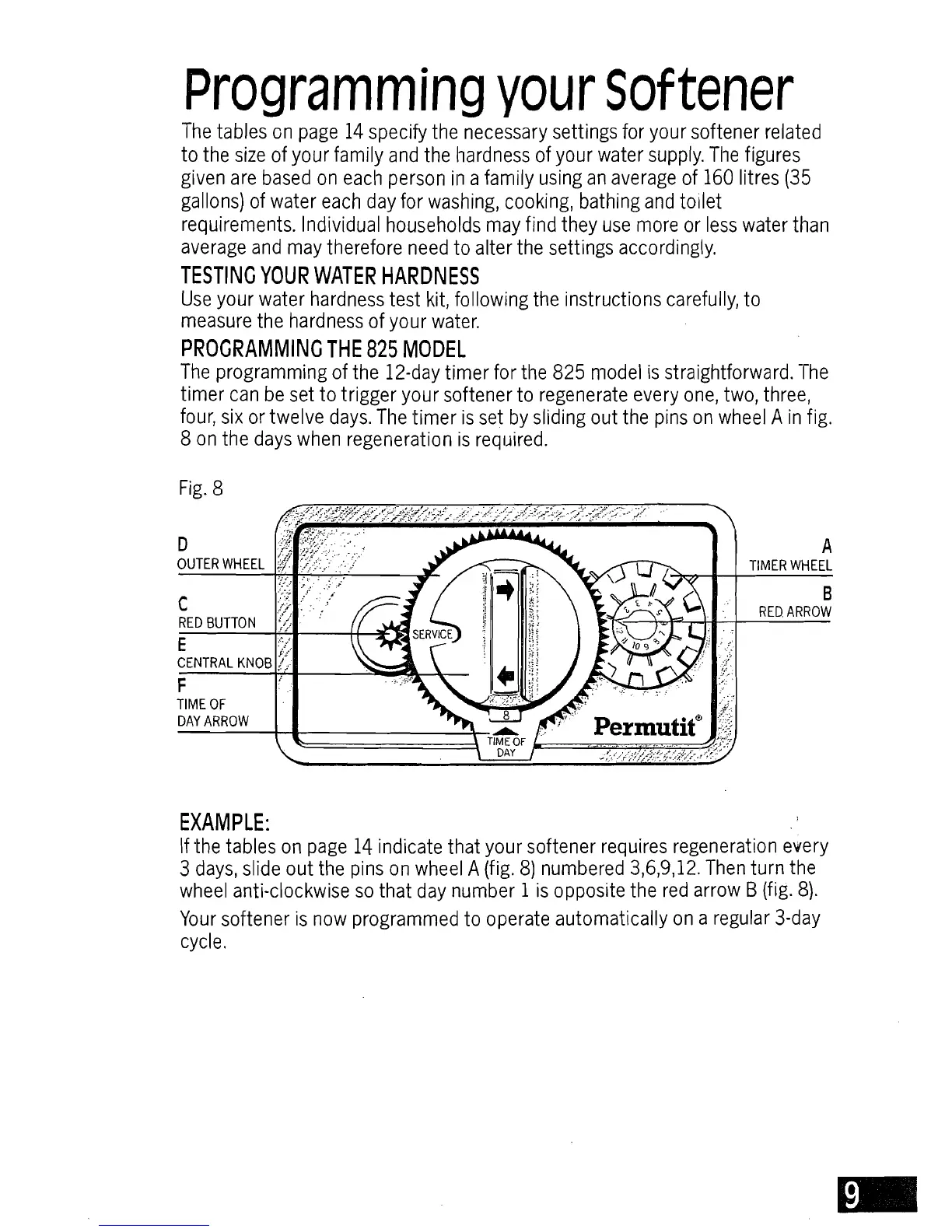
The
timer
is
set
by
sliding
out
the
pins
on
wheel
A
in
fig.
8
on
the
days
when
regeneration
is
required.
Fig.
8
D
A
OUTER
WHEEL
TIMER
WHEEL
RED
BUTTO
N~';;
'.'
I7
F
TIME
OF
DAY
ARROW
c
."
B
.
RED
ARROW
EXAMPLE:
If
the
tables
on
page
14
indicate
that
your
softener
requires
regeneration
ellery
3
days,
slide
out
the
pins
on
wheel
A
(fig.
8)
numbered
3,6,9,12.
Then
turn
the
wheel
anti-clockwise
so
that
day
number
1
is
opposite
the
red
arrow
B
(fig.
8).
Your
softener
is
now
programmed
to
operate
automatically
on
a
regular
3-day
cycle.