11
3. Select the correct treat size insert
Your Petcube Bites 2 Lite camera comes with three different inserts
to accommodate different treat sizes: Small, Medium and Large.
• Use Small insert with treats under 12mm or 0.47in of size;
• Use Medium insert with treats between 12-16mm or 0.47-0.63in of size;
• Use Large insert with treats above 16mm or 0.63in of size.
Keep in mind that if the treats you’re using have an unnatural form (a star or a bone),
for the best experience it is recommended to use the insert 1 size bigger.
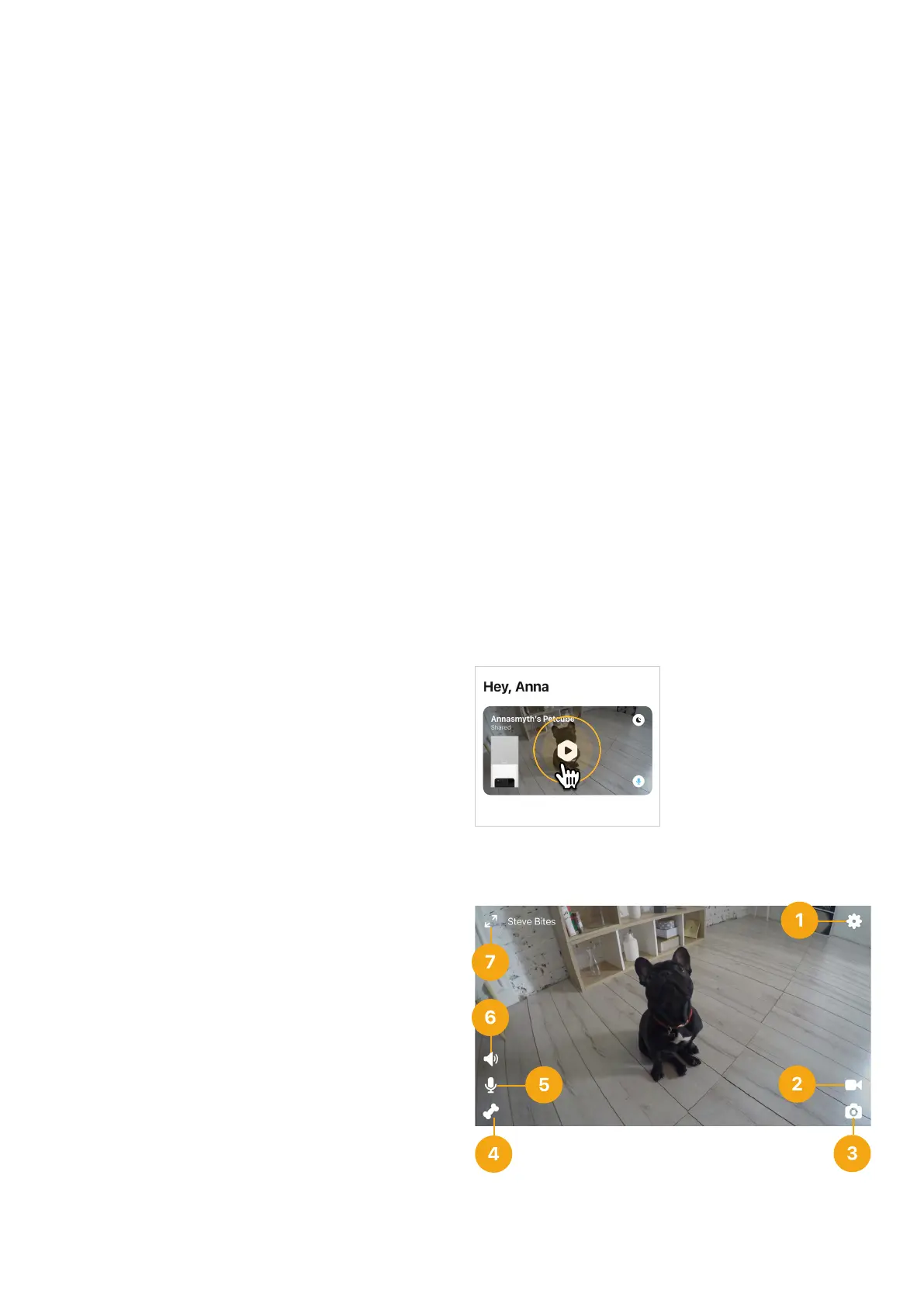
4. Playing with your Petcube
When you successfully registered your
Petcube and the LED light on the back
glows blue, tap on the camera profile
on the homescreen to access camera
page (fig 4.4.1).
Petcube Bites 2 Lite Live Stream
Controls (fig 4.4.2):
1 — Game Settings Menu;
2 — Start video to be saved
on your device;
3 — Take a photo to be saved
on your device;
4 — Dispense treats to your pet;
5 — Tap to talk to your pet;
6 — Tap to hear your pet;
7 — Switch to portrait mode (iOS only).
Fig. 4.4.2
Fig. 4.4.1



 To Next Page