12
Fig. 4.4.3
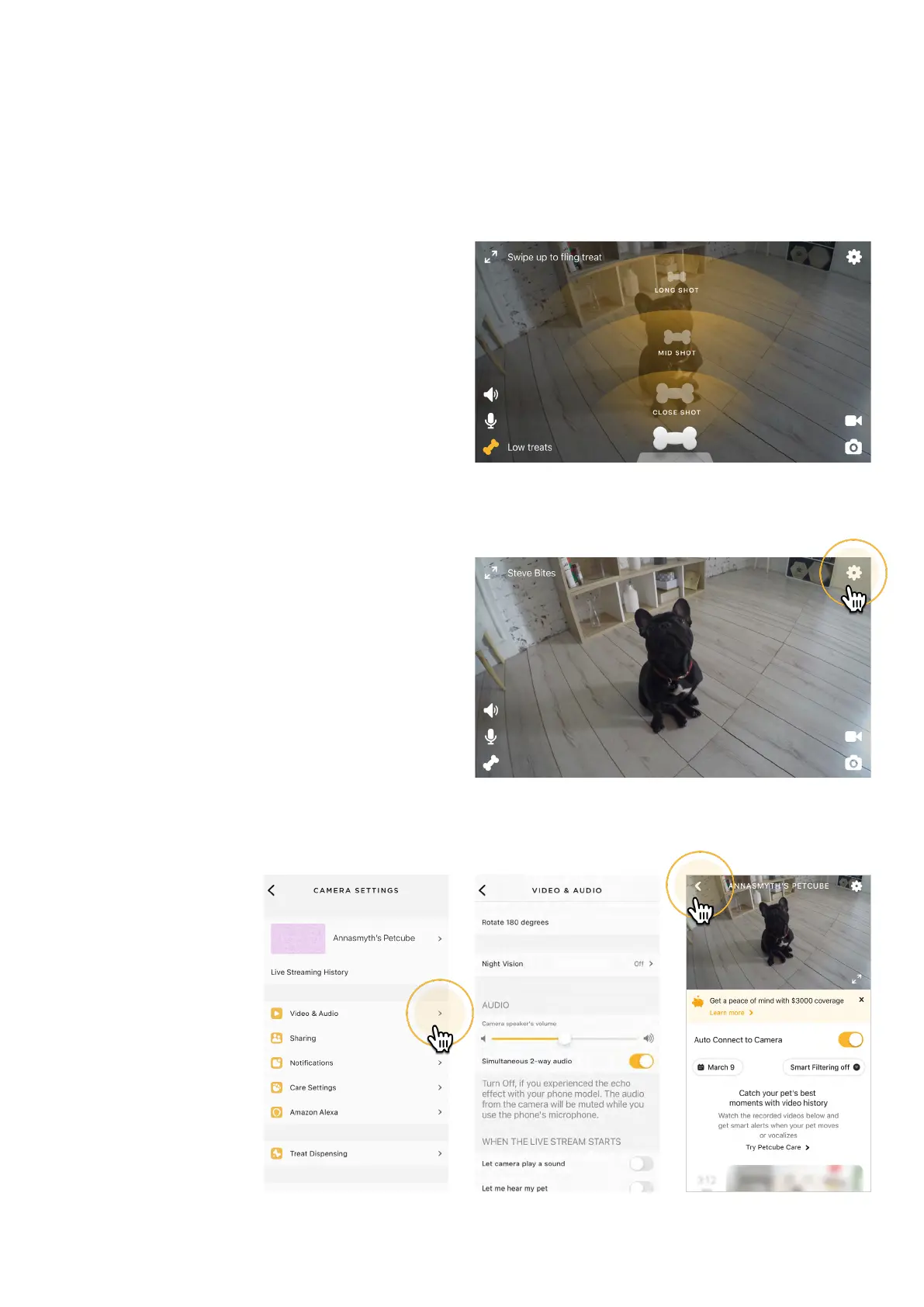
To fling treats, use the bone icon
(#4 on fig 4.4.2) in the bottom left corner
of the app while in play mode, then hold
down the bone icon in the middle
of the screen and swipe up to select
how far you want to fling the treats:
you can select close, medium and
long shots (fig 4.4.3).
To access advanced Video & Audio
control, select the ‘Settings’ icon
in the top right corner of the screen
(fig 4.4.4 - 4.4.6).
To exit the live stream, first exit
the landscape mode by pressing
the 2 arrows icon in the upper left
corner. To return back to the Petcube
homescreen, tap the camera video while
in portrait mode and press the ‘back’ icon
in the upper left corner (fig 4.4.7).
Fig. 4.4.7
Fig. 4.4.4
1
2
Fig. 4.4.6Fig. 4.4.5



 To Next Page